
Known Participant
January 9, 2023
Answered

Fill in gaps in a hollow text font

  • January 9, 2023
  • 2 replies
  • 2850 views

Hi all !


I'm using DS Cathedral font and I'd like to be able to use a stroke so the inner font is brown and the outer is yellow.


I thought I could do this naturally but when I add stroke, it doesn't fill all the gaps in the background and adding more stroke just got over the orignal text. If you see what i mean in the attachement.


I have tried a clipping mask but evezrything got yellow then.

Possible to do it easily 

Thank you
 

This topic has been closed for replies.
Correct answer Ton Frederiks

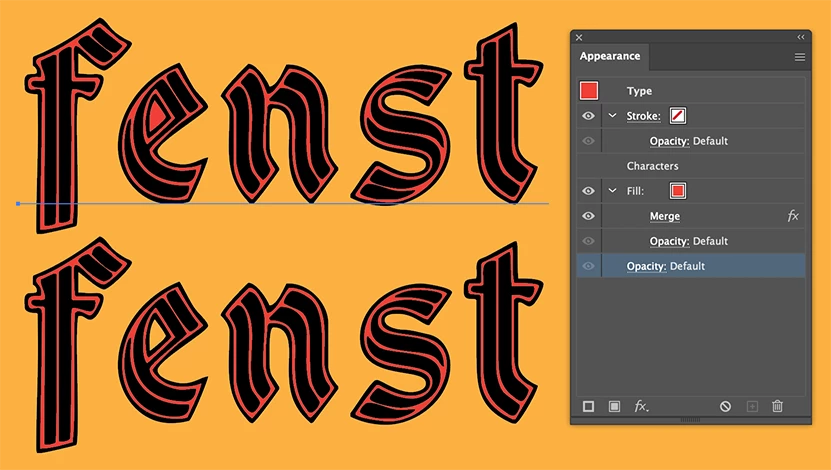
Similar to Monika's solution but with Pathfinder Merge.

Object > Expand Appearance will create outlines and the Shape Builder tool (Shift M) will remove the fill in the e when clicked with the Alt key.

2 replies

Ton Frederiks
Community Expert
Ton FrederiksCommunity ExpertCorrect answer
Community Expert
January 9, 2023

Similar to Monika's solution but with Pathfinder Merge.

Object > Expand Appearance will create outlines and the Shape Builder tool (Shift M) will remove the fill in the e when clicked with the Alt key.

Known Participant
January 11, 2023

Wow thank you both of you !  Appearance, pathfinder and fill for the color  and shape tool to remove the extra color in E did the trick ! I learned a lot with that one !  🙂

Known Participant
January 12, 2023

Good to hear that helped.


The colored path thickness is a little bit too small in my opinion but I'll check how I can enlarge it !

Monika Gause
Community Expert
Community Expert
January 9, 2023

In the Appearance panel add a new fill and move it below the characters.

Then apply Effect > Pathfinder > Trim and after that Effect > Pathfinder > Add to that fill (only to that fill). Disregard the warnings. Unfortunately this will also fill the punches.


Maybe you could also add a new stroke in the Appearance panel, move it below the Characters and then just apply a very thick stroke so that the gaps are filled.