
Participating Frequently
February 17, 2020
Answered

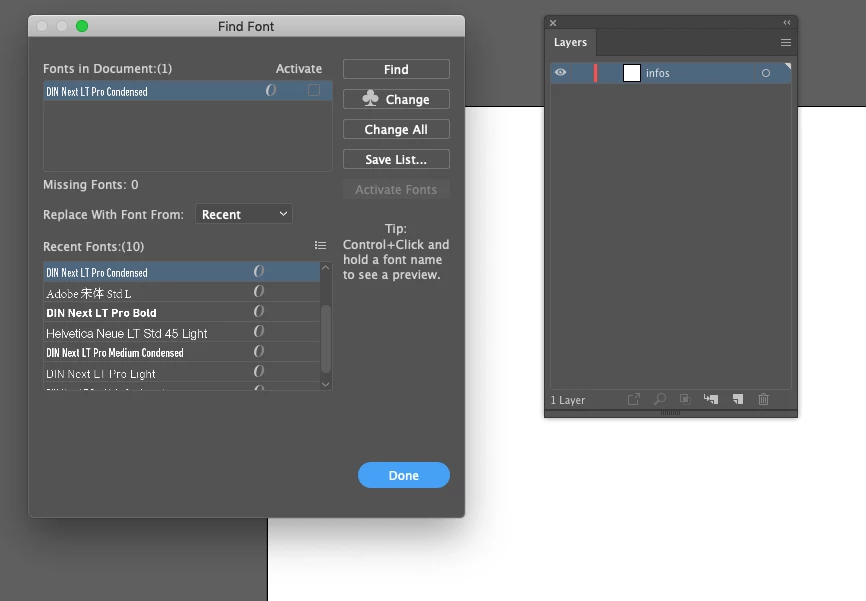
Find font display typo when there's nothing on the artboard

  • February 17, 2020
  • 2 replies
  • 828 views

Illustrator documents sometimes keep fontes listed even when there's nothing on the artboard.


If I outline the fontes of a document to send the work to the printer, some typo could stay listed as if they were still somewhere on the artboard (in the case, Din Next but it could be Myriad). And it stays like this even if I delete everything on the artboard. Like a ghost.


Could it be a Cache problem?

This problem is happening randomly since I've updated AI to CC.2020 (24.0.3).


Using AI 24.0.3 on MAC OS Mojave, 10.14.5.
This topic has been closed for replies.
Correct answer Ton Frederiks

nice. But it's kinda hard to do it well because if you search for the font in that Find font panel, the system won't show you the font.


The object of this was to get rid of all typo when packaging the AI file. It packaged the font and it could cause confusion to the receiver if there's a font included which is unsued on the artboard. 


If you want to package the file and get rid of the unused symbols, run the action "Delete Unused Panel Items" from the default actions set.

2 replies

Ton Frederiks
Community Expert
Community Expert
February 17, 2020

I just noticed the Symbols panel icon and that is a clover.

When you have text as part of a Symbol, the Find Font dialog will show a clover in the Change button to indicate that the font is part of a Symbol.

Delete the Symbol from the Symbols panel and the font is gone.

EricLehouAuthor
Participating Frequently
February 19, 2020

hummm, I tested it and it worked!


So even if there is nothing on the artboard, if the file contains a Symbol, the font included in that symbol will be count as if it is effective. I guess it's the same logic then the Spot colors in the Swatch panel. 


It's pretty obvious now that I know it!

Thanks a lot for that! 

Ton Frederiks
Community Expert
Community Expert
February 19, 2020

Yes, and with Find Font it is possible to change the font in the Symbol, even when it is not used on the Artboard.

Ton Frederiks
Community Expert
Community Expert
February 17, 2020

It may have nothing to do with your problem, but I noticed a clover sign in your Change button that I cannot see in my Illustrator.

Do you have some kind of font management system enabled?

EricLehouAuthor
Participating Frequently
February 17, 2020

I'm using that good old MAC OS font book.


But yeah, I don't know what this clover means