
Known Participant
September 27, 2022
Answered

Font or symbol use in Illustrator

  • September 27, 2022
  • 1 reply
  • 663 views

Does Illustrator have a the copyright and published symbols?  If so where/how? 

I mean the P and the C with circle around.  I downloaded a font from a manufacturers site, but don't know how to use them inside Illustrator. 

Would appreciate any help. Thanks in advance. 
This topic has been closed for replies.
Correct answer Omar.Fathy

It depends on the font itself. You can find it in a font and you can not find in another one.
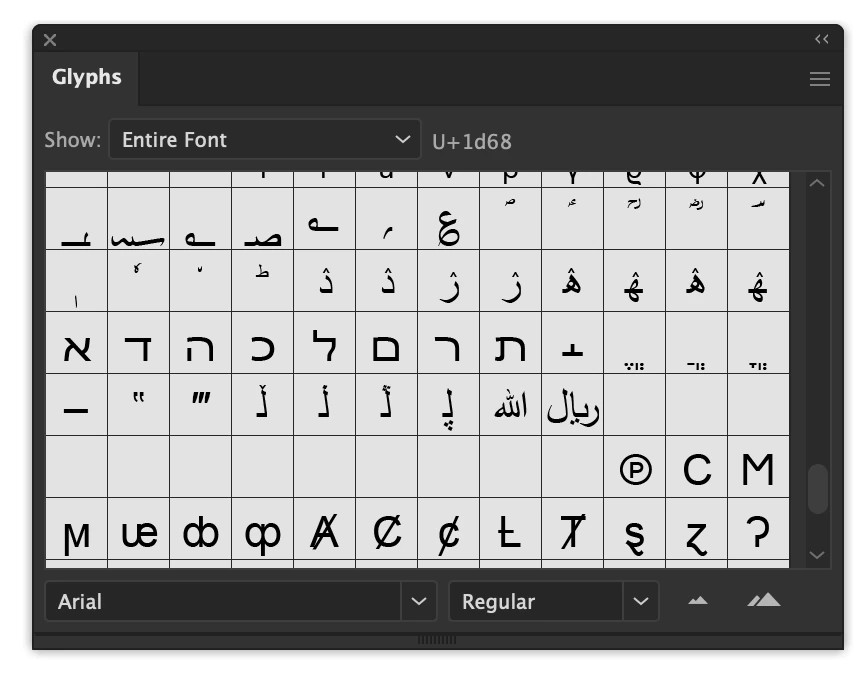
It is existing in Arial font for example, and many fonts that I have on my PC.


1 reply

Omar.Fathy
Community Expert
Community Expert
September 27, 2022

From Window > Type > Glyphs you can open the Glyphs panel and you will find the all special characters of the font including the copyright and registerd mark.


Known Participant
September 27, 2022

Thanks. I see it now. 

Unless I over looked it, I don't see the Publised one.  That's the P inside a circle.  

I downloaded from the manufacturing plant, but they don't know how I would add them, or use them in Illustrator.  Is that possible?  I downloaded a zip file with the folder inside. 

Omar.Fathy
Community Expert
Omar.FathyCommunity ExpertCorrect answer
Community Expert
September 27, 2022

It depends on the font itself. You can find it in a font and you can not find in another one.
It is existing in Arial font for example, and many fonts that I have on my PC.