
HarryGi
Participant
May 27, 2020
Answered

Font selection panel is really zoomed in

  • May 27, 2020
  • 3 replies
  • 2388 views

Hi


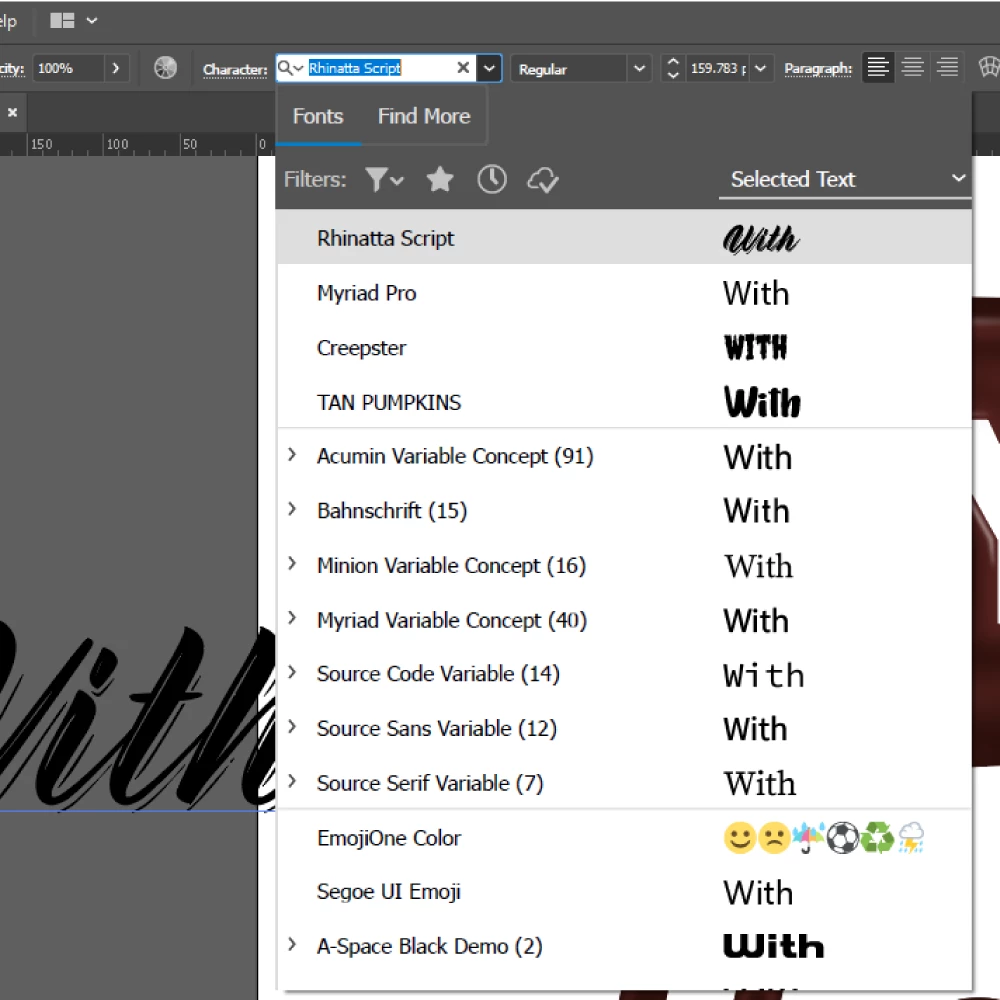
My font selection panel has always shown really zoomed in and makes it so I can't access Adobe fonts directly. See below:


I also have a lot of trouble with the index system - I can't seem to search for a font with any more than the first letter of it's name.


For example, if I am searching for a font called 'Creepster' - I type the character 'C' in the search box, and all the fonts begining with 'C' show.


When typing the next character 'r', all fine. But, everytime I type the 3rd letter (in this case 'e') this happens:
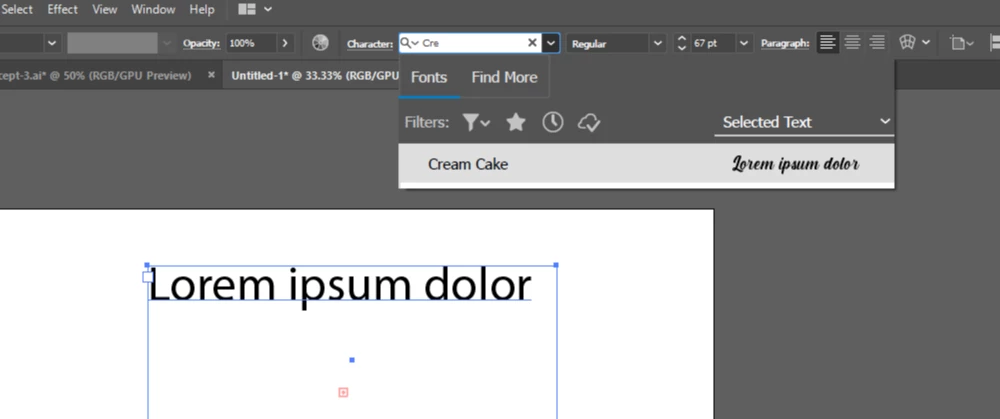
 

As you can see, only the first font that applies is shown, the correct font is actually hidden below it out of view and I can only access using the keyboard arrows.


Any suggestions of how to fix would be great - this issue has been present ever since I installed illustrator CC on my machine.


Thanks


Harry


This topic has been closed for replies.
Correct answer Ashutosh_Mishra

Hi Harry,


Sorry to hear about your experience. Would you mind sharing version of OS & Illustrator? Also, are you using Illustrator on a second monitor?

Mohammad is absolutely correct about resetting preferences. Please find more information about resetting preferences on help article https://helpx.adobe.com/illustrator/using/setting-preferences.html#setting_illustrator_preferences


**Please note that resetting preferences will remove all the custom settings and Illustrator will launch with default settings. You can also take a backup of the folders in case you want to. Location is mentioned in the article.

Let us know how it goes. Looking forward to your response.


Regards,

Ashutosh


3 replies

Participant
February 12, 2021

Hi Harry, I too am having the same problem with the zoomed in pulldowns and also panels. For instance, color themes only show 3/4 of the panel width and no way to adjust it out. I have reset preferences and gone through every setting I can think of. I am using multiple monitors on a Windows 10 Home, Illustrator 25.2. 

I have attached a pic of the two issues. 

Participant
March 30, 2021

I am also having this issue - its definitely to do with second monitor. I cannot find the setting to scale anything up or down in preferences?


Participant
April 2, 2021

Holly, I think I have found the answer.

https://helpx.adobe.com/photoshop/kb/high-dpi-scaling.html


Ashutosh_Mishra
Ashutosh_MishraCorrect answer
Inspiring
May 28, 2020

Hi Harry,


Sorry to hear about your experience. Would you mind sharing version of OS & Illustrator? Also, are you using Illustrator on a second monitor?

Mohammad is absolutely correct about resetting preferences. Please find more information about resetting preferences on help article https://helpx.adobe.com/illustrator/using/setting-preferences.html#setting_illustrator_preferences


**Please note that resetting preferences will remove all the custom settings and Illustrator will launch with default settings. You can also take a backup of the folders in case you want to. Location is mentioned in the article.

Let us know how it goes. Looking forward to your response.


Regards,

Ashutosh


Participant
July 12, 2020

Hi, I have the same problem and have tried to reset the preference but it still the same. 

Mohammad.Harb
Community Expert
Community Expert
May 27, 2020

Hi Harry,

Which system are you using ?

if everything was working perfectly and suddenly starts behaving in an abnormal way,

I highly recommend resetting the preferences :


Hold Cmd-Opt-Ctrl-Shift when restarting illustrator if you are on Mac 

Hold Alt-Crtl-Shift on if you are on windows  

HarryGi
HarryGiAuthor
Participant
May 28, 2020

Hi there


No it wasn't working perfectly before - I don't recall it ever working the way it should. I'll try this now.


Thanks