
irenaf7521482
Participant
January 30, 2019
Question

Fonts are missing in folder when package is created from AI CC

  • January 30, 2019
  • 5 replies
  • 8833 views

Hi!

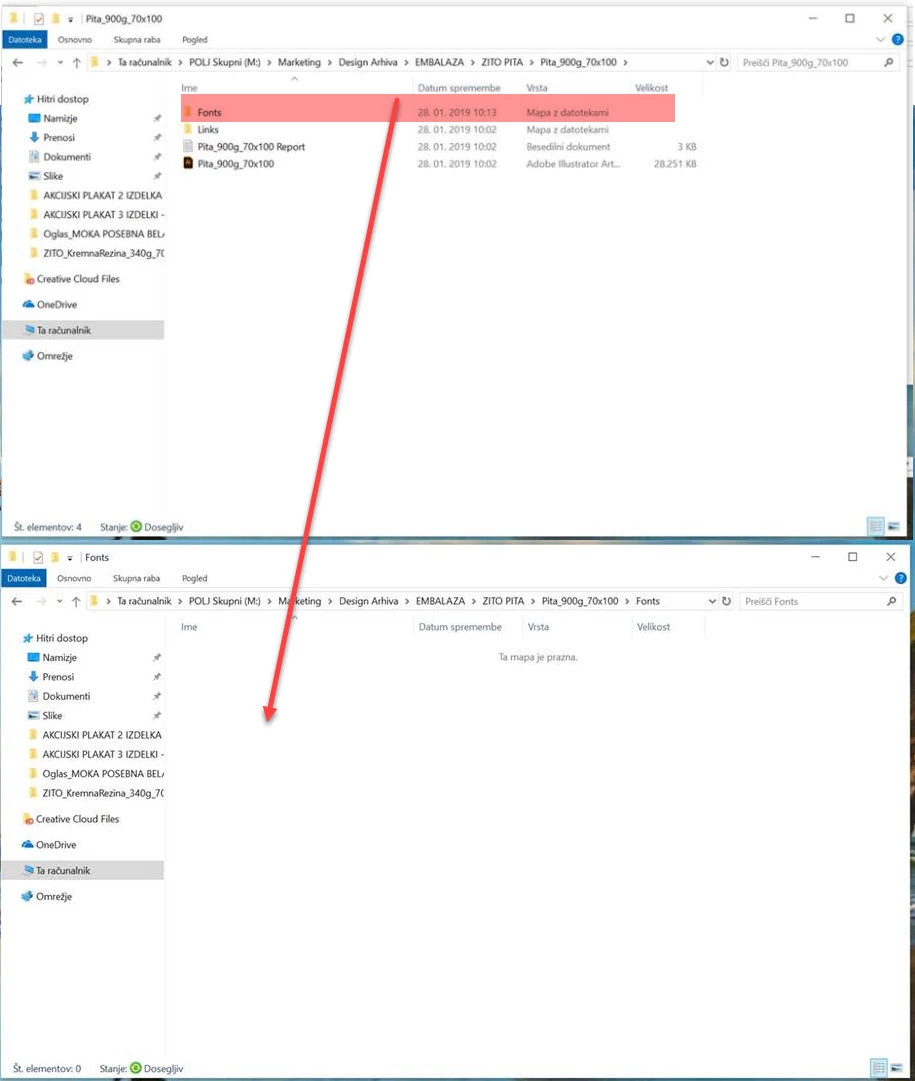
One of our users has problem when creating package from Adobe Illustrator CC - Fonts folder is empty although everything else is successfully exported. This user has new computer and issue is present from beginning. There isn't any error shown, only fonts are not saved. Does somebody have any idea what can we try to resolve this issue?
    5 replies

    Participant
    September 25, 2024

    I am currently experiencing the same issue im using Dupencil VF, i got it from adobe fonts and when I package my file on illustrator for printing at my university. illustrator was saying missing fonts even tho I have it installed on my creative cloud.

    how to solve this issue

    Monika Gause
    Community Expert
    Community Expert
    September 25, 2024

    Adobe Fonts do not get packaged.


    I don't think I understood what is happening to you. The font is not correctly synchronized when you open the packaged file on a different computer?

    Participant
    September 26, 2024

    When i opened my packaged file on my school mac in order to use their printer my file would say missing font link and when i check the folder that should have my fonts its not there.


    Oh I see i thought it would because all the fonts i used were all from adobe and when I packaged them from my previous illustrator or indesign projects and open them from a different they would have all of my fonts and i didnt to redownload the fonts on different computers to use them. Isnt that what packaging a file is used for?

    savagequest
    Inspiring
    September 13, 2023

    I just had the same issue, this has always worked for me until today. Not sure why, the font files are on my machine and there are zero errors (missing fonts) when opening the file.  

    Known Participant
    October 9, 2023

    I have the same issue on Illustrator 2023 on PC

    I use Montotype (font server) app with my account and I have all the persmissions to use all of thoses fonts
    But when I package my files they are no font in my fonts folder or sometimes juste one or two

    The same Illustrator file open on Mac works
    The package fonts are OK and all the fonts are packaged

    Community Manager
    October 23, 2023

    Hello @savagequest,

    Sorry to hear about this experience. Would you mind sharing some more details, like the exact version of the OS/Illustrator, whether the font used is from Creative Cloud or a third-party, a sample file (https://adobe.ly/3s00iOz), and details about your exact workflow, so we can investigate this further?


    Looking forward to hearing from you.


    Thanks,

    Anubhav

    irenaf7521482
    Participant
    January 30, 2019

    Those are the fonts used in this specific example:

    Charcuterie Cursive (OTF)

    Gotham Condensed Bold (TrueType)

    Gotham Bold (TrueType)

    It worked with same fonts on old computer, but not anymore on new one. Fonts are locally installed on computer and not in Adobe Fonts. Where can I check font permissions?

    Srishti Bali
    Community Manager
    Community Manager
    January 31, 2019

    Hi Irena,

    Could you please confirm from where did you get these fonts? If you have install files could you try to uninstall and reinstall them and check if that works?

    Regards,

    Srishti

    markrm
    Participant
    January 17, 2020

    I have the same issue. we are using FontExplorerX. The fonts are collected but they are hidden within the folder

    Monika Gause
    Community Expert
    Community Expert
    January 30, 2019

    Are the fonts licensed through Adobe Fonts?

    Doug A Roberts
    Community Expert
    Community Expert
    January 30, 2019

    Is it an Adobe font (formerly Typekit)? Does the font have appropriate permissions?

    savagequest
    Inspiring
    September 13, 2023

    Not for me, it's a system font this time and one I've never had an issue with till now. 

    savagequest
    Inspiring
    September 13, 2023

    @savagequest  schrieb:

    Not for me, it's a system font this time and one I've never had an issue with till now. 


    Which system is it and which font?


    MAC OS  Ventura 13.5.2.  Font is: Myriad Pro suite