Copy link to clipboard
Copied
I guess I started this project in ai 2024 and when I open it in 2025 some of the fonts go all whack:
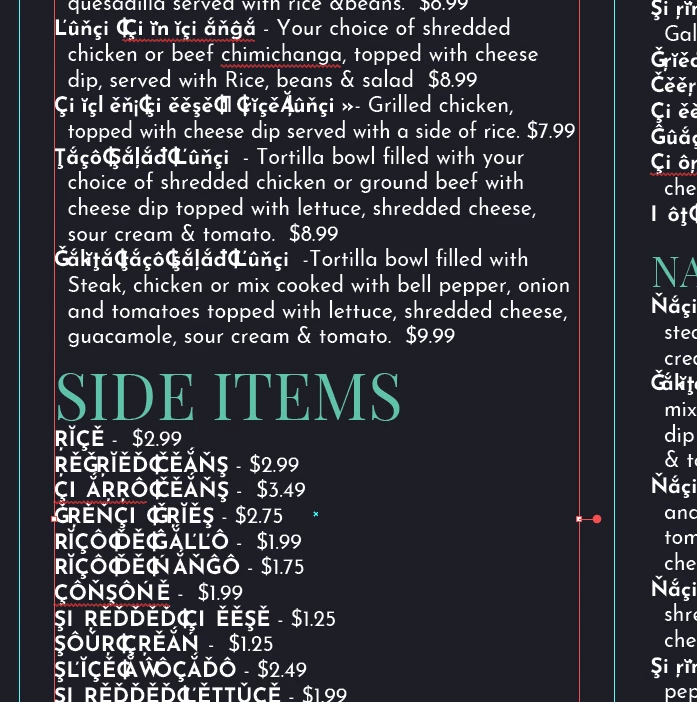
If I click on the type I get the "this was created in an older version of illustrator" warning which is how I realized it was a version problem. It looks correct in 2024 and does the conversion immediately upon opening, and not when I attempt to edit. I'm not ever sure of the language to report this as a bug.
Copy link to clipboard
Copied
Hello @ELPrepress,
I'm sorry to hear about the trouble you're having with your file. Would you mind checking if Illustrator 2025 has the same problem opening all files created on the older version? If not, kindly share a sample file here after uploading it to a file-sharing service, so I can check it with the team.
Looking forward to hearing from you.
Anubhav
Copy link to clipboard
Copied
It looks like I can create a new file in 2024, create a text box populated with lorem ipsum, and open it in 2025 and have it replicate the issue. It currently appears to be associated with Josefin Sans Bold as files using other fonts and other fonts in the first file don't seem to be changing.
Copy link to clipboard
Copied
Hello @ELPrepress,
Thanks for sharing the details. I tried replicating this on my end but could not. Would you mind removing the Josefin Sans font and reinstalling it from Adobe fonts to check if it helps?
Looking forward to hearing from you.
Anubhav
Copy link to clipboard
Copied
Reactivating the font didn't seem to make any difference. I've now started a project where I'm using Work Sans Bold that is showing the same distortion. It wasn't pasting into illustrator 24. I have trouble saving the file once opened in Illustrator 25. If I copy out of 24 and paste into 25 this happens:
Reinstalling the font got me a different set of glyphs, but didn't correct the issue.
Copy link to clipboard
Copied
One step that might be worth trying is downloading the version of Josefin Sans from the Google Fonts web site. There is a chance the font package there could be a slightly different build and may work correctly.
In Preferences I would try toggling on/off the Paste Text without Formatting setting in Clipboard Handling. I don't know if any of the Type options in Preferences might affect the odd behavior. English: USA is usually the default language setting in Document Setup.
Get ready! An upgraded Adobe Community experience is coming in January.
Learn more