Exit
  • Global community
    • Language:
      • Deutsch
      • English
      • Español
      • Français
      • Português
  • 日本語コミュニティ
  • 한국 커뮤니티
0

Forest plot for diagnostic studies using line graph tool
Community Beginner ,
Jan 27, 2019 Jan 27, 2019

Se Sp and lots of details.jpg

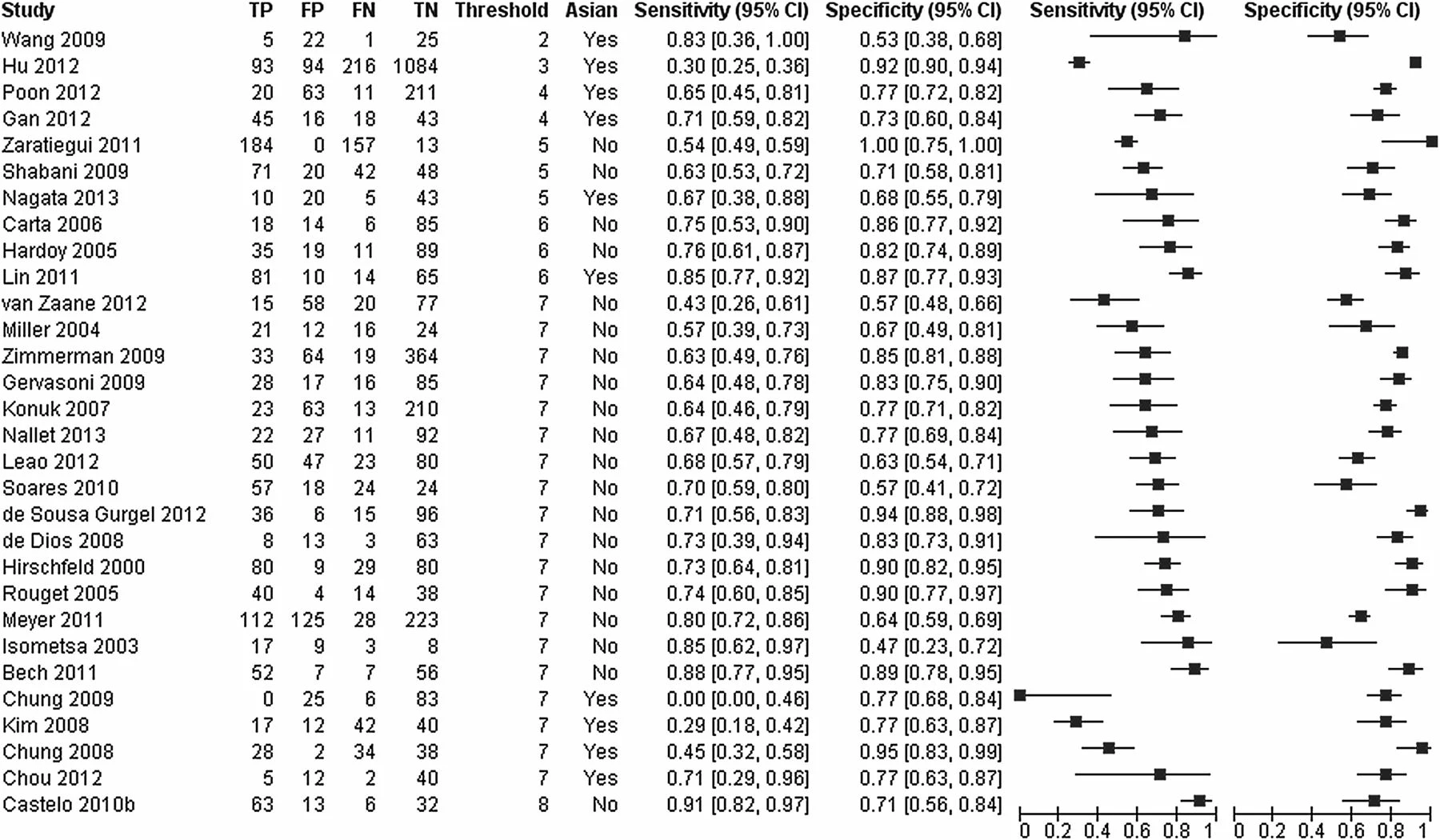
Hoping to recreate a graphic similar to the one above. Due to missing data (TP, FP, Fn TN) I cannot use the usual tools to create the above figure like Stata, RevMan or R. Was thinking of using illustrator to create two line graphs for sensitivity and specificity, above right. And the table function to input the rest of the data, above left.

Tried 2 datasets of 3 cells per study (row): sensitivity, lower CI and upper CI. other data set: specificity, lower CI and upper CI

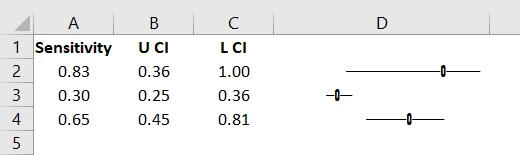
This is the output for two studies for sensitivity only.Can put a line between the point representing the CI (upper and lower confidence interval) and edit the points. But I cannot change the categories to the vertical axis and values to the horizontal. Any one got any good suggestions please? Pretty stumped!


Thanks
2.1K
Translate
Report
Community guidelines
Be kind and respectful, give credit to the original source of content, and search for duplicates before posting. Learn more
community guidelines

correct answers 1 Correct answer

Community Expert , Jan 27, 2019 Jan 27, 2019

how about using Excel? use font Playbill

excelChart.PNG

excelChart2.PNG

Translate
Adobe
Community Expert ,
Jan 27, 2019 Jan 27, 2019

Probably disappointing news, but this kind of graphing including some automated styling is something that Illustrator does not provide, unless you are willing to do manual modifications.

Illustrator's graph capabilities are old, really old ...

Translate
Report
Community guidelines
Be kind and respectful, give credit to the original source of content, and search for duplicates before posting. Learn more
community guidelines
Community Beginner ,
Jan 28, 2019 Jan 28, 2019

Hi Kurt

Bad news alright. Such a shame as I used Illustrator recently for statistical presentation and really like the results.

Thanks for considering!

Barrie 

Translate
Report
Community guidelines
Be kind and respectful, give credit to the original source of content, and search for duplicates before posting. Learn more
community guidelines
Community Expert ,
Jan 27, 2019 Jan 27, 2019

how about using Excel? use font Playbill

excelChart.PNG

excelChart2.PNG

Translate
Report
Community guidelines
Be kind and respectful, give credit to the original source of content, and search for duplicates before posting. Learn more
community guidelines
Community Beginner ,
Jan 28, 2019 Jan 28, 2019

Hi Carlos

Going to give this a go. Thank you.

Will the output be transferable to a word document?

Translate
Report
Community guidelines
Be kind and respectful, give credit to the original source of content, and search for duplicates before posting. Learn more
community guidelines
Community Expert ,
Jan 28, 2019 Jan 28, 2019

Hi, sure it will, straight copy/paste

barriew73769468  wrote

Such a shame as I used Illustrator recently for statistical presentation and really like the results.

the whole thing could be automatically built and stylized in Illustrator, do you do this often?

Translate
Report
Community guidelines
Be kind and respectful, give credit to the original source of content, and search for duplicates before posting. Learn more
community guidelines
Community Beginner ,
Jan 28, 2019 Jan 28, 2019

Going to have a crack off that excel suggestion. WOuld be interested in knowing more about the automation if that might be an option too. Thanks Carlos for the help.

Translate
Report
Community guidelines
Be kind and respectful, give credit to the original source of content, and search for duplicates before posting. Learn more
community guidelines
Community Beginner ,
Jan 28, 2019 Jan 28, 2019

I think I a m missing something.

Got the bit of code in but the only difference is what appears to be a large blank merged cell to the right of the formula entry.

Translate
Report
Community guidelines
Be kind and respectful, give credit to the original source of content, and search for duplicates before posting. Learn more
community guidelines
Community Beginner ,
Jan 28, 2019 Jan 28, 2019

Grr .. decimal place!

Translate
Report
Community guidelines
Be kind and respectful, give credit to the original source of content, and search for duplicates before posting. Learn more
community guidelines
Community Beginner ,
Jan 28, 2019 Jan 28, 2019


Worked a treat. Thanks Carlos. Will mess around with the formating

Translate
Report
Community guidelines
Be kind and respectful, give credit to the original source of content, and search for duplicates before posting. Learn more
community guidelines
Community Expert ,
Jan 28, 2019 Jan 28, 2019

Excelent!!! The issue was the big numbers you were trying. The main thing to consider is the multiplying values in the formulas. 40 and 100 worked ok for the 0 to 1 range you posted initially. For bigger ranges like 0 to 100 you might need to use 4 and 10? Try different numbers, trial and error is your friend

Translate
Report
Community guidelines
Be kind and respectful, give credit to the original source of content, and search for duplicates before posting. Learn more
community guidelines
Community Expert ,
Jan 28, 2019 Jan 28, 2019

I meant 40 "spaces" look as wide as 100 "dashes"

Translate
Report
Community guidelines
Be kind and respectful, give credit to the original source of content, and search for duplicates before posting. Learn more
community guidelines
Community Beginner ,
Jan 28, 2019 Jan 28, 2019

Getting a bit closer. Works ok for the sensitivity Sp and PPV and NPV, but not so much with the likelihood ratios. They have a much more varied range:

Translate
Report
Community guidelines
Be kind and respectful, give credit to the original source of content, and search for duplicates before posting. Learn more
community guidelines
Community Expert ,
Jan 28, 2019 Jan 28, 2019

try changing your font to Playbill, the values I used (40 and 100) worked ok specifically with Playbill font and that specific range of values in your sample data (0 to 1)

Translate
Report
Community guidelines
Be kind and respectful, give credit to the original source of content, and search for duplicates before posting. Learn more
community guidelines
Community Expert ,
Jan 28, 2019 Jan 28, 2019
LATEST

it works fine, but unfortunately comparing 29.33 to 0.07 it's going to look awkward, the difference is too wide.

Translate
Report
Community guidelines
Be kind and respectful, give credit to the original source of content, and search for duplicates before posting. Learn more
community guidelines