
WonderWallStudio
Participating Frequently
January 28, 2020
Question

Formula

  • January 28, 2020
  • 5 replies
  • 582 views

Hey.
Is it possible to make the illustrator consider the formula.

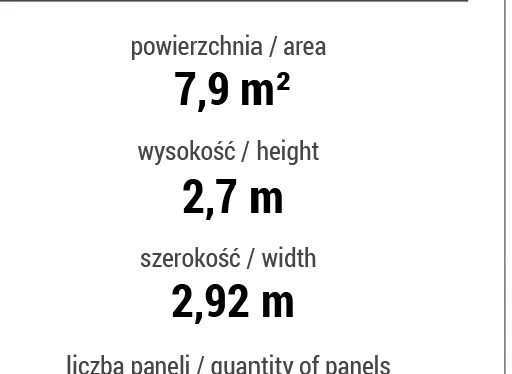
I need two text layers to multiplicate, and put the the answer in third text layer.

 

This topic has been closed for replies.

5 replies

pixxxelschubser
Community Expert
Community Expert
February 2, 2020

Hi @CarlosCanto,

I like your code.

😉


Here is mine (with prompts for inserting)

// text_numbers-values_changeAndMultiplyValues.jsx -  !!!!! the document needs a given layers structure
// regards pixxxel_schubser

var aDoc = app.activeDocument;
aDoc.selection = null;

var newWidth = Number(prompt ("Please insert new width value", "2,6", "New Width").replace(",","."));
var newHeight = Number(prompt ("Please insert new height value", "3,7", "New Height").replace(",","."));

var w = aDoc.layers.getByName("Width_Value");
w.textFrames[1].contents = w.textFrames[1].contents.replace(/[0-9,]+/,newWidth).replace(".",",");

var h = aDoc.layers.getByName("Height_Value");
h.textFrames[1].contents = h.textFrames[1].contents.replace(/[0-9,]+/,newHeight).replace(".",",");

var a = aDoc.layers.getByName("Area_Value");
a.textFrames[1].contents = a.textFrames[1].contents.replace(/[0-9,]+/,newWidth*newHeight).replace(".",",");


One note for @WonderWallStudio

Please use your original document with the changed layer structure for that (as mentioned before). And please do not use @CarlosCanto's code meantime in the same document (use different documents for testing with different codes). Otherwise the formatting does not works any longer properly.


Have fun

😉

CarlosCanto
Community Expert
Community Expert
February 1, 2020

here's another version


select all 3 separate text frames before running


// multiply 2 text frames
// Carlos Canto - 01/31/2020
// https://community.adobe.com/t5/illustrator/formula/td-p/10885881

var idoc = app.activeDocument;
var sel = idoc.selection;
if (sel.length == 3) {
    var result = [], numbers = [], number, myUV;

    for (var a=0; a<sel.length; a++) {
        number = sel[a].contents.replace(',', '.');
        myUV = new UnitValue(number);
        
        if (myUV.type == "?") {
            result = [sel[a]];
        }
        else {
            numbers.push(myUV);
        }
    }

    if (numbers.length == 2 && result.length == 1) {
        var area = String(numbers[0] * numbers[1]);
         
        result[0].contents = area.replace('.', ',') + ' ' + numbers[0].type + '2';
        app.redraw();
        var lastChar = result[0].characters[result[0].characters.length-1];
        lastChar.characterAttributes.baselinePosition = FontBaselineOption.SUPERSCRIPT;
    }
    else {
        alert('The 2 number Text Frames must include UNITS, ie 2,4 m or 0,5 in \nResult Text Frame UNITS are optional, i.e. 9,2 m2 or 4,5 are both ok');
    }
}
else {
    alert('Select exactly 3 Text Frames and try again');
}


pixxxelschubser
Community Expert
Community Expert
January 31, 2020

Ok.

Sorry, but your file is not ready for a script. The code for searching for and changing values will be much more complicated.


But if you can change the layers hierarchy a little like in the screenshots:


searching for and changing the values through script are possible without problems - and the maths too.


That's why - and this is very important!

  1. Create three new (top level) layers
  2. rename these layers (exactly like shown below and in the screenshots)
  3. move the necessary text frames into these new layers ( !!! pay attention to the correct order of the text frames)


Finally you should have the following layers hierarchy

  • Area_Value   (new layer - the name is very important and should be exact the same)
    • powierzchnia / area  (your own existing text frame - only moved)
    • 6 m²     (your own existing text frame - only moved)
  • Height_Value   (new layer - the name is very important and should be exact the same)
    • wysokość / height     (your own existing text frame - only moved)
    • 3 m     (your own existing text frame - only moved)
  • Width_Value   (new layer - the name is very important and should be exact the same)
    • szerokość / width     (your own existing text frame - only moved)
    • 2 m     (your own existing text frame - only moved)


In the following script snippet the values for width and height are hardcoded.

The script exchanges the existing values in your document through the hardcoded values and will do the simple math and do write the new value for the area in the correct text frame.


But be sure. In the moment the script snippet is not very useful. It does what you want. But you will need one or two additional dialog/s for a comfortable input for the width and height value.

Here is the [JS] script snippet:


// text-numbers-values_changeAndMultiplyValues -  !!!!! the document needs a given layers structure
// regards pixxxel_schubser

var aDoc = app.activeDocument;
aDoc.selection = null;

var newWidth = 2.6;  // hardcoded value - replace later with dialog for input
var newHeight = 4.2;  // hardcoded value - replace later with dialog for input

var w = aDoc.layers.getByName("Width_Value");
w.textFrames[1].contents = w.textFrames[1].contents.replace(/[0-9,]+/,newWidth).replace(".",",");

var h = aDoc.layers.getByName("Height_Value");
h.textFrames[1].contents = h.textFrames[1].contents.replace(/[0-9,]+/,newHeight).replace(".",",");

var a = aDoc.layers.getByName("Area_Value");
a.textFrames[1].contents = a.textFrames[1].contents.replace(/[0-9,]+/,newWidth*newHeight).replace(".",",");


Have fun

😉

pixxxelschubser
Community Expert
Community Expert
January 30, 2020

Thx for your example file.

I'll check this out this evening.

😉

WonderWallStudio
Participating Frequently
January 30, 2020

Thank you! ❤️


pixxxelschubser
Community Expert
Community Expert
January 29, 2020

Possible - yes.

But you have six text layers.


Can you upload an example file and link to here?

WonderWallStudio
Participating Frequently
January 29, 2020

But another layers is blocked)

example.ai