
Participant
December 9, 2018
Question

free gradient tool bug

  • December 9, 2018
  • 5 replies
  • 1167 views

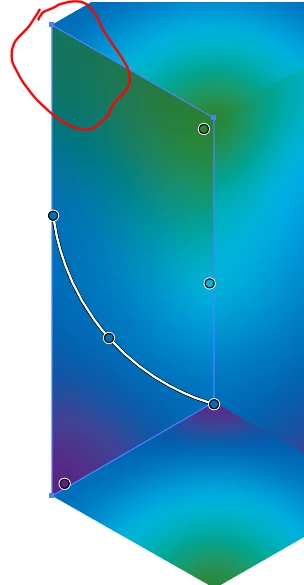
When i select multiple objects, a gradient point disappears.

initial set of points, desired
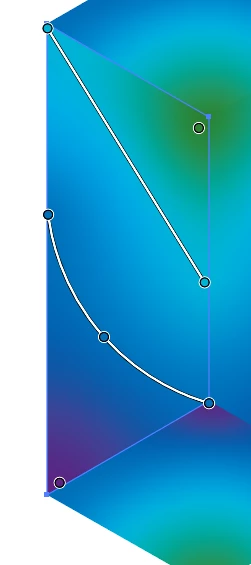
when i select multiple objects, the upper left corner point disappears
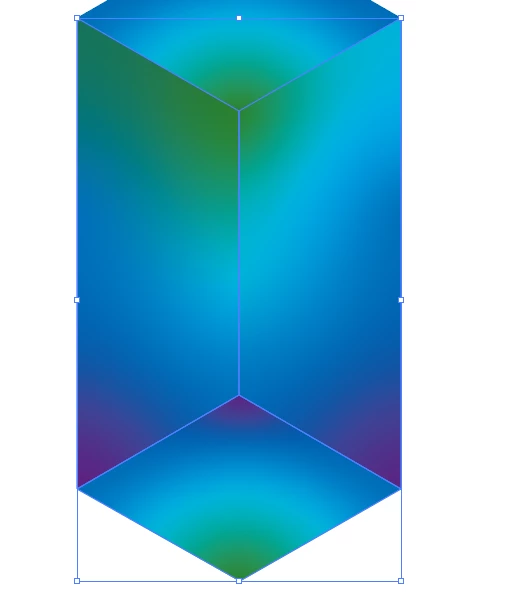
after selecting multiple objects, in red is where the point then disappears.
This topic has been closed for replies.

5 replies

Known Participant
July 21, 2019

I have all sorts of bugs with the Freeform Gradient Tool. It WOULD be the most awesome tool if it was reliable. Points disappearing is the least problem. I just got a gradient where I wanted it (it used black control points set to either 100% or 0% opacity). After I'm done editing when I select then shape ALL the points disappear and the shape reverts to completely empty!  Adobe needs to do some serious work on this tool. I'm losing so much productivity with this crap.

Monika Gause
Community Expert
Community Expert
July 21, 2019

Indyboosler  schrieb

I have all sorts of bugs with the Freeform Gradient Tool. It WOULD be the most awesome tool if it was reliable. Points disappearing is the least problem. I just got a gradient where I wanted it (it used black control points set to either 100% or 0% opacity). After I'm done editing when I select then shape ALL the points disappear and the shape reverts to completely empty!  Adobe needs to do some serious work on this tool. I'm losing so much productivity with this crap.

Please post screenshots.

Participant
April 11, 2019

Bit late to this one, but just thought I add that I also had the same issue after reflecting an object. Any new points I added would disappear after I clicked off the shape. BUT another workaround I found was to reset the bounding box of the object. This essentially clears any stored info of transformations on the object. After that the gradient worked fine!

Myra Ferguson
Community Expert
Community Expert
December 10, 2018

It looks like you can reflect it if you first duplicate your object and go to Object > Expand Appearance. But after it's expanded, you won't be able to edit the gradient.

(Note:  I also tried making it a symbol without expanding appearance, which did not successfully reflect the gradient.)

kjleary14Author
Participant
December 10, 2018

It probably would be helpful to say how i got the shape in the first place.

Draw the right shape and make it fill with live paint with and filled with free gradient. Then reflected that shape to create the opposite sides. The gradient doesn't translate with the shape(it does, yet its the same as rotating the shape 180 degrees). So i move the gradient points around to make the image look like the way i wanted. Then i would try to select both shapes at the same time, and a gradient point disappears.

*redraw the second shape, rather than reflect the first shape, and remake the gradient entirely, fixes the issue.*

Although that points the bug with reflection transform.

tromboniator
Community Expert
Community Expert
December 10, 2018

You're absolutely right about the reflection: it can't be done as an ordinary transform, has to be done as an effect. These things need thorough investigation.

Although I'm not seeing the disappearance of gradient points that you are.

Peter

Jeff Witchel, ACI
Community Expert
Community Expert
December 9, 2018

Just to make sure I understand, you select the objects filled with the Gradients, then you deselect the objects and one of the Stops in a line of your Freeform Gradient disappears when you reselect the object.

Are you doing anything other than selecting the objects and deselecting them?