
Free Plain Rectangle Tool
Adobe®, in its AI CC2014 version, has introduced a new tool called the Live Rectangle. This is a really great feature but has its huuuuge limitation: it doesn’t snap to grids, points and objects correctly on resize!
Since we don’t know whether adobe is going to fix this and since there is no option to replace the Live Rectangle with the classic one (plain) by default, I’ve decided to write my own plugin (available for free for personal and commercial use) which imitates behavior of the ‘old’ Rectangle Tool. It doesn’t replace the Live Rectangle – it works completely independent!
My Plain Rectangle Tool correctly snaps to grids/objects/points and correctly aligns to grid/points on resize. Of course it supports the SHIFT and ALT/OPTION keys, Snap to Grid and Smart Guides options. In other words it works almost 100% the same as the Rectangle Tool we know from CC (17.1), CS6 and earlier.
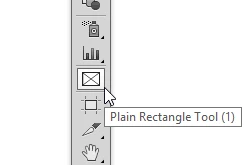
The installation package (zxp) adds ‘Plain Rectangle Tool’ icon into the Ai panel (of curse you can assign your custom keyboard shortcut to it as well)
Note: The Plain Rectangle can be easily converted into the Live one using Object > Shape > Convert to Rectangle
Grab your copy at http://63mutants.com/subc/products/PlainRectangleTool_m01/PlainRectangleTool_m01.php and share it with your friends.
It’s completely free.
Regards,
Pawel Kuc
 AdChoices