
mattl63375823
Known Participant
January 25, 2023
Answered

Gap in text block after # sign that can't be edited

  • January 25, 2023
  • 3 replies
  • 1691 views

Suddenly when I type a # sign in Illustrator, a huge gap is created when I spacebar over to type the next word. This space is not only NOT editable, but you can't even undo it. Once you hit space, there's no turning back.


What is the fix?


Video of this debacle attached.
This topic has been closed for replies.
Correct answer Mike_Gondek10189183

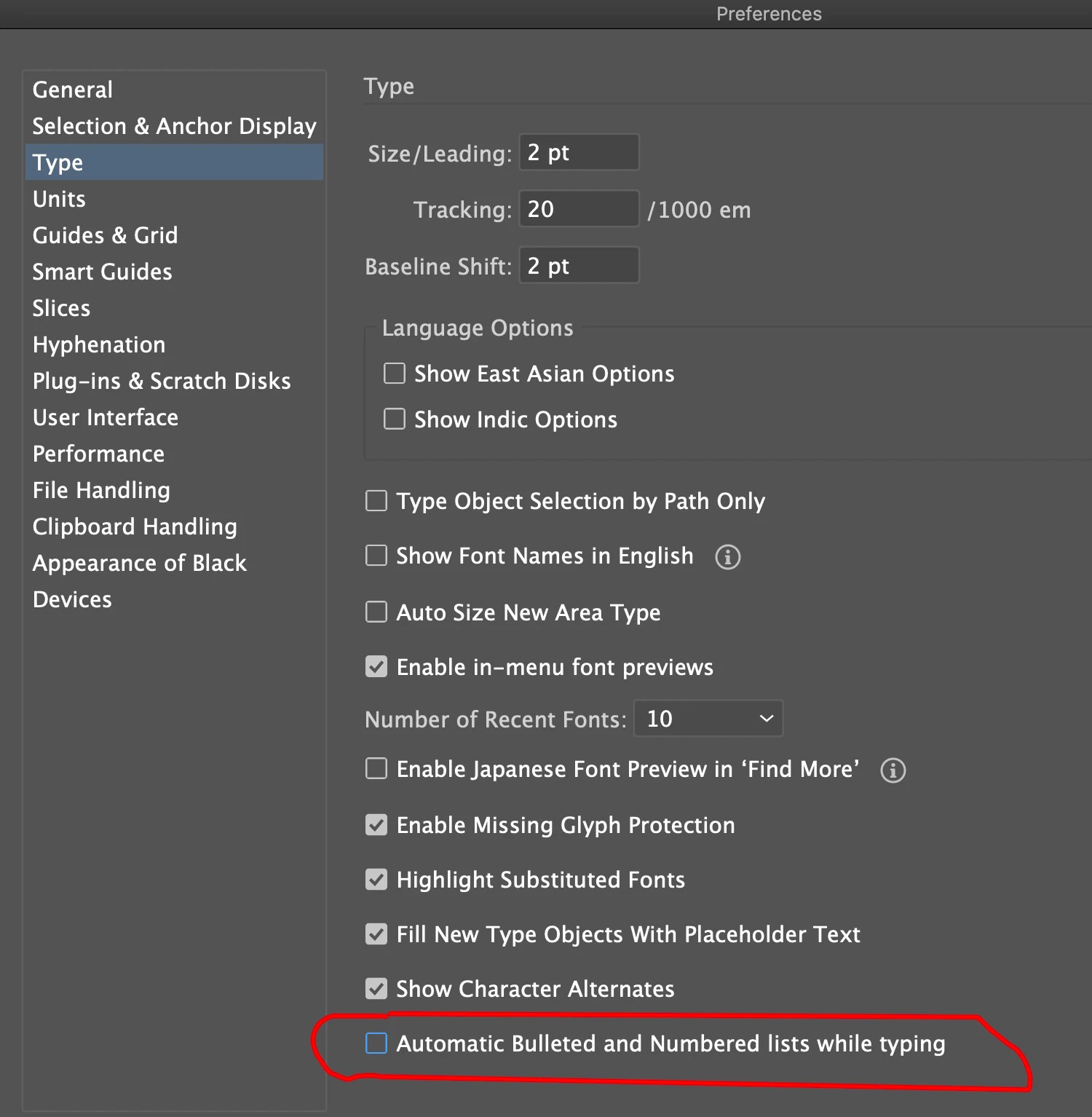
You are experiencing an embedded shortcut to automatically set your type as a bulletted list. This is annoying and I personally do not know anyone that likes this. To get around try this:


type "x of trips"

Then go back and change the "x" to "#"


or change setting at the bottom.


3 replies

Mike_Gondek10189183
Community Expert
Mike_Gondek10189183Community ExpertCorrect answer
Community Expert
January 25, 2023

You are experiencing an embedded shortcut to automatically set your type as a bulletted list. This is annoying and I personally do not know anyone that likes this. To get around try this:


type "x of trips"

Then go back and change the "x" to "#"


or change setting at the bottom.


mattl63375823
Known Participant
January 25, 2023

Thanks Mike. That's what it was. And thank you too, Myra. Your last suggestion also worked, but Mike's was a more permanent solution. I swear if I ever see an Adobe engineer in public, there is no limit to the number of wet noodle lashings I will dole out lol

Myra Ferguson
Community Expert
Community Expert
January 26, 2023

You're very welcome. 🙂


And if you'd like to leave feedback about that feature with the Illustator team, you can post it to the Illustrator Uservoice page:

Myra Ferguson
Community Expert
Community Expert
January 25, 2023

Yep, that's a method of creating a custom bullet in Illustrator:

Myra Ferguson
Community Expert
Community Expert
January 25, 2023

Illustrator appears to be converting the # to a bullet. If you click on the bullet icon in the Control bar above your artboard, the # will go away.


I can get "# trips" to appear without the space/converting to a bullet by placing a space before #.

mattl63375823
Known Participant
January 25, 2023

I was able to do this with no issue just yesterday. Suddenly it's doing this and I can't get it to stop doing it by default. it's definitely related to the bulleting system. But do you know how to get it to stop?? I tried going to Type>Bullets and Numbering>Convert to Text, but this doesn't work long term. As soon as I give it a # plus space, it auto converts it to a bulleted list. Something else is causing it to default permanently.


God I HATE Adobe!