
Participating Frequently
August 3, 2017
Answered

gaussian blur in Illustrator

  • August 3, 2017
  • 2 replies
  • 6640 views

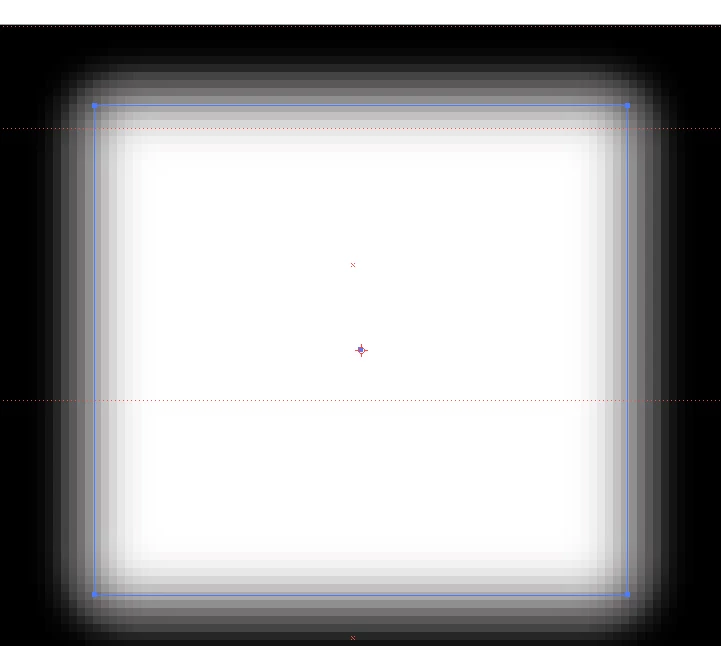
Hi all - can I ask about gaussian blur?  I have a vector shape in illustrator that I want a blurred edge to.  However it shows as VERY blocky and not smooth (see photo below) is there something I can do to make it look smoother?

I am sure years ago I had this and my colleague showed me a setting I could change - but my colleague is not here to ask!

Many thanks
MJ
    This topic has been closed for replies.
    Correct answer Larry G. Schneider

    To what number is the Document Raster Effect of the current file set? It looks like it is set to 72.

    2 replies

    Larry G. Schneider
    Community Expert
    Community Expert
    August 3, 2017

    Gaussian Blur is a raster effect.

    There are several places. for a new document use the Advanced settings

    For a current file use the Effects menu

    杨洋748835831
    Participant
    October 29, 2017

    Thanks!very useful!

    Larry G. Schneider
    Community Expert
    Larry G. SchneiderCommunity ExpertCorrect answer
    Community Expert
    August 3, 2017

    To what number is the Document Raster Effect of the current file set? It looks like it is set to 72.

    ScanSevenAuthor
    Participating Frequently
    August 3, 2017

    I haven't rasterized it.  So where is it that I set the Document Raster Effect?

    Doug A Roberts
    Community Expert
    Community Expert
    August 3, 2017

    gaussian blur is a raster effect. it is always rasterised.

    set the document raster effects resolution in Effect > Document Raster Effects.