


0

New Here
,
/t5/illustrator-discussions/generate-text-with-font-name-of-an-existing-text-field/td-p/13182111
Sep 06, 2022
Sep 06, 2022
Copy link to clipboard
Copied
Hi, was wondering if it's possible to use AI script to generate a "label" underneath existing text fields that indicates which font was used. For ex. in the image below, the script would add those smaller font name labels under the "sample text" text boxes.

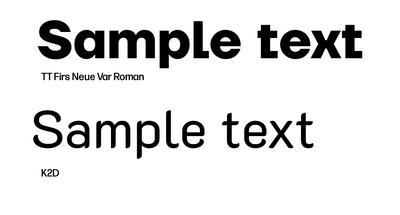
am I expecting too much? 🙂
TOPICS
Feature request
,
Scripting
,
Type

Community guidelines
Be kind and respectful, give credit to the original source of content, and search for duplicates before posting.
Learn more

 1 Correct answer

Guide
,
Sep 06, 2022
Sep 06, 2022
var distance = 5;  // below descender (point text) or text path (area text)
var size = 5;  // font size
var doc = app.activeDocument;
var frames = [];
for (var i = 0; i < doc.textFrames.length; i++) {
    frames.push(doc.textFrames[i]);
}
for (var i = 0; i < frames.length; i++) {
    var x = frames[i].position[0];
    if (frames[i].kind == "TextType.POINTTEXT" ||
        frames[i].kind == "TextType.AREATEXT") {
        var y = frames[i].position[1] - (frames[i].height + distance);
    } else {

Explore related tutorials & articles
 2
Replies
2
2
Replies
2

Guide
,
/t5/illustrator-discussions/generate-text-with-font-name-of-an-existing-text-field/m-p/13182329#M335153
Sep 06, 2022
Sep 06, 2022
Copy link to clipboard
Copied
var distance = 5;  // below descender (point text) or text path (area text)
var size = 5;  // font size
var doc = app.activeDocument;
var frames = [];
for (var i = 0; i < doc.textFrames.length; i++) {
    frames.push(doc.textFrames[i]);
}
for (var i = 0; i < frames.length; i++) {
    var x = frames[i].position[0];
    if (frames[i].kind == "TextType.POINTTEXT" ||
        frames[i].kind == "TextType.AREATEXT") {
        var y = frames[i].position[1] - (frames[i].height + distance);
    } else {
        continue;
    }
    var text = doc.textFrames.pointText([x, y]);
    text.contents = frames[i].textRange.textFont.name;
    text.textRange.size = size;
}
Community guidelines
Be kind and respectful, give credit to the original source of content, and search for duplicates before posting.
Learn more
_swolleneyes
AUTHOR
New Here
,
LATEST
/t5/illustrator-discussions/generate-text-with-font-name-of-an-existing-text-field/m-p/13187401#M335385
Sep 08, 2022
Sep 08, 2022
Copy link to clipboard
Copied
wow, femke. you wrote that so fast and it works perfectly.
Thank you!
Community guidelines
Be kind and respectful, give credit to the original source of content, and search for duplicates before posting.
Learn more


 AdChoices