
Known Participant
March 31, 2017
Answered

Ghost box around drop shadow on digital printing

  • March 31, 2017
  • 3 replies
  • 11357 views

Hi,

When printing on a digital printer, only on black, there is a ghost box around objects that have Drop Shadow effect.

Is there a way to get rid of it (without having to rasterize the file)?

Thanks in advance
    Correct answer Mike_Gondek10189183

    Why is your document RGB?

    Set your document color mode to CMYK and try the suggestions I posted.

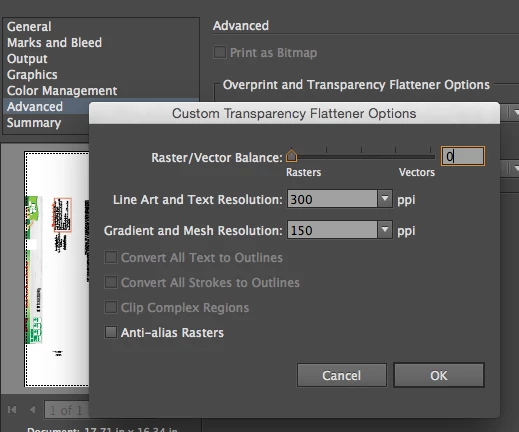
    Another way to resolve this is to slid all the way to rasters. If you set your resolution high enough you will get the max quality of that printer.

    3 replies

    chuck.heather
    Participant
    January 4, 2025

    I had the same ghost box and none of these suggestions quite fixed it, but I found that when I increased the bounds of the shadow to 400% the box disappeared. (Effect - 3D Materials - Lighting - Shadow Bounds)

    Mike_Gondek10189183
    Community Expert
    Community Expert
    March 31, 2017

    Do you have spots?

    or

    Kurt Gold
    Community Expert
    Community Expert
    March 31, 2017

    Which version of Illustrator are you using. What printer? What print settings? What do you mean by "ghost box"? Can you take a photo and post it?

    dedine3Author
    Known Participant
    March 31, 2017

    Which version of Illustrator are you using. What printer? What print settings? What do you mean by "ghost box"? Can you take a photo and post it?

    Here are more details.

    I use Illustrator CC.

    Document in RGB

    Printer : HP color laserJet

    It is difficult to see on a picture, so I made a "simulation" of the effect I see on paper. See attached document.

    I add dot red line around the ghost box.

    There is a box like that around every object that has drop shadow effect.

    Mike_Gondek10189183
    Community Expert
    Mike_Gondek10189183Community ExpertCorrect answer
    Community Expert
    March 31, 2017

    Why is your document RGB?

    Set your document color mode to CMYK and try the suggestions I posted.

    Another way to resolve this is to slid all the way to rasters. If you set your resolution high enough you will get the max quality of that printer.