
Glitch? Adding a color to the gradient slider affects other gradients (even on locked layers.)
Another user posted recently posted this: Re: filling an object with a gradient affects the last object I filled and I'm having the same problem. I wanted to share some screenshots of what's happening hoping that someone can help.
Step 1
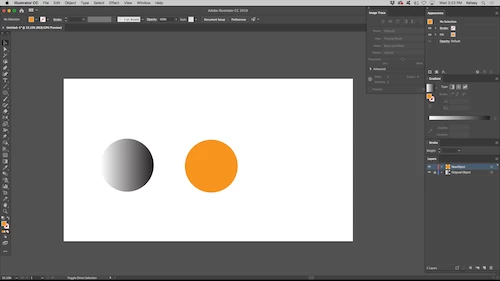
Create a new document. Shape 1 is a simple gradient in a locked layer. Shape 2 is an orange circle I want to turn into a gradient.
Step 2
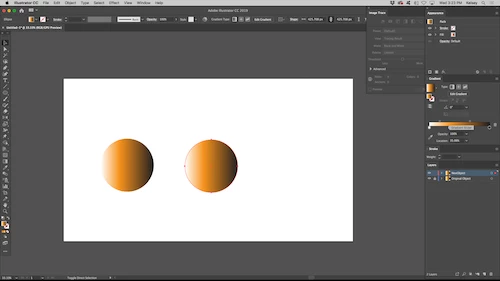
I want to turn Shape 2 (orange circle) into a gradient, but I also want to keep the orange color of the shape. I drag the orange fill into the gradient slider. In the past this would only effect the object you had selected. In CC2019 this color is ALSO dropped into Shape 1's (b/w gradient circle) gradient, even though it is still on a locked layer and not selected.
I did some testing and this will affect every shape that shares a gradient with Shape 1. As long as it's an identical gradient each instance of it will have the color orange dropped into it.
Step 3
Whats strange is that if I adjust the position of the new color in the gradient slider, only the gradient of the selected object changes. Similarly, if I change the postion of the colors in the slider before dropping the orange color in it will not affect Shape 1.
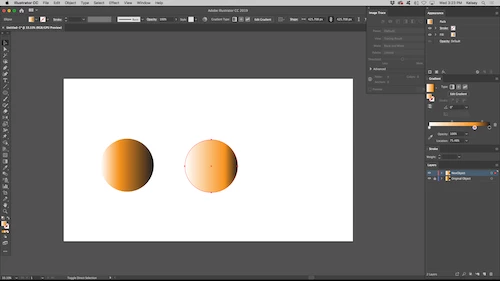
This is a frustrating change. The only solution I've found to avoid this is to make a small change to the gradient slider before adding a fill into a gradient which adds an unwanted new step. If there is a setting I can change to stop this please let me know! Or is it a new glitch in the updated CC2019 gradient slider?
 AdChoices