/t5/illustrator-discussions/gradient-issue/td-p/11566768Nov 03, 2020
Nov 03, 2020
Copy link to clipboard
Copied
Hello all!
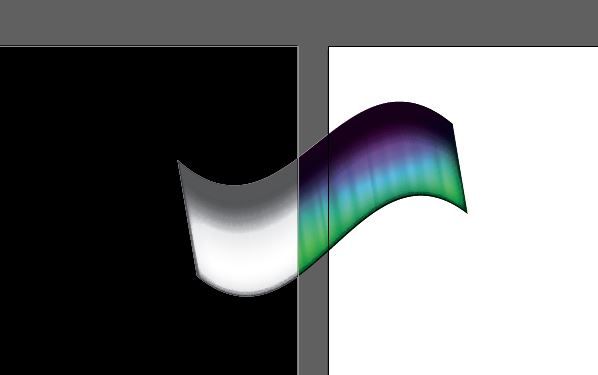
I am having an issue with a gradient. It seems to become black and white when it transfers to a black background, but is fine on white. The vector is copied from an EPS file because I unfortunately do not have access to the native AI file. Please help!
Start by turning off hardware acceleration and reverting to software-only rendering. If you copied & pasted the "gradient" from an EPS it likely is a flattened pixel image or a construct made from thousands of paths that may simply overwhelm your graphics hardware and cause incorrect blending operations. You might consider re-creating it natively from scratch at some point.
/t5/illustrator-discussions/gradient-issue/m-p/11567073#M250731Nov 03, 2020
Nov 03, 2020
Copy link to clipboard
Copied
LATEST
Start by turning off hardware acceleration and reverting to software-only rendering. If you copied & pasted the "gradient" from an EPS it likely is a flattened pixel image or a construct made from thousands of paths that may simply overwhelm your graphics hardware and cause incorrect blending operations. You might consider re-creating it natively from scratch at some point.







 1
Reply
1
Reply


 AdChoices