
Participant
August 14, 2018
Answered

Gradient on a centreless circle

  • August 14, 2018
  • 4 replies
  • 713 views

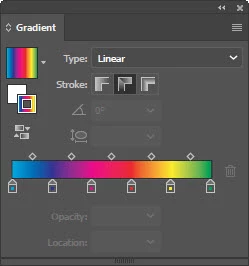
i have this gradient that I want to go around this centreless circle. I problem is I don’t want it to repeat. It’s blue @ 12 O’clock, green, yellow, red, purple then it’s back. What’s happening is the gradient is doubled. Starts with blue at 12 but at 6 it’s blue.
    This topic has been closed for replies.
    Correct answer Myra Ferguson

    Set the gradient on your stroke to Apply gradient along stroke in the Gradient panel.

    4 replies

    Participant
    August 14, 2018

    Like the first on. The second on is what I'm getting.

    Kris Hunt
    Legend
    August 14, 2018

    Well, that's a linear gradient. That will never work. What I did was create a blend of six lines, starting and ending with blue. Then I saved it as an art brush and applied it to a circular path.

    Kris Hunt
    Legend
    August 14, 2018

    Is this what you're trying to achieve? How did you go about making it?

    Participant
    August 14, 2018

    Ya, like that! I just posted my results.

    macpawel
    Participating Frequently
    August 14, 2018

    Please provide screenshot - now it's difficult to recognise your problem and needs

    pawel

    Larry G. Schneider
    Community Expert
    Community Expert
    August 14, 2018

    Can you post a screenshot of your results?