
Participant
February 20, 2010
解決済み

Gradients not showing up in illustrator text

  • February 20, 2010
  • 返信数 3.
  • 86248 ビュー

I've done this 100s of times all the sudden it doesn't work. I pick a gradient and try to set it to the text and the text turns to black any idea why this is happening? Gradients work fine with object but for some reasons text cannot be anything but a solid color. This is in CS4.

It might be worth noting that I can set a gradient for the stroke on text which in itself is odd as I haven't been able to do that in the past.
このトピックへの返信は締め切られました。
解決に役立った回答 Wade_Zimmerman1

Wade...

Following this thread and can't apply a gradient to the text... CS4

Wrote the text... tried to apply gradient fill... not working. Text remains black... by clicking on the Fill in the Appearance Palette/Panel, i can change the fill colour but not get a gradient.

Have tried by selecting the text using the Type Tool (highlighting it) and using the Select Tool (black arrow).

Cheers...

S


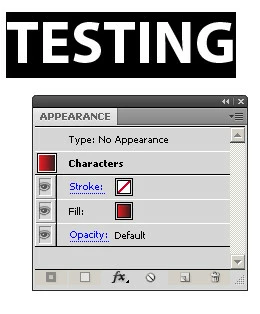
I was actually mistaken as I look closer you d not appear to have fill for the Type but only for the characters which is text at the text level which would allow you to add a color but not such as a gradient for which you have to add a fill to the type level.

If you notice the Type does not have an appearance and so you have to give it one and in this case that would be a fill.

http://mysite.verizon.net/wzphoto/Gradient.mov

返信数 3

January 21, 2016

Hi, just wanna add something on how to change the gradient direction:

  1. Using Selection Tool, select the text

2.  Right click, select Transform Each, and tick the Transform Patterns under Options field. Also, change the rotation angle


3. The result;

Inspiring
October 30, 2016

Using Adobe Illustrator CC (20.1.0 64-bit)

I have applied gradient to the text, and it is displaying black. Just to prove that this actually is happening, I made a rectangle and applied the exact same gradient. The gradient is working on the rectangle. Nothing, and I mean nothing I can do will make a gradient work on the text. I can change the text color to red or any solid color and it will work on the text, just not a gradient. Look at the image I made here:

Xp7I9xX.png

Just so you can see that the actual characters themselves have that gradient applied, here is a snapshot of "some" of the characters selected. You will note the black to bright green gradient is indeed applied to the characters themselves.

9TcZvqG.png

Gradients are not showing up on my text. Gradients are working on shapes.

It is really making me think that this is a bug that nobody can solve.

Ton Frederiks
Community Expert
Community Expert
October 30, 2016

Select your text with a selection tool (not with the text tool).

Fill the text with none.

Go to the Appearance Panel and add a New Fill.

Change that fill to a gradient.

Jacob Bugge
Community Expert
Community Expert
February 20, 2010

overXbound,

I've done this 100s of times all the sudden it doesn't work.

Such (mis)behaviour may be aused by preference corruption. You may try a possible, and reversible, cure: Move the folder

In older versions, an extra fill was needed to change colour and make gradients. Is this a simplifying change in CS4 (along with the gradient stroke option)?

Inspiring
February 20, 2010

Let's try this one more time.

With the selection tool (black arrow) select the Text, do not use the text tool use the selection tool.

Then place the appearance panel so it will also be in the screen shot and while the text is selected with the selection tool tale the screen shot.

But it appears you have the black fill at the type object level and the gradient at the character level.

But we have to see. Please.

Inspiring
February 20, 2010

Wade...

Following this thread and can't apply a gradient to the text... CS4

Wrote the text... tried to apply gradient fill... not working. Text remains black... by clicking on the Fill in the Appearance Palette/Panel, i can change the fill colour but not get a gradient.

Have tried by selecting the text using the Type Tool (highlighting it) and using the Select Tool (black arrow).

Cheers...

S

Inspiring
February 20, 2010

select the object and do a screen shot of the appearance panel and post it.

I think that you may be trying to fill the type at the text object level when you want to do it at the character level or vice verse.

As far as the gradient stroke I think you are actually using an added fill with an offset that is being filed and it is stacked behind a black fill.

if there is a black fill and a gradient fill drag the gradient above the black fill.

overXbound作成者
Participant
February 20, 2010

Here you go. I thought of the black under text that's not the problem as far as I can tell I looked at that before I posted and double checked before I can here. At anyrate the color will change if its a solid color just not a gradient.

http://img641.imageshack.us/img641/376/gradientproblem.png

Inspiring
February 20, 2010

I am going to try this one more time.

Select the type with a selection tool and then show the Appearance Panel

Take a screen shot of the type and the Appearance Panel.

Post the screen shot of the appearance panel. while you have the text selected.