
Known Participant
December 8, 2010
Answered

green guide layer that i can't turn off?

  • December 8, 2010
  • 2 replies
  • 91801 views

hey guys

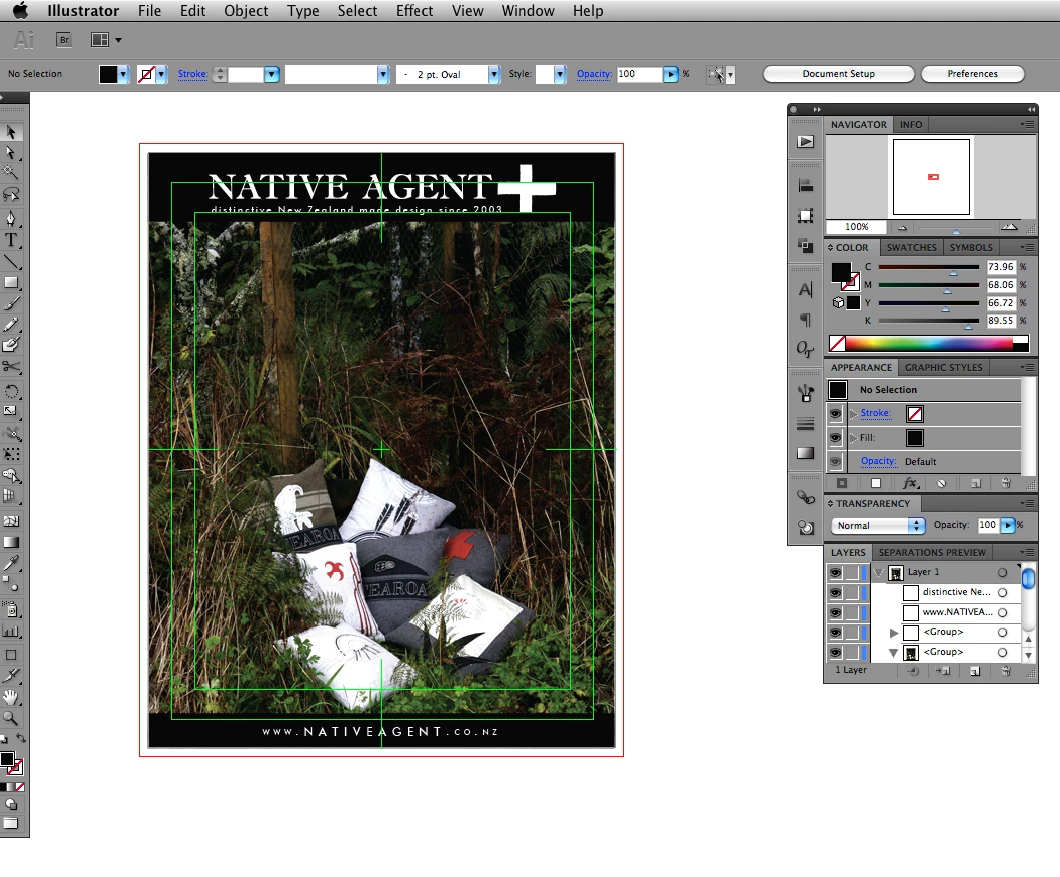
i just jumped from CS3 to CS5 illustrator and lots of suff has changed. the thing that is bugging me out right now is this guide layer, it looks like a title safe guide from after effects? anyway this is a print job so I really don't need video guides. thing is... i can't turn it off... duh. see attached screenshot. I have set the document up with 3mm bleed and then made a clipping mask to the size of my artboard, hence the red guide, this is fine. The bright green line with a cross hair in the centre is the guide that is driving me nuts, I can't actually focus on layout with this visble.

I'm sure I'm missing someting really obvious... man I feel like a doofus

i've been through all the view menu options and preferences, and searched the forums and stuff to no avail, so i thought I'd ask the world.

thanks

dan
This topic has been closed for replies.
Correct answer susanh5814000

In Illustrator cc 2017 on the Artboard set up page, under display, there is a check box for "show center mark" and "show cross hair".  These should be unchecked. 

2 replies

Participating Frequently
December 30, 2017

An old thread, but I found the solve for this...
If Illustrator artboards are set to a video preset, AfterEffects will honor the size and aspect ratio of the video artboard and not retain layer sizes. If you set up a custom template or paste into a new document as "print" with RGB color mode, layer sizes will be retained as well as perceptual color values for artwork.

Viola!

Participant
December 8, 2010

Hey,

Double click the artboard tool (shift+o & Enter), under "Display" category uncheck all the options.

The reason for those guides is that when you've opened your document you chose to do so from the video & film preset sizes.

btw

Your artwork should go all the way to the bleed if You intend it for printing.

susanh5814000
susanh5814000Correct answer
Participant
July 24, 2017

In Illustrator cc 2017 on the Artboard set up page, under display, there is a check box for "show center mark" and "show cross hair".  These should be unchecked. 

Participant
October 8, 2018

Thank you susanh5814000​...