Participant
December 5, 2017
Answered

Grid doesn't show right in Illustrator 2018

  • December 5, 2017
  • 2 replies
  • 2175 views

When I switch on grid it looks angled. How can I make it look usual & simple as it should be. Illustrator CC 2018


    This topic has been closed for replies.
    Correct answer Doug A Roberts

    what does this option say in prefs?

    2 replies

    Anna Lander
    Inspiring
    December 5, 2017

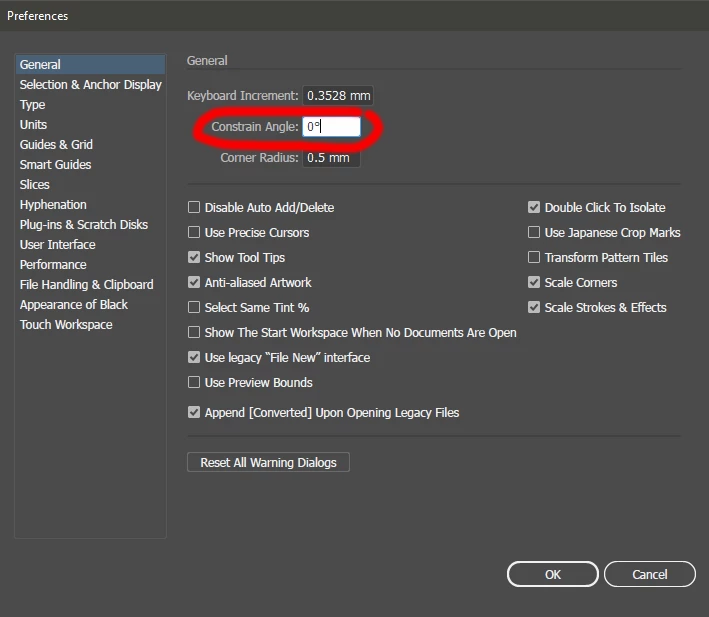
    Check Edit > Preferences > General > Constrain Angle

    If it's not = 0°, set it = 0° and relaunch Illustrator.

    Monika Gause
    Community Expert
    Community Expert
    December 5, 2017

    https://forums.adobe.com/people/Anna+Lander  schrieb

    Check Edit > Preferences > General > Constrain Angle

    If it's not = 0°, set it = 0° and relaunch Illustrator.

    You don't need to relaunch.

    Can you please read if your answer has already been posted?

    Anna Lander
    Inspiring
    December 5, 2017

    well, I checked it on Illustrator CC 2018 to be sure in my answer and I needed to relaunch. It did not change the grid appearance without this action. So I added this moment to the previous answer. And yes, I read the thread to not post the same thing twice.

    Doug A Roberts
    Community Expert
    Doug A RobertsCommunity ExpertCorrect answer
    Community Expert
    December 5, 2017

    what does this option say in prefs?

    Participant
    December 5, 2017

    Thanks a lot! I did it. Tried again & relaunch Ai for several times. Then it was fixed.