
Participating Frequently
November 16, 2017
Answered

Grid tool skew setting for true logarithmic proportions

  • November 16, 2017
  • 3 replies
  • 2985 views

How can I make a logarithmic slide rule In AI CC? I also want to create some log-log graph paper.

I know I can use the grid tool for this, but I don’t know the skew setting for a true logarithmic proportion.

This topic has been closed for replies.
Correct answer JETalmage

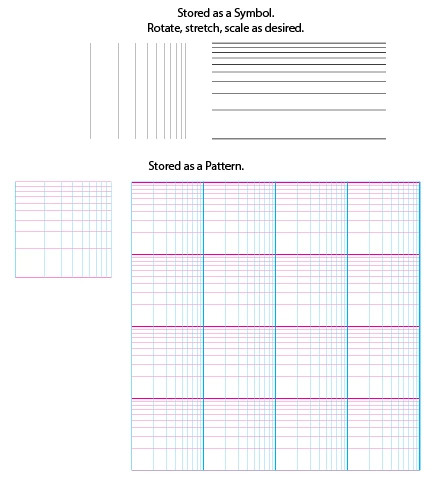
You can draw a Log 10 scale in less than 5 minutes, store it as a Symbol or Pattern (or even as a Brush):

JET

3 replies

JETalmage
JETalmageCorrect answer
Inspiring
November 20, 2017

You can draw a Log 10 scale in less than 5 minutes, store it as a Symbol or Pattern (or even as a Brush):

JET

Ray Yorkshire
Participating Frequently
November 17, 2017

joakimbl

Maybe generate one here, download the pdf and use that in Illustrator,

You can Embed it at the top of the illustrator interface

Logarithmic Graph Paper PDF Generator

https://incompetech.com/graphpaper/logarithmic/

Ray Yorkshire
Participating Frequently
November 17, 2017

Just out of interest what is the proportion in placing the grid lines?

Image result for log-log graph paper.

joakimblAuthor
Participating Frequently
November 17, 2017

Obviously the grid tool could only make one logarithmic cycle and you would have to copy and paste it 8 more times in order to get the log-log paper in the graphic you provided. It seems to me that noone knows the answer to what is the right skew setting for this, so I will have to try and reverse engineer the skew setting by making grids that are approximately logarithmic, comparing them to actual logarithmic grids and then get closer and closer to the right skew value.

Larry G. Schneider
Community Expert
Community Expert
November 17, 2017

It's not a skew setting. Your best bet is to scan and trace a piece of log/log graph paper and generate a template from that.