Exit
  • Global community
    • Language:
      • Deutsch
      • English
      • Español
      • Français
      • Português
  • 日本語コミュニティ
  • 한국 커뮤니티
0

Grid

Engaged ,
Jan 29, 2020 Jan 29, 2020

Does anyone know how to make a background "Grid" like this this "HUD" background.


TOPICS
Draw and design
2.0K
Translate
Report
Community guidelines
Be kind and respectful, give credit to the original source of content, and search for duplicates before posting. Learn more
community guidelines

correct answers 2 Correct answers

Explorer , Jan 29, 2020 Jan 29, 2020

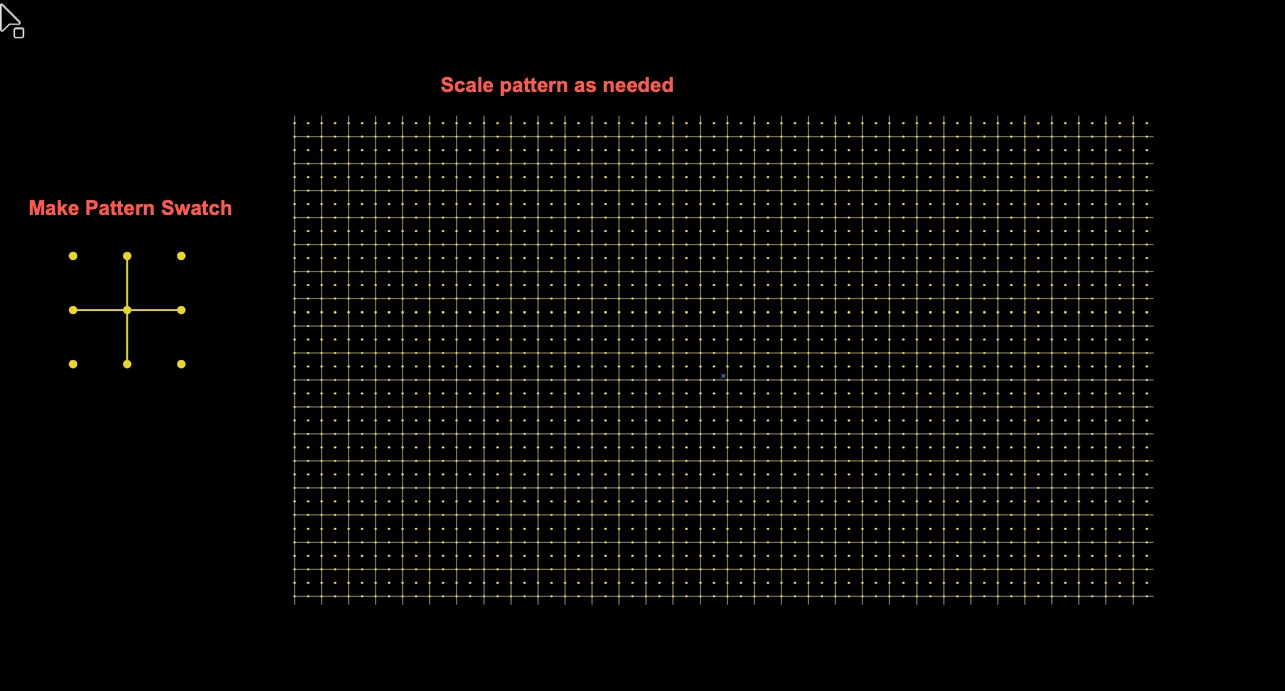
I would create a simple pattern using a few lines and spheres.

Object > Pattern > Make


I made one to show you how I'd handle this... Here's what mine looks like: 

Pattern made.JPG


Then, simply create a rectangle and fill it with the swatch of your pattern and use it as the background "grid". Note: It would help to lock this layer.


Another note: You can adjust the size of the pattern to get it exactly how you'd like it!

Select the rectangle filled with your pattern and then click Object > Transform and use the foll

...
Translate
Community Expert , Jan 29, 2020 Jan 29, 2020

HUD grid.png


Peter

Translate
Adobe
Explorer ,
Jan 29, 2020 Jan 29, 2020

I would create a simple pattern using a few lines and spheres.

Object > Pattern > Make


I made one to show you how I'd handle this... Here's what mine looks like: 

Pattern made.JPG


Then, simply create a rectangle and fill it with the swatch of your pattern and use it as the background "grid". Note: It would help to lock this layer.


Another note: You can adjust the size of the pattern to get it exactly how you'd like it!

Select the rectangle filled with your pattern and then click Object > Transform and use the following settings:

Scale Pattern.JPG


Here is an example of my result, but the size of the grid could be adjust as needed:

Result.png


Translate
Report
Community guidelines
Be kind and respectful, give credit to the original source of content, and search for duplicates before posting. Learn more
community guidelines
Community Expert ,
Jan 29, 2020 Jan 29, 2020

Have you tried the Rectangular Grid Tool?

Untitled-2.png

Translate
Report
Community guidelines
Be kind and respectful, give credit to the original source of content, and search for duplicates before posting. Learn more
community guidelines
Engaged ,
Jan 30, 2020 Jan 30, 2020

Thanks!

Translate
Report
Community guidelines
Be kind and respectful, give credit to the original source of content, and search for duplicates before posting. Learn more
community guidelines
Community Expert ,
Jan 29, 2020 Jan 29, 2020

HUD grid.png


Peter

Translate
Report
Community guidelines
Be kind and respectful, give credit to the original source of content, and search for duplicates before posting. Learn more
community guidelines
Engaged ,
Jan 30, 2020 Jan 30, 2020

How were the dots created to fit symmetrical with the grid?

Translate
Report
Community guidelines
Be kind and respectful, give credit to the original source of content, and search for duplicates before posting. Learn more
community guidelines
Community Expert ,
Jan 30, 2020 Jan 30, 2020
LATEST

I drew the vertical and horizontal line segments, drew a small filled circle, and duplicated and aligned it with Smart Guides.

Translate
Report
Community guidelines
Be kind and respectful, give credit to the original source of content, and search for duplicates before posting. Learn more
community guidelines