
Participant
September 13, 2024
Question

Hatched and colored box on Matplotlib, empty on Illustrator

  • September 13, 2024
  • 1 reply
  • 1092 views

Hi everyone,


I am pretty new to Illustrator but my issue is not experience-related (at least it does not seem on a first approach).


I am using Matplotlib to plot some figures. Specifically, I perform a boxplot with seaborn and I use matplotlib features to color the box and hatch it. I then save it in svg. It looks like this (and it also looks like this in Inkscape):
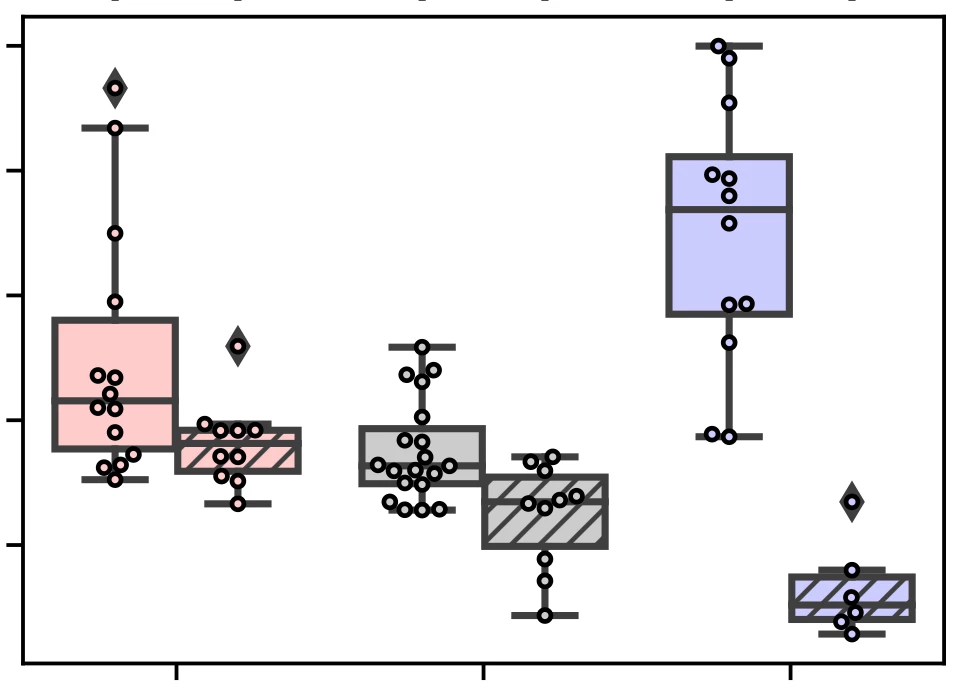
Then I move to Illustrator and insert it using the File-> Place command. I obtain this:
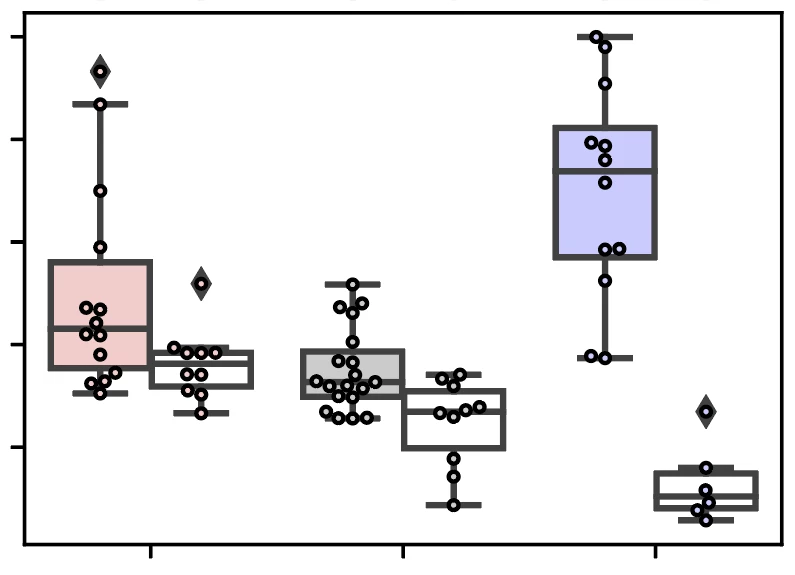
As you can see, the hatching and the color of the previously hatched boxes has disappeared.

Any idea of where the problem comes from and how I can solve it?

Thanks!

This topic has been closed for replies.

1 reply

Monika Gause
Community Expert
Community Expert
September 13, 2024

Exactly how is the hatching made? Can you share a demo file?

Participant
September 14, 2024

Thanks for your answer. Please find below the sequence of code I use to generate the plot in python. I use python 3.7.

        plt.subplots()
        ax = sns.boxplot(data=data_table_AI, x='data', y='quantitative data', order=['foo', 'bar', 'spam'],
                         hue='sub-data', hue_order=['eggs', 'parrot'], dodge=True)
        sns.swarmplot(data=data_table_AI, x='data', y='quantitative data', order=['foo', 'bar', 'spam'],
                      hue='sub-data', hue_order=['eggs', 'parrot'], dodge=True,
                      size=2.5, linewidth=1)
        # Set box colors based on tissue and box hatching for basal side
        hatch_pattern = '////'
        list_color = ['#FFCCCC', '#FFCCCC', '#CCCCCC', '#CCCCCC', '#CCCCFF', '#CCCCFF', None, None]
        i_box = 0
        for patch in ax.patches:
            if patch.__class__.__name__ != 'Rectangle':
                patch.set_facecolor(list_color[i_box])
                # The hue order is 'apical' then 'basal', so every second patch (i.e., odd-indexed) is basal
                if i_box % 2 == 1:
                    patch.set_hatch(hatch_pattern)  # Set hatching for basal boxes
                i_box += 1
        # Set points color and edge color
        for i, collection in enumerate(ax.collections):
            collection.set_edgecolor('k')
            collection.set_facecolor(list_color[i])
        # Capitalize the first letter of tissue labels
        tissue_labels = [label.get_text() for label in ax.get_xticklabels()]
        tissue_labels = [label.capitalize() for label in tissue_labels]
        ax.set_xticklabels(tissue_labels)
        # Set labels and title
        plt.xlabel('Data')
        plt.ylabel('Quantitative data')
        plt.legend().remove()
        plt.tight_layout()
        # Set statistical tests
        pairs = [(('foo', 'eggs'), ('foo', 'parrot')),
                 (('bar', 'eggs'), ('bar', 'parrot')),
                 (('spam', 'eggs'), ('spam', 'parrot'))]
        annotator = Annotator(ax, pairs, data=data_table_AI, x='data', y='quantitative data',
                              order=['foo', 'bar', 'spam'], hue='sub-data', hue_order=['eggs', 'parrot'])
        annotator.configure(test='Mann-Whitney', text_format='star', loc='outside')
        annotator.apply_and_annotate()
        plt.show()


Participant
September 14, 2024

Any file will be interpreted by Illustrator as soon as you open it, since Illustrator's native format is AI. 


Your pattern is an actual pattern in the SVG and Illustrator cannot read it.


I understand - I would have loved to understand where the issue was coming from, just for the knowledge of it, beyond the practical aspect.

Thank you for the time you spent on this!