
Participant
November 20, 2017
Answered

Help Hide Perspective Grid

  • November 20, 2017
  • 3 replies
  • 5430 views

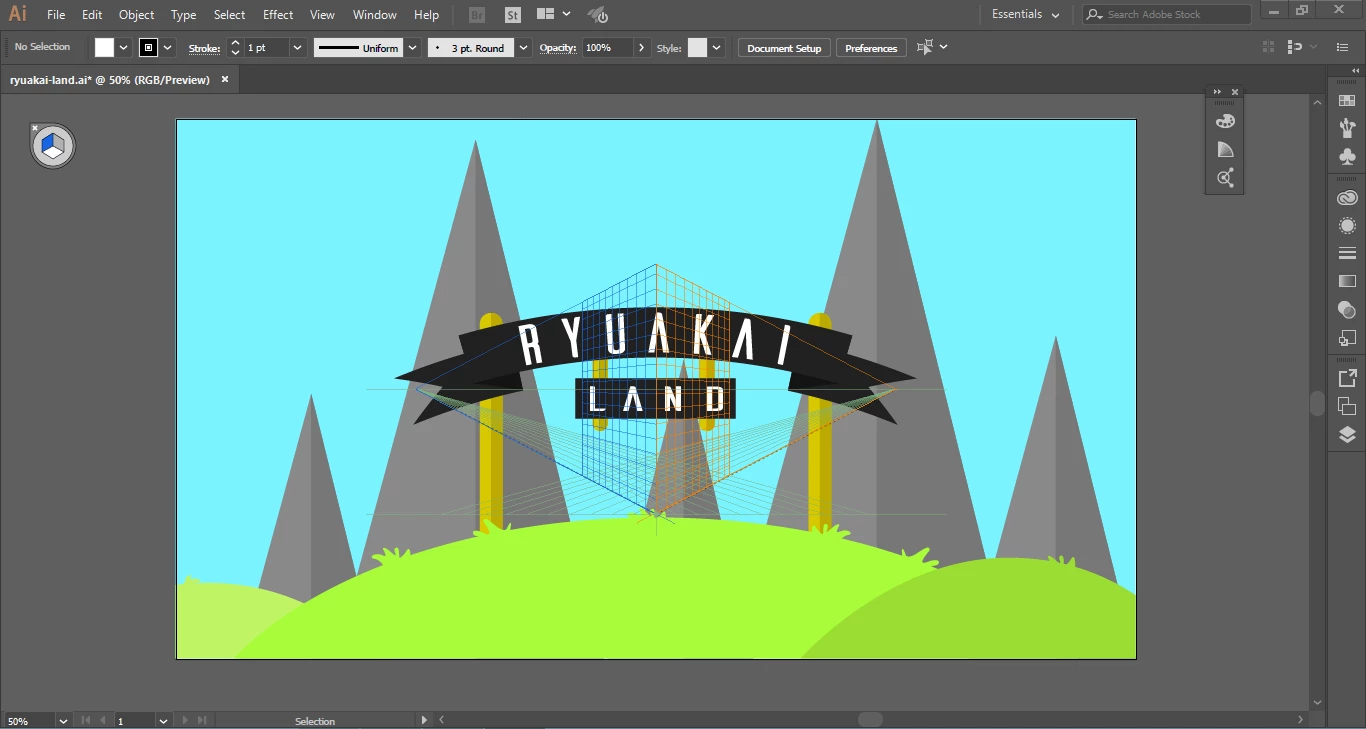
Hello! So I was making a flat landscape little thing here, and I must've clicked something without knowing because this showed up! I can't seem to figure out what it is or what caused it. The little X next to the 3 sided square doesn't do anything either.

Thank you!
Correct answer Ton Frederiks

You probably clicked the Perspective Grid tool;

Choose View > Perspective Grid > Hide Grid

3 replies

Edu Couchez
Inspiring
August 29, 2025

Hey! Here from the future, almost 9 years later, and this is still an annoying problem. This perspective grid keeps getting triggered by who knows what combination of keywords. In 2025 we have fabulous AI-powered tools, but I still need to Google how to disable that damn perspective grid, which I've never used in my life. And no... it still doesn't work by clicking on that little "x" in the corner of the icon, which in theory should close the tool.

Monika Gause
Community Expert
Community Expert
August 29, 2025

It doesn't get triggered by keywords. It gets triggered when you select the perspective grid tools or when you accidentally press a certain shortcut. If you never need it, create a custom toolbar that doesn't contain the perspective tools. ANd for hiding it: cmd+Shift +I


(which is mentioned in the documentation, no need to Google it)

Ton Frederiks
Community Expert
Community Expert
November 21, 2017

Or, if you can click very very precisely, click the little x.

Ton Frederiks
Community Expert
Ton FrederiksCommunity ExpertCorrect answer
Community Expert
November 20, 2017

You probably clicked the Perspective Grid tool;

Choose View > Perspective Grid > Hide Grid