
Participant
July 16, 2022
Answered

Help! I hit Clear All on my fonts!

  • July 16, 2022
  • 2 replies
  • 242 views

I just started some night classes on adobe suite and design and one of my first assignments is to create a logo. While I was futzing around in the Type >> Character window I was going through Filters and then hit Clear All. Now I don't have any of my fonts showing up, including the ones that I activated myself from adobe dot com. How can I restore them?
This topic has been closed for replies.
Correct answer Anubhav M

Hello @Maureen25272535msy2,


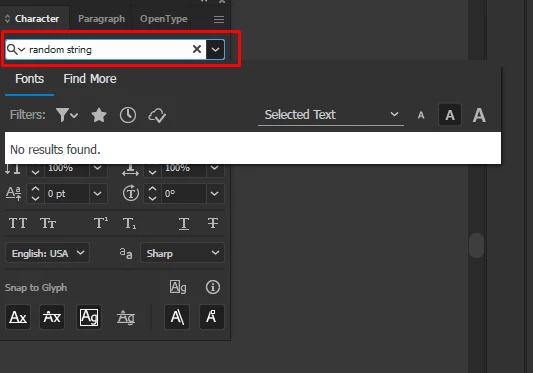
Thanks for reaching out. As pointed out by Monika, "clear all" simply clears the filters that you have applied to sort your fonts. Kindly check if you have some text in your search box preventing all of your fonts from showing up.


Looking forward to your response.


Thanks,

Anubhav

2 replies

Anubhav M
Community Manager
Anubhav MCommunity ManagerCorrect answer
Community Manager
July 18, 2022

Hello @Maureen25272535msy2,


Thanks for reaching out. As pointed out by Monika, "clear all" simply clears the filters that you have applied to sort your fonts. Kindly check if you have some text in your search box preventing all of your fonts from showing up.


Looking forward to your response.


Thanks,

Anubhav

Monika Gause
Community Expert
Community Expert
July 16, 2022

Clear all doesn't delete the fonts or deactivate them. It just turns off the filters. Can you please show a screenshot of what you are seeing? And then also show us how you have the filders set up? Maybe there is still an active filter and none of your fonts matches it?