
Participant
August 14, 2022
Question

Help! I'm ready to throw my computer into the ocean!

  • August 14, 2022
  • 3 replies
  • 346 views

Hello, I am hoping someone can help me with this. 
Illustrator crashes for me literally every single time I use it. I have some days where it crashes upon launch and takes my whole computer with it, and other days where it crashes after half an hour or more. 

Because of this, I can guarantee you that I have very little idea how to even do basic things in Illustrator and have essentially only been able to use it like a  kindergardener using a glorified version of Microsoft Paint. I am not doing anything complicated. As far as I know, based on the $3,000 I paid for this stupid computer specfically to learn to do things with Adobe, it was supposed to be able to do much more than run this program. What am I missing? My Creative Cloud is always up to date. 


My Surfacebook 3 info: 
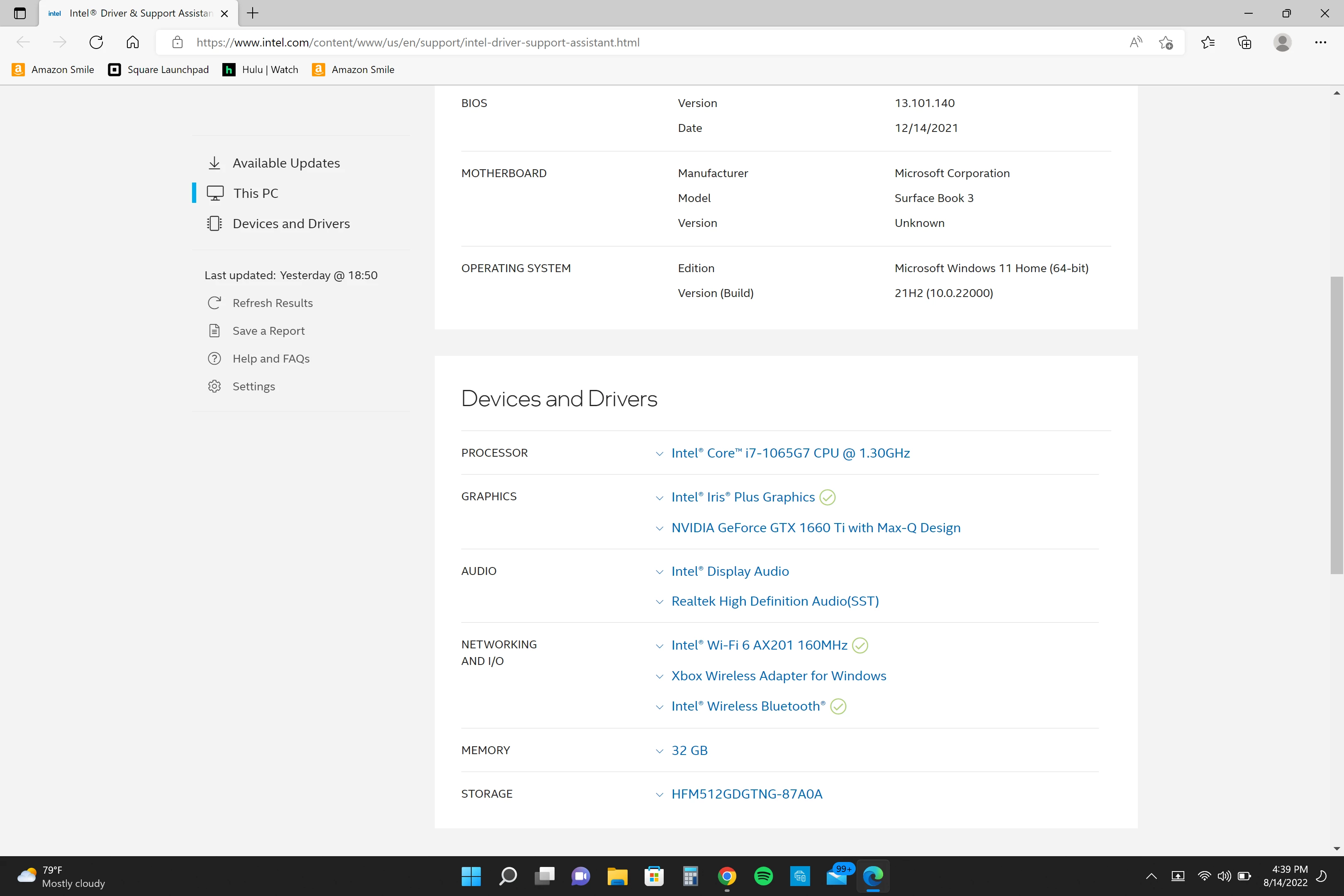

If you need more info, I'll add it. Just so incredibly frustrated that I can't even work on a basic project without an App that I have at this point paid hundreds of dollars for crashing repeatedly. Should I have just sold out and gone to Apple instead? UGH!

This topic has been closed for replies.

3 replies

Anshul_Saini
Community Manager
Community Manager
August 17, 2022

Hi @borderlinewitchcraft,


We are sorry about the crashing! I know that's really frustrating. Would you mind trying the suggestion in this help article to resolve the crash (https://helpx.adobe.com/ie/illustrator/kb/fix-crash-on-launch-issues.html)?


Also, I would encourage you to submit the crash report by following the steps suggested in this help article (https://helpx.adobe.com/ie/illustrator/kb/crash-next-steps.html).

While submitting the crash report, please use the same email address with which you are signed in on this community. This will help us locate the crash report on our internal crash reporter website. By doing this, we will be able to check what is causing the crash and assist you accordingly.


Let the steps on the helpx article I shared above and let us know how it goes. We will be looking forward to your response.


Thanks & Regards,

Anshul Saini

Mylenium
Legend
August 15, 2022

Windows Update may not necessarily automatically show and install new drivers, so you still have to check the optional components directly in the panel. otherwise check the NVidia and intel web sites directly or use the device manager (right-click --> Check for new and updated drivers/ devices).


https://www.nvidia.com/Download/index.aspx?lang=en


https://www.intel.com/content/www/us/en/support/products/197532/graphics/intel-iris-plus-graphics.html#support-article-selector


Mylenium


Participant
August 15, 2022

Ah, yes, gotcha. Unfortunately, every time it crashes, after I coax it through the process, I do manually go through the drivers just to check and verify that they are all up to date. So far, my computer has yet to mess up or overlook an install and has always been current. 

If those are all current and up to date, can you think of anything else that would be causing it? 

Doug A Roberts
Community Expert
Community Expert
August 15, 2022

If you can't discern a pattern, contact Adobe support. They may ask to see crash logs or remotely access your computer and can diagnose things that forum questions can't.

Mylenium
Legend
August 15, 2022

The boring, unsatisfying answer is that you will need to spend time straightening out your graphics driver(s), but on a Surface these options are limited and I have no idea how Windows 11 affects things, since it uses a new driver model. Either way, at the very least check your Windows Update or the NVidia and intel web sites for updated drivers. It may also help to run AI in Windows 10 compatibility mode, so right-click on the *.exe and change that in the properties. Perhaps it miraculously makes things work.


Mylenium

Participant
August 15, 2022

Would you be able to specify what you mean by straightening out my graphics drivers? 


The computer is set to check and automatically updates every day, so that is not an issue, at least it shouldn't be. 


I will give the safe mode suggestion a try, and report back. 


Thank you!