
Participating Frequently
May 15, 2017
Question

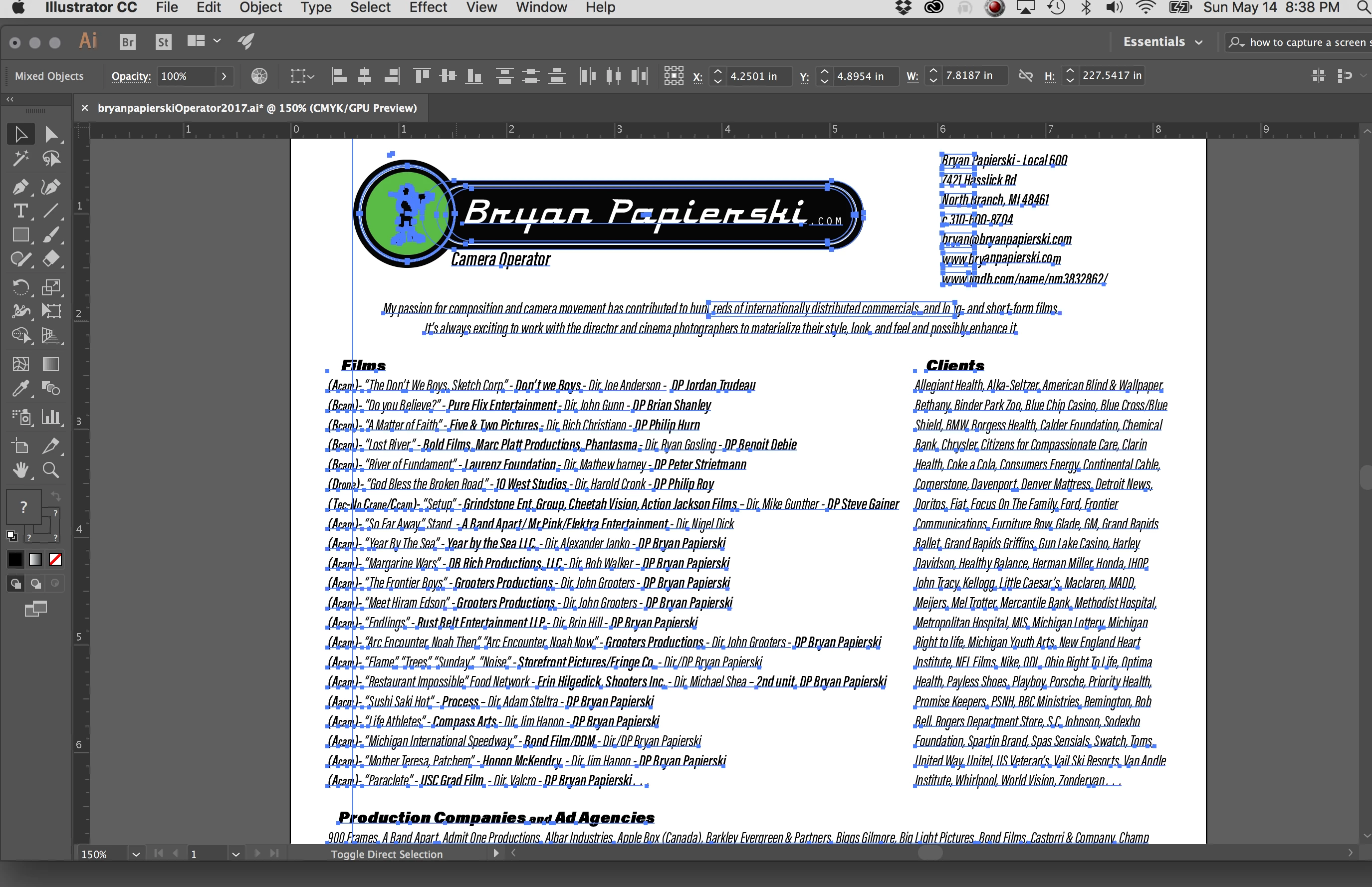
HELP! Illustrator broke all my text into hundreds of text paths?!

  • May 15, 2017
  • 6 replies
  • 11566 views

last week i worked on my resume and all was good. today i open up the file and the text was broken into hundreds of text paths! 

How do i get it back to normal???

The first time i opens it the logo was in 20 pieces but thats what i changed?  HELP!
    6 replies

    Participating Frequently
    May 15, 2017

    and about your screw driver and tooth brush comment. i agree on the proper tool comment when you know how to use the proper tool. but, i own an electric tooth brush and a manual screwdriver.  if i had an electric screwdriver it would be the correct tool.

    for instance:

    Premiere is great for editing and After Effects is great for graphics. But some times the graphics in Premiere are all you need if you don't know After Effects that well.

    or

    if you moving out of your house its easer to get all your belongings in a huge semi truck but when you don't have the proper license to drive the huge truck a shall does just fine.

    im total open to comments. but, instead of putting me down you could have made your point without trying to make me look and feel like a fool. i though about indesign to use but i didn't have time to go out and buy an ELECTRIC SCREWDRIVER, un box it and charge the battery so i can use it.

    Willi Adelberger
    Community Expert
    Community Expert
    May 15, 2017

    You should relearn. InDesign is a layout software for layouts with only a single page as well.Your answer shows only that you have no clue on InDesing and neither on Illustrator.

    Participating Frequently
    May 15, 2017

    id been working off and on in ill for the past 2 weeks and all was fine until today.

    EVERYONE PLEASE DROP THE NEGATIVE COMMENTS.  IM SORRY I DO NOT KNOW INDESIGN AS WELL AS ILLUSTRATOR.    PLEASE MOVE ON, unfortunately i cannot change the past.  As you can see by my resume I'm a CAMERA OPERATOR not a graphic lay out person .

    unless you can help the issue at hand.

    Participating Frequently
    May 15, 2017

    You may be correct, but i know ill so well it took me no time at all to do the layout. To do this lay out it took me about 3 minutes to lay it out. So after i was done designing the logo i started another page which is about the time it would have taken me to open up another program. Plus not using inDesign for 6 years for me to get up today would take me longer. It being only one page i believe in design is great for designing a 12 page brocuer i totally agree. But thanks for looking out for me. In the future if i have time to re learn a program ill totally do that.

    b-

    Monika Gause
    Community Expert
    Community Expert
    May 15, 2017

    https://forums.adobe.com/people/art+is+food  schrieb

    You may be correct, but i know ill so well it took me no time at all to do the layout.

    Sorry, but that is a pretty lame excuse.

    You're applying for a job, so more experience and more abilities will be a plus on your resume.

    On top of that InDesign allows you to export this as a structured document, which will also be a plus since it's demanded by companies these days that a document does not only look pretty but can be processed in their workflows and document management systems.

    Participating Frequently
    May 15, 2017

    I'm looking for help on my current problem. not to be put down by using the wrong program "poor excuse" NICE.

    Eternal Warrior
    Inspiring
    May 15, 2017

    FWIW - If you have Illustrator then there are high chances you have InDesign...

    I would categorically use InDesign to make a Resume in future...out of all  the Adobe products (assuming a standard text/word resume was not desired).

    It is the best for Designing layouts, publications, posters, resumes etc. etc... that will be printed or used in PDF format.

    The learning curve is not that steep to become an basic/intermediate user... Particularly if you have any Illustrator experience.

    Again this comes back to @Bob.Levine's point of using the right tool for the right job.

    Illustrator for Resume's is a bit like using a toothbrush when you actually need a screwdriver...

    Sorry!

    Willi Adelberger
    Community Expert
    Community Expert
    May 15, 2017

    Another problem could be, that an AI file was created in a later version of Illustrator and opened in an older one. It results in opening the PDF fork and would handle Illustrator as PDF editor. You have to open the file in the same or in a newer version of Illustrator.

    Participating Frequently
    May 15, 2017

    Looked and thats not the problem.  good thought!

    Willi Adelberger
    Community Expert
    Community Expert
    May 15, 2017

    I suppose you created the PDF, you have opened, either outside Illustrator or as PDF without Illustrator's editing capabilities. In either case you should not open it in Illustrator as this application is not a common PDF editor.

    Go back to the original application and the oriiginal file, make there your changes and export the PDF again.

    Legend
    May 15, 2017

    Ajar Productions developed a script you could use to merge selected text back into a single easy to edit object:

    Alternatively what you could do is use Adobe Acrobat to extract the text the file for reuse in Illustrator.

    1. Open the AI file in Adobe Acrobat
    2. Select the Selection tool and press Option then drag a marquee around the area of text you want to select.
    3. Right-click and choose Copy with Formatting.
    4. Back in Illustrator create a text area by click dragging with the Type tool, and paste in the text.

    To look at why this issue occurred in the first place:

    • It almost looks like you've saved it to a much older version of Illustrator (with a different type engine), and then opened it again.  E.g. if you save an AI file as Illustrator 10 or earlier (backward compatible), a warning message will appear that text is converted to point type.
    • When reopening the Illustrator file you would have seen the following dialog box.
    • If you click Update the issue you occurs.
    Participating Frequently
    May 15, 2017

    Carl

    ill give it a try and let you know!

    thank you.

    b-

    Legend
    May 15, 2017

    How did you go combining the text again?  Did you manage to get it all back in order?

    When you save your Illustrator document, ensure you save it as the latest version, this will prevent the issue from re-occurring in the future.

    Alternatively if you save as a PDF, use the Adobe PDF Preset [Illustrator Default], and ensure that the Preserve Illustrator Editing Capabilities option is selected.