
Inspiring
September 11, 2025
Answered

Help: Qt Widget Not Occupying Full AI Panel Space

  • September 11, 2025
  • 1 reply
  • 631 views

Hello Everyone,

I am writing a C++ plugin using the latest SDK (v1-Aug 2025) for Adobe Illustrator 2025 (version 29.8.1). My requirement is to display a Qt UI inside an AI Panel. I have taken the EmptyPanel sample as a reference and added my Qt widgets to the panel.

I am able to see the Qt widget in the panel, and it resizes when the panel resizes. However, the Qt widget is not fully occupying the panel space, even though I set the widget size to match the AI Panel size using the sAIPanel->GetSize API. I am also updating the size when the window size changes through PanelSizeChangedNotifyProc.


To isolate the issue, I created a simple QWidget and explicitly set its geometry to the panel size, but I still see the same problem.

Below is the code snippet. Also attached the screenshot of my Plugin panel view. Could someone shed some light on what I might be missing or doing wrong?
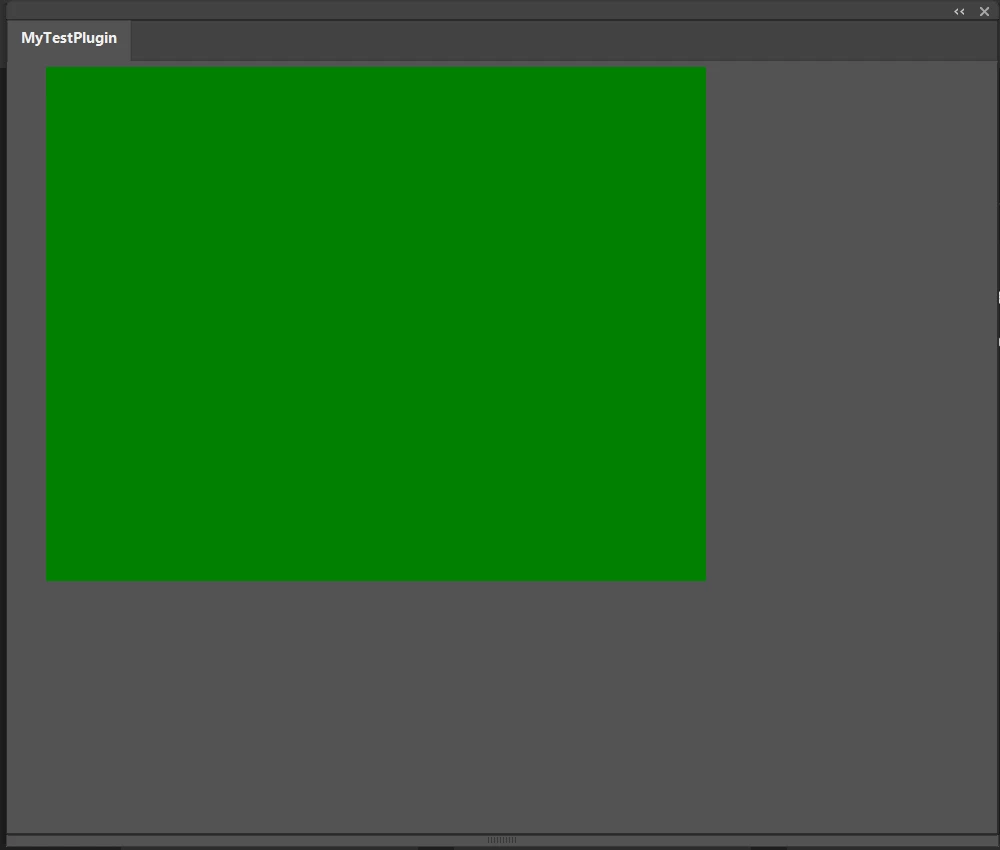
Thanks in advance!

ASErr EasyVariantsPlugin::StartupPlugin(SPInterfaceMessage* message)
{
//Initialization code

    AISize pnSize = { 2000, 2000 };
    AIErr error = sAIPanel->Create(fPluginRef, ai::UnicodeString("MyTestPlugin"), ai::UnicodeString("MyTestPlugin"), 1, pnSize, true, NULL, this, fPanel);

    AISize minSize = { 200, 200 };
    AISize maxSize = { 2000, 2000 };
    AISize prefConstSize = { 500, 500 };
    AISize prefUnconstSize = { 500, 500 };

    error = sAIPanel->SetSizes(fPanel, minSize, prefUnconstSize, prefConstSize, maxSize);
    CHECK_ERROR	
    error = sAIPanel->Show(fPanel, true);
    CHECK_ERROR	
    error = sAIPanel->SetVisibilityChangedNotifyProc(fPanel, PanelVisibilityChangedNotifyProc);
    CHECK_ERROR
        error = sAIPanel->SetSizeChangedNotifyProc(fPanel, PanelSizeChangedNotifyProc);
    CHECK_ERROR
        error = sAIPanel->SetClosedNotifyProc(fPanel, PanelClosedNotifyProc);
    CHECK_ERROR
	
	AddQtWidgets();
}

AIErr EasyVariantsPlugin::AddQtWidgets()
{
    AIErr error = kNoErr;
    _hDlg = nullptr;
    error = sAIPanel->GetPlatformWindow(fPanel, _hDlg);
    if (error != kNoErr || !_hDlg)
        return error;
    
    _containerWidget = new QWidget();
    _containerWidget->setStyleSheet("background-color: green;");

    SetParent((HWND)_containerWidget->winId(), _hDlg);
    SetWindowLong((HWND)_containerWidget->winId(), GWL_STYLE, WS_CHILD | WS_VISIBLE); 

    AISize panelSize = { 0, 0 };
    error = sAIPanel->GetSize(fPanel, panelSize);
    _containerWidget->setGeometry(0, 0, panelSize.width, panelSize.height);
    _containerWidget->show();
    return error;
}

Calling below function from "void PanelSizeChangedNotifyProc(AIPanelRef inPanel)" callback

void UpdateUIOnPanelResize(AISize& outSize)
{
    if (_containerWidget != nullptr)
    {
        _containerWidget->setGeometry(0, 0, outSize.width, outSize.height);
    }
}


Correct answer bapuji_4469

Hi @A. Patterson, I have increased the size(Hard-coded to 1500 X 1500) but no luck. I will debug further and update here my solution later. I am also a windows guy. Thank you for the feedback and inputs.


Hi @A. Patterson, Good day. Finally, I figured out the solution. To fix this, we need to add the following line before instantiating QApplication:

QApplication::setAttribute(Qt::AA_PluginApplication);

The root cause is that after creating a Qt application in the plugin, Qt takes over the event loop and does not return it to Illustrator. 

1 reply

A. Patterson
Inspiring
September 11, 2025

FIrst thing is to make sure that AI doesn't have any UI scaling going on. If so, you can tell Qt to match the UI scaling (it has a similar feature) and that might solve your problem.


We do exactly what you're doing and I don't see any obivous reason why it wouldn't work at first blush. If you find it's not the scaling, reply and I'll poke around our internals a bit and see if there's something we've got that you're missing.

Inspiring
September 12, 2025

Thank you, A. Patterson, for taking the time to read my lengthy post and respond. Your feedback is greatly appreciated. As you suggested, I attempted to set the scaled value to my QWidget; however, it is still not functioning as expected. I have applied a scale factor of 1.3333f, based on the conversion from points to pixels, but this has not resolved the issue. Could you please advise on how I can adjust the widget so that it occupies the available panel space? Maintaining the aspect ratio is not necessary in this case. My Dev setup details are: Windows 10, VS2022 and Adobe Illustrator 2025.

void UpdateUIOnPanelResize(AISize& outSize){
    if (_containerWidget != nullptr){
        const float kiUIScaleFactor = 1.3333f;
        const int kiNewWidth = outSize.width * kiUIScaleFactor;
        const int kiNewHeight = outSize.height * kiUIScaleFactor;
        _containerWidget->setGeometry(0, 0, kiNewWidth, kiNewHeight);
    }
}


A. Patterson
Inspiring
September 12, 2025

Sorry, I'm not sure I was clear enough. I don't mean a pixel <--> point scaling; all of the panel APIs work in pixels, not points. I can get how that might not be clear given that most of the APIs do work in points. That said, pixels basically equal points for Illustrator.


What I meant was that Illustrator  has a UI scaling option (somewhere in preferences) that literally scales the whole application, similar to doing via the OS. It very well might get automatically defaulted to some value based on resolution, monitor, etc. If that's set to 1, you shouldn't need to do any scaling. If you _do_ need to scale it, to make things look right you should use the QT scaling options, which are -- if memory serves -- done via environment variables that need to be set before the QApplication is created.


Beyond that though, I feel like the logic is very straight forward for doing what you're doing. The headaches came form it being off by a couple of pixels (due to invisible widget chrome) -- we were never off by as much as your screenshots. Which suggests something important _is_ missing. I'll take a look later this morning and see if I can't spot some factor that's missing from your code.