 Adobe Community

- Home
- Illustrator
- Discussions
- Re: Help with cutting a whole in an image/clipping...
- Re: Help with cutting a whole in an image/clipping...

Copy link to clipboard
Copied
Hello.
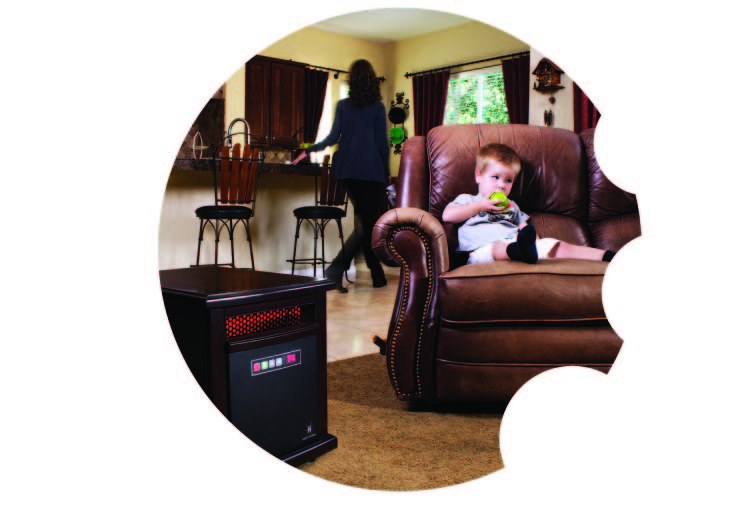
I am needing to cut out circles in an image so that the background shows through. Sort of like an inverse clipping mask..but I don't know if those exist.. And once I cut holes in the image I am needing to put a clipping mask on the whole thing so that only part of the image is still showing with parts of the cut-outs.
Or i guess if I could figure out how to create an odd shape clipping mask that would work as well.
The image below is something like what I'm trying to accomplish just different image and different sizes and locations of the cut-outs along the edge.


 1 Correct answer


bonnierod,
If I understand it in the right way, you may:
1) Create the basic shape of the Clipping Path (the path to use for the Clipping Mask),
2) Create the cutouts on top of it,
3) Select 1) and 2) and Pathfinder>Minus Front,
4) Apply 3).

Explore related tutorials & articles
 14
Replies
14
14
Replies
14

Copy link to clipboard
Copied
bonnierod,
If I understand it in the right way, you may:
1) Create the basic shape of the Clipping Path (the path to use for the Clipping Mask),
2) Create the cutouts on top of it,
3) Select 1) and 2) and Pathfinder>Minus Front,
4) Apply 3).
Copy link to clipboard
Copied
Ok, as I was searching the forums before posting my question I saw something about the pathfinder effect. But in my version of Illustrator (CS4) I don't have the 'minus front' option.
Copy link to clipboard
Copied
But in my version of Illustrator (CS4) I don't have the 'minus front' option.
That is strange, bonnierod.
I thought it had been called that from CS or CS2.
The old name is Pathfinder>Subtract from shape area.
You could also put the cutouts behind and use Pathfinder>Minus Back; I am sure that name is unchanged.
Or try the different ones and see which one works in the right way with them in front.

Copy link to clipboard
Copied
Don't select pathfinder effects, but take the pathfinder panel. That's something different.
Copy link to clipboard
Copied
Thank you very much. I found it! I am fairly inexperienced with Illustrator, obviously. Once I got the pathfinder panel/window I found the 'minus front' option right away. And followed Jacob's steps to success! Thanks again Monika and Jacob!
Copy link to clipboard
Copied
For my part you are welcome, Bonnie.
Luckily, Monika has a keen eye.

Copy link to clipboard
Copied
But why all this messing around with Pathfinder?
The only thing that Pathfinder does in this case is to make a compound which you can easily do with Cmd+8.
Follow that with Cmd+7 and you've got your mask.
Copy link to clipboard
Copied
Steve,
As far as I can see from the OP, in this case Object>Compound Path>Make (Ctrl/Cmd+8) will add the non overlapping portions of the cutout paths to the Clipping Path, instead of just biting off part of the basic path.
Apart from that, any excuse for dragging Ofelas into the picture should be used.

Copy link to clipboard
Copied
Jacob,
Ofelas is new to me. Looks interesting.
Peter
Copy link to clipboard
Copied
Peter,
Looks interesting.
It is far more than that. And the Tsjuder with the scar is the spitting image of Thor in Hrafninn flýgur.

Copy link to clipboard
Copied
I am not certain about the previous postings but here is how to do it.
1 place your circle on top of the image select the image and make sure the image is filed with white no stroke.
2 Go to the transparency panel and from the flyout select opacity mask make
3. make sure invert is select and clip is deselected as in the screen shot.
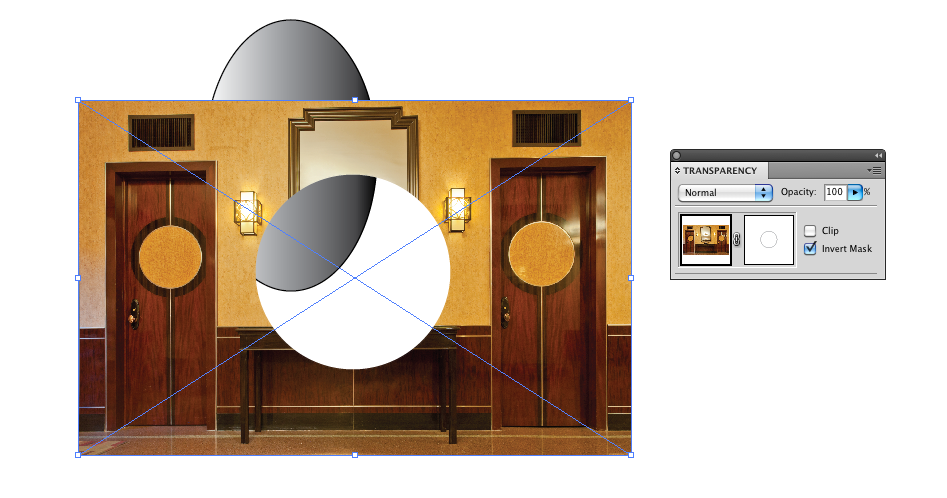
Works with linked or embedded images.
Copy link to clipboard
Copied
Bonnie,
What Monika said. I always show the full path (here starting with Pathfinder).
... here is how to do it.
I thought we all agreed that Illy is (more) versatile, at least when you ask her nicely.
Copy link to clipboard
Copied
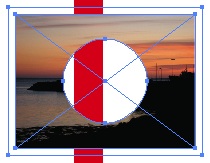
Just make a compound path and use it as a mask.

Copy link to clipboard
Copied
Photoshop can be used if you are aware of all Photoshop tools and perfect in using them. If you don't have proper knowledge of tools then I would recommend to take advice from (Link removed by Moderator) as they know what is good and what is best. There are lots of online clipping path service provider. You can take help from anyone.


 AdChoices