
Known Participant
March 4, 2020
Answered

Help with excel-to-Illustrator fonts in charts

  • March 4, 2020
  • 7 replies
  • 10435 views

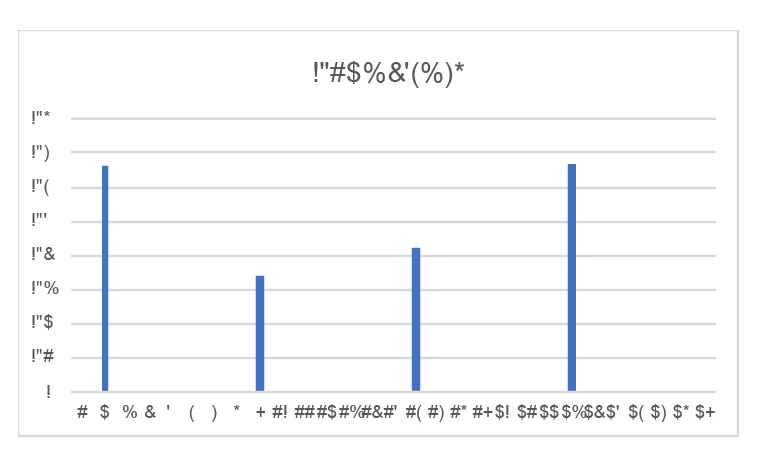
I've seen posts about this before, but haven't found anything that's fixed it for me. I'm runing OSX 10.15.3, trying to paste copied graphs from Excel (version 16.34) into Illustrator 24.0.3. Whatever font I've used to make a graph in Excel, when I paste it into Illustrator, the text changes from letters to symbols (screenshot below). 


I tried a solution I've seen elsewhere, exporting from Excel to a PDF. When I open the PDF in Acrobat, it looks fine, but when I open it in Illustrator, it looks just like in the screenshot below. If I export from Excel into a postscript file, Illustrator opens it and it looks normal. That isn't a great work-around, however, because the imported text isn't in text boxes, so it doesn't make it any easier to edit than the other way.


Any thoughts? Why is Illustrator not reading the font the same way that Acrobat and Excel are? 


Thanks in advance. 

This topic has been closed for replies.
Correct answer Brad @ Roaring Mouse

This is an old thread, but in case others have issues, the reason the PDF creates "gibberish" is that Excel subsets the fonts for the purposes of display/printing ONLY, so the encoding is created on the fly for each instance of a subset for that purpose only. (It's particularly a problem with expanded character sets in fonts like Calibri), so when it's opened in Illustrator, there's no order at all to it that it can understand. The best option is to export as SVG instead.

7 replies

Participating Frequently
November 4, 2024

Select the chart in Excel and change the font to Avenir.

Copy and paste to Illustrator.

Brad @ Roaring Mouse
Community Expert
Brad @ Roaring MouseCommunity ExpertCorrect answer
Community Expert
September 21, 2021

This is an old thread, but in case others have issues, the reason the PDF creates "gibberish" is that Excel subsets the fonts for the purposes of display/printing ONLY, so the encoding is created on the fly for each instance of a subset for that purpose only. (It's particularly a problem with expanded character sets in fonts like Calibri), so when it's opened in Illustrator, there's no order at all to it that it can understand. The best option is to export as SVG instead.

Participating Frequently
March 24, 2022

Export to SVG is a great solution!

Gia Ninja
Participating Frequently
July 29, 2020

Brilliant, thank you, changing the font to Avenir works. That has been annoying me so much. This is a time saver. Thank you.

Participant
April 16, 2020

Hi, 
I see your problem is solved, but it might be interesting to mention there is another way to approach this: make you charts in Illustrator using the Datylon Graph plug-in. Just upload or copy the data from Excel, not the graph itself, and build the graph in Illustrator with numerous styling options and using all the fonts you like. You can also create templates which allow you to re-use your charts by simply uploading new data. 
See datylon.com/graph.

Participant
April 6, 2020

Hi, I've been frustrated by this for a long time, but this is the first time I have checked online to see if there was a solution. My workaround has been to convert all fonts in the graph manually to Avenir Next, an OpenType font. Not sure if other OpenType fonts would work. This is readable when I copy and paste the graph to Illustrator. I'm using Illustrator 2020 on a MacBook pro2017 running Catalina, and the most recent version of Excel, whatever that is. But I've had this problem for at least a year, under several other operating systems and versions of Illustrator and Excel.

Known Participant
April 6, 2020

Do you convert to that font in Excel, or after copying into Illustrator? 

Participant
April 6, 2020

I do it in Excel, in the graph. It's tedious, especially if I have a bunch of graphs to spruce up for publication. I'd love to find a more efficient way.

Monika Gause
Community Expert
Community Expert
March 4, 2020

Use a different font than Calibri

Known Participant
March 4, 2020

I tried Arial, Times, and a few others. No luck. 

Larry G. Schneider
Community Expert
Community Expert
March 4, 2020

You will have to change the font in Excel before making the PDF or copy/pasting the chart into Illustrator. Is that what you tried or did you try changing the font in AI after the fact?

Mylenium
Legend
March 4, 2020

Well, the magic of Unicode and OpenType fonts. This typically happens when there is a language mismatch, i.e. the region and language system settings don't line up with the app languages. Start by checking that. In fact I'm pretty sure that if you checked your PDFs you might already find hints at potentially wrong font sub-sets being embedded. The only reason it may work with Postscript is that it gets dumbed down to the standard Western/ Latin encoding on export.


Mylenium

Known Participant
March 4, 2020

I was hopeful when I read this, but checked the language settings in Excel and they're set to US English...is there a language setting in Illustrator that I can fix? I couldn't find anything.