

Jason Burnett
Inspiring
April 23, 2025
Question

Help with Illustrator blending modes

  • April 23, 2025
  • 3 replies
  • 1695 views

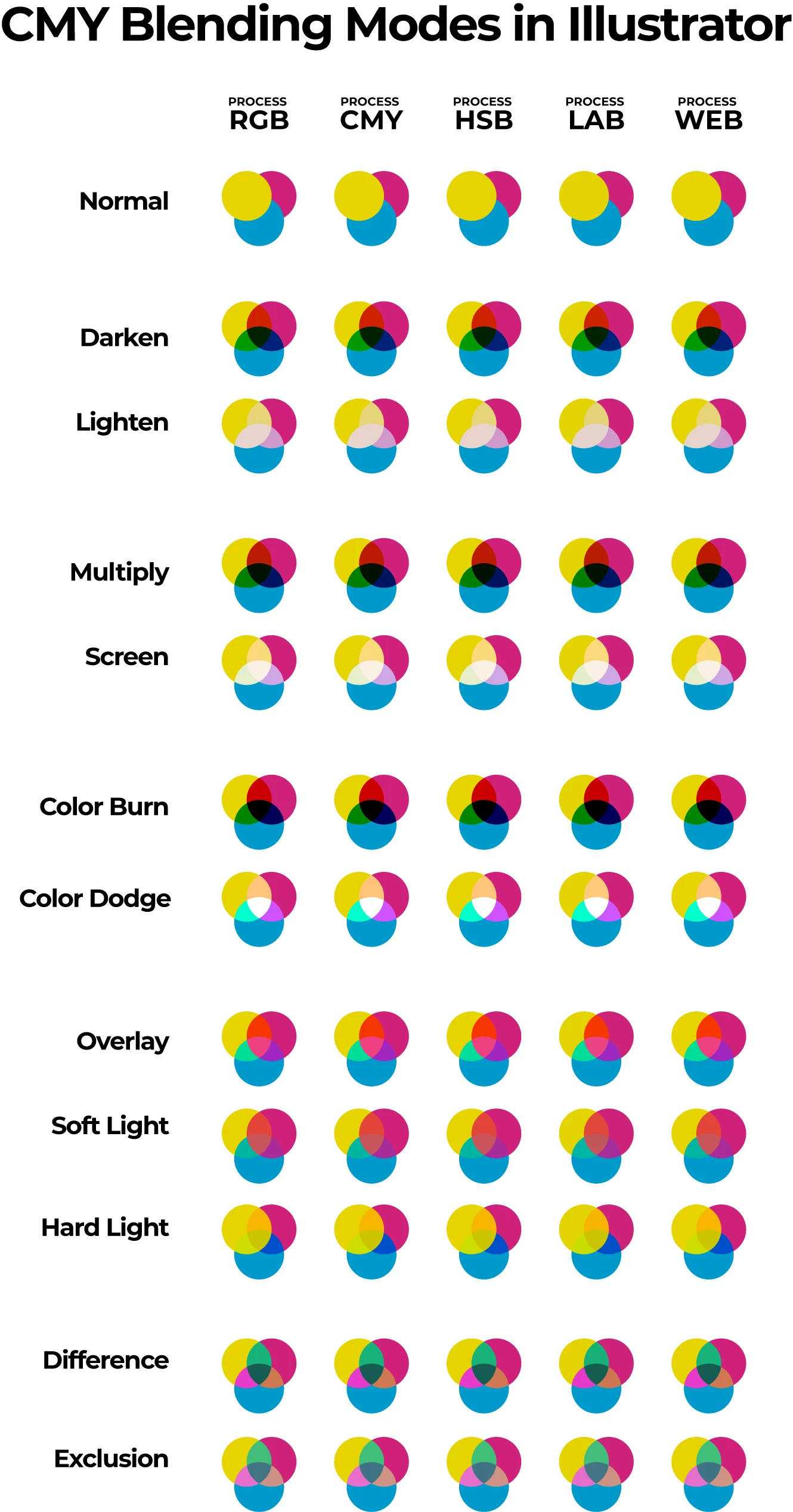
I spent a good hour or two writing out a detailed post about some confusion I have witessed regarding blending modes in Illustrator. I included a diagram that demonstrated the blend modes  did not care which definition you used to create your color, the results would be the same.. 

When I tried to submit the post, I got an authentication error and I just don't have it in me to write it all out again. Here is a JPG of my diagram demonstrating the same results for different blend modes in eery color space in Illustrator. 

I am hping that I did something wrong and that someone can figure it out. DM me for the original Illustrator file where you can select any circle on the page and view its color definition and blend mode.
 

3 replies

Ton Frederiks
Community Expert
Community Expert
April 28, 2025

Whatever you select in the Color panel, Grayscale, RGB, HSB, CMYK, Web Safe RGB, it is just a way to select a color.

That color will be automatically converted to the Document color mode, RGB or CMYK. The exception is a spot color which can have a Lab color definition independend of the document color mode.

Jason Burnett
Inspiring
April 28, 2025

Create a new document in CMYK mode.
Draw w square and fill it with #0065D7

Thius color is RGB format and OUT OF CMYK COLOR SPECTRUM.

Save the document and reopen the document.


If you are correct, the color value of that rectangle will be automatically converted to CMYK and the out of gamut data for that sqaure will be lost. In other words, your color panel CANNOT identify the color you applied because your color was OUT OF GAMUT and the claim is that the colors are being forced in CMYK Gamut. 

When you export the file or print the file, THEN A VALID CMYK COLOR PROFILE can be used to convert your colors to CMYK. Before then, the CMYK Document Color Mode does not destroy the extra data ffor out of Gamut colors because there is such a wild difference in CMYK Output profiles.


For example, you pick an output profile SWOP which is weak in the Red Orange gamut, for example. Your active document does not change your selected color to cut off the Red Orange colors. It keeps the out of gamut colors. Then, when you change to some other CMYK profile, it has MORE data to work with and can better match the intended output profile. This is the only way that it makes any sense.


So imagine you swapped back and forth between output profiles while working with your art. Eventually you could technically lose all the details in your work because you keep cutting off parts of your gamut that each different profile misses. That would produce the worst possible results.

So since Adobe HAS TO SHOW THE COLORS IN RGB ON YOUR SCREEN, why not just store the RGB data (that they have generally coallesced into the compatible CMYK subset of RGB) up until you are ready for export or print? It helps them, and it makes your prints better.


If you can show me where in Adobe's documentation they claim that using CMYK Color Mode forces adherence to CMYK Color Moel Gamut during the working process (not just during output), I will be convinced and it will be just another reason to avoid the CMYK Document Color mode. I have a list of at least  a dozen reasons to avoid it in the first place, more fodder for the list would be greatly appreciated.

Ton Frederiks
Community Expert
Community Expert
April 28, 2025

You are right, color is not very well documented in the help files.

In this help document

https://helpx.adobe.com/illustrator/using/selecting-colors.html

There is only mention of this:

Select colors using the Color panel

  1. Select the color mode you want to use from the panel menu. The mode you select affects only the display of the Color panel; it does not change the color mode of the document.

In an old CS6_PrintGuide.pdf

https://helpx.adobe.com/content/dam/help/en/indesign/pdf/CS6_PrintGuide.pdf

I found this note on page 82:

Note: In an RGB document, even if the color sliders are set to CMYK when choosing a color, an RGB color is created.

Monika Gause
Community Expert
Community Expert
April 23, 2025

Which color mode is the document?

The color mode you set up in the color panel does not matter. The color will always be in the document color mode.

Jason Burnett
Inspiring
April 28, 2025

I think you are mistaken here.

To test this, I create a new document in CMYK Document Color Mode. I draw a rectangle and fill it with an RGB color that is outside of the CMYK gamut. According to your logic, that should not be possible because the color will always be within the limited gamut of CMYK.

There would be no need for Gamut warnings in CMYK mode if Adobe limited your available colors to the CMYK gamut.

Doug A Roberts
Community Expert
Community Expert
April 28, 2025
quote

I create a new document in CMYK Document Color Mode. I draw a rectangle and fill it with an RGB color that is outside of the CMYK gamut. According to your logic, that should not be possible because the color will always be within the limited gamut of CMYK.


By @Jason Burnett


It is not possible. The RGB values are out of gamut, but the colour you created on the artboard isn't.

Jacob Bugge
Community Expert
Community Expert
April 23, 2025

Jason,


Can you state which blending modes are involved and roughly how in the confusion you have witnessed?


Based on similar posting error experience I try to remember to copy (the HTML/Source code of) important/long posts in a text editor before hitting the Post button, and sometimes I write the full post in the text editor and copy it to the Reply box..