
Participant
November 17, 2020
Answered

Help with perspective/warp on text

  • November 17, 2020
  • 2 replies
  • 1900 views

I am wondering if someone can help me learn how to acheive this: 

 

I need to recreate this for a logo. 


Am I just overlooking this and it's actually something so simple?   I have tried perspective and warp but it's just not turning out right. 


Thank you for your help!
 

This topic has been closed for replies.
Correct answer kphotopage

As Kurt mentioned, Text on a path and Options are your friend.


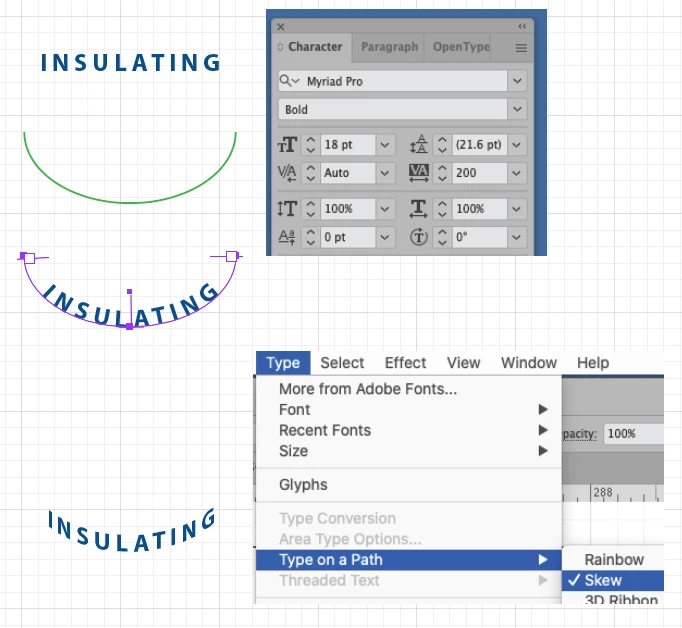
To help you out, here are a few steps I did for this example.


Set your area text, larger tracking. Paragraph, center align

Draw an ellipse. Only need half.

Create Text on Path

Finally Type>Type on Path>Skew.


K

2 replies

kphotopage
kphotopageCorrect answer
Legend
November 19, 2020

As Kurt mentioned, Text on a path and Options are your friend.


To help you out, here are a few steps I did for this example.


Set your area text, larger tracking. Paragraph, center align

Draw an ellipse. Only need half.

Create Text on Path

Finally Type>Type on Path>Skew.


K

kikilottAuthor
Participant
November 25, 2020

Thank you very much for your help, it worked! 

Kurt Gold
Community Expert
Community Expert
November 17, 2020

Which version of Illustrator are you using?


Have you already explored all the ways you can go with Type on a Path objects?


kikilottAuthor
Participant
November 17, 2020
Yes, I have done Type on the path but the angles and perspectives are still
off.
kikilottAuthor
Participant
November 18, 2020

Illustration 2020 is the version I am using.