
Participant
October 15, 2020
Answered

HELP WITH STROKE ON TEXT

  • October 15, 2020
  • 5 replies
  • 895 views

I have separated my text with the line segment tool and then pathfinder, divide. At that point the stroke now goes in the middle of the letter where the letter is divided, I was wondering how to eliminate just the part of the stroke that is in the letter but not the actual outline? I cannot figure this out for anything.
This topic has been closed for replies.
Correct answer pixxxelschubser

Why work destructively?


Maybe an alternative solution for you:
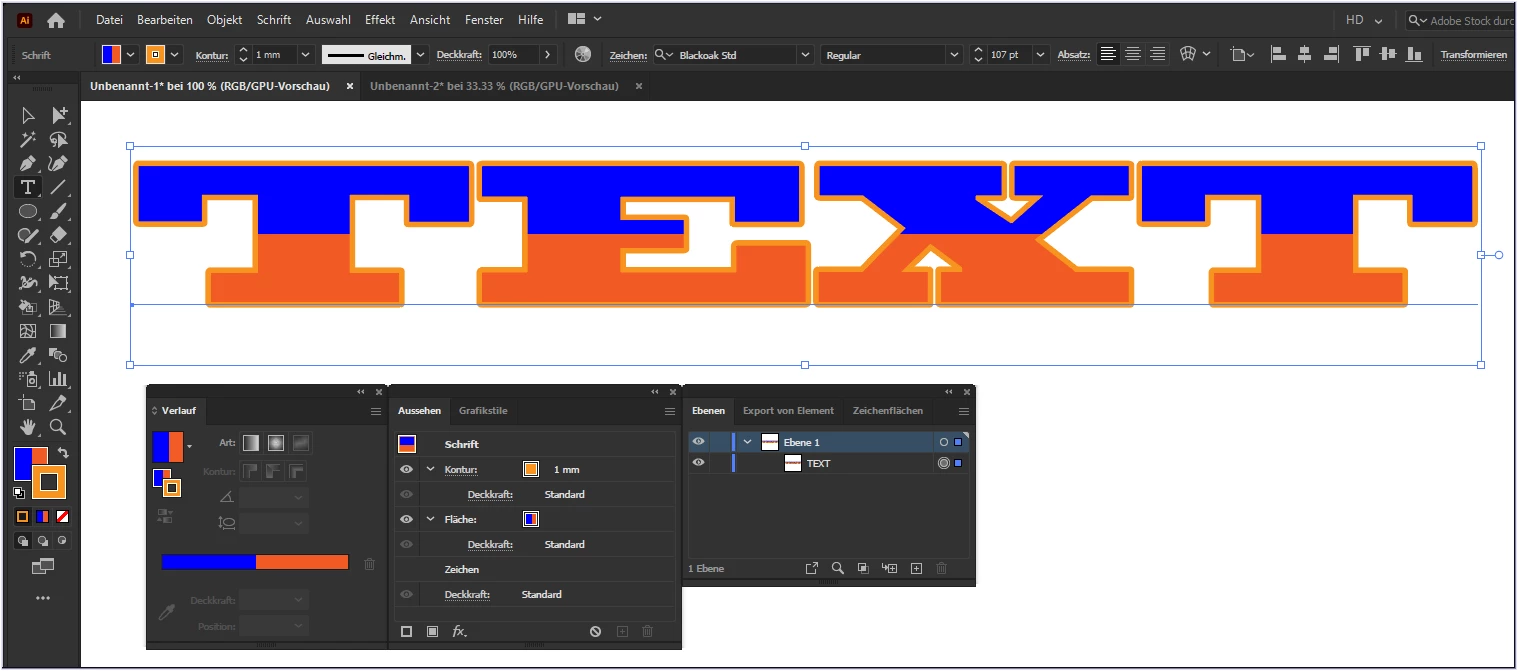
Use a "hard" gradient as the fill color for an additional fill area for your text. Create a normal stroke contour.

Non-destructive, flexible, editable

5 replies

pixxxelschubser
Community Expert
Community Expert
October 15, 2020

I know that you know that I know that you know …

😉

tromboniator
Community Expert
Community Expert
October 15, 2020


Jacob Bugge
Community Expert
Community Expert
October 16, 2020

Who is looking over your shoulder, Peter?


pixxxelschubser
Community Expert
pixxxelschubserCommunity ExpertCorrect answer
Community Expert
October 15, 2020

Why work destructively?


Maybe an alternative solution for you:
Use a "hard" gradient as the fill color for an additional fill area for your text. Create a normal stroke contour.

Non-destructive, flexible, editable

tromboniator
Community Expert
Community Expert
October 15, 2020

Your method is how I would do it; I just thought that if they had done the destruction already, use it.


Peter

tromboniator
Community Expert
Community Expert
October 15, 2020

Do not add the stroke directly to the lettering, or remove it if you have already done so. Select all the parts of the letters and group them, and keep selected. Open the Appearance panel (Window menu > Appearance).

Click at the top where it says Group:

Then click the lower left icon to add a stroke:

Click and drag the new stroke below the Contents level:

then select the color and adjust the stroke weight. Half of the stroke will be hidden behind the fill, so double whatever stroke you want to show:

Peter

Ton Frederiks
Community Expert
Community Expert
October 15, 2020

Can you show an example/sketch of what your problem is?

lambiloon
Community Expert
Community Expert
October 15, 2020

Hi this is due to divide you need to delete them by selecting it ..... regards

Ali Sajjad / Graphic Design Trainer / Freelancer / Adobe Certified Professional
P01NTAuthor
Participant
October 15, 2020

Im sorry I am not following? I need the divide because I want to color part of the lettering but not the entire lettering? That is why I had the divide. But I want to eliminate the stroke portion inside the lettering. Thank you so much for your help!