
Hex Codes not matching up? PNG vs. JPG? Exporting? Anything?
Hi everyone! For a bit of context, I'm new to graphic design and have no institutional background in it—therefore I do not know much about the technical side (document setup, exporting, etc.)
Anyways, I create graphics for a student organization at my college. Recently, someone pointed out that the colors I'm using have stopped matching from the original color palette. I thought this was strange as I always pull directly from the original Ai color palette file. But, I checked and sure enough, they aren't the same after exporting as a JPG. When I export as PNG and use a third-party hex code picker (or Photoshop) they are the correct hex codes, but when I bring the "correct" PNG into the actual design file the hex codes of the PNG become slightly off? I tried this on my roommate's illustrator and there was no issue at all. I've messed with Color Setting, Assign Profile, and even resetting my preferences through Bridge but still, nothing can correct this weird mistake of my colors being sometimes right and sometimes wrong.
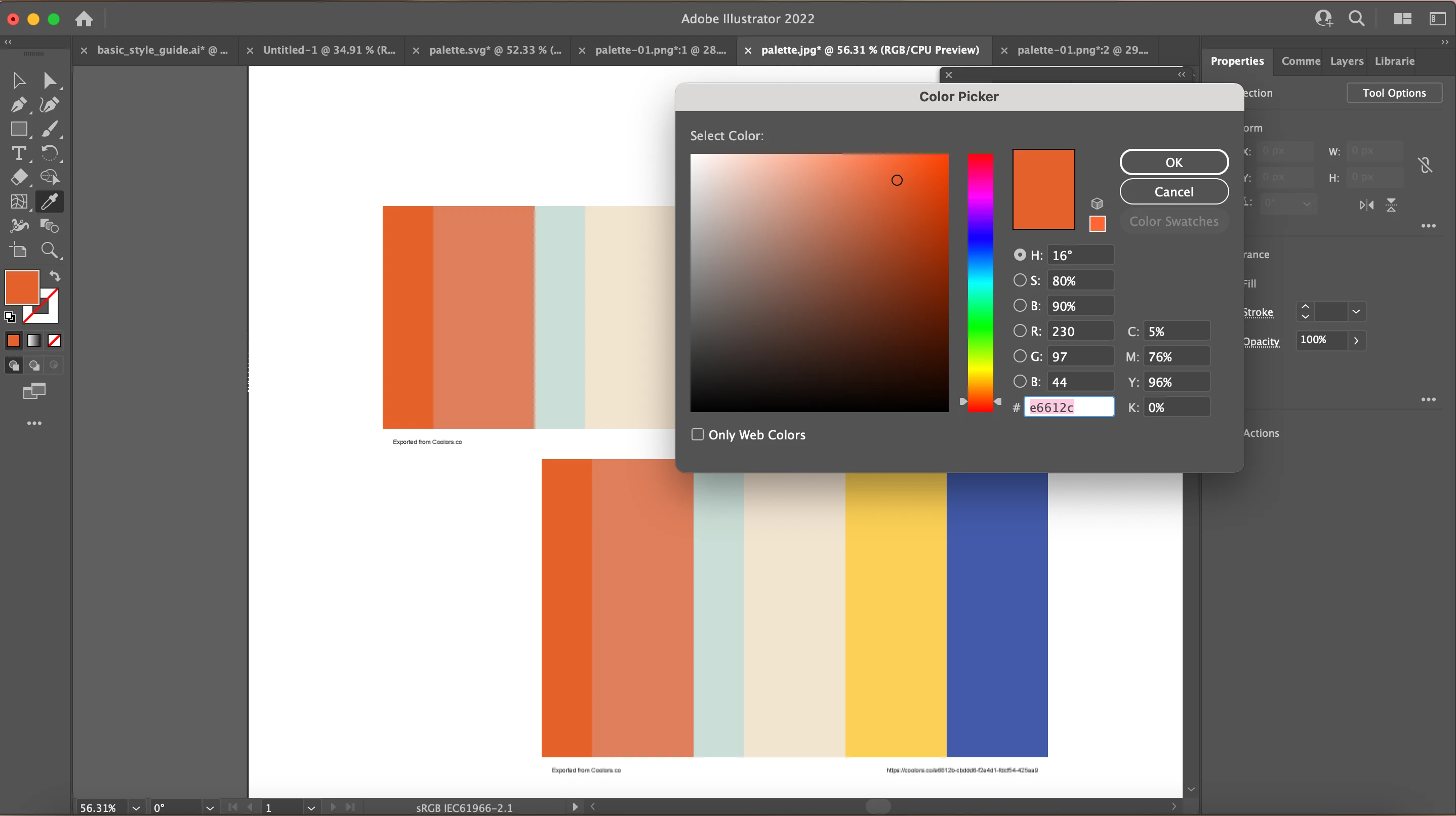
To describe the picture below. I saved the original/correct color palette as a PNG and JPG. I then opened them separately and both were correct, but as soon as I brought them together, one of them becomes slightly off. In this case, the JPG became E6612C instead of E6612B (I know this is a small change, but the student organization really wants me to figure it out).
 AdChoices