Exit
  • Global community
    • Language:
      • Deutsch
      • English
      • Español
      • Français
      • Português
  • 日本語コミュニティ
  • 한국 커뮤니티
0

Hexagon on iPad

Community Beginner ,
Apr 02, 2023 Apr 02, 2023

I noticed there's no hexagon shape in the polygon tool on the iPad.  There has to be a way to draw one.  Am I missing it somewhere?


Thank you

TOPICS
Draw and design
3.6K
Translate
Report
Community guidelines
Be kind and respectful, give credit to the original source of content, and search for duplicates before posting. Learn more
community guidelines
Adobe
Community Expert ,
Apr 02, 2023 Apr 02, 2023

Try the following:


"Double-tap or long press the Rectangle tool and then tap the Triangle tool. Drag on the canvas to draw a live triangle. To create a polygon, drag to change the number of sides using on-canvas controls."


https://helpx.adobe.com/illustrator/using/draw-edit-shapes-ipad.html

Translate
Report
Community guidelines
Be kind and respectful, give credit to the original source of content, and search for duplicates before posting. Learn more
community guidelines
Community Beginner ,
Apr 03, 2023 Apr 03, 2023

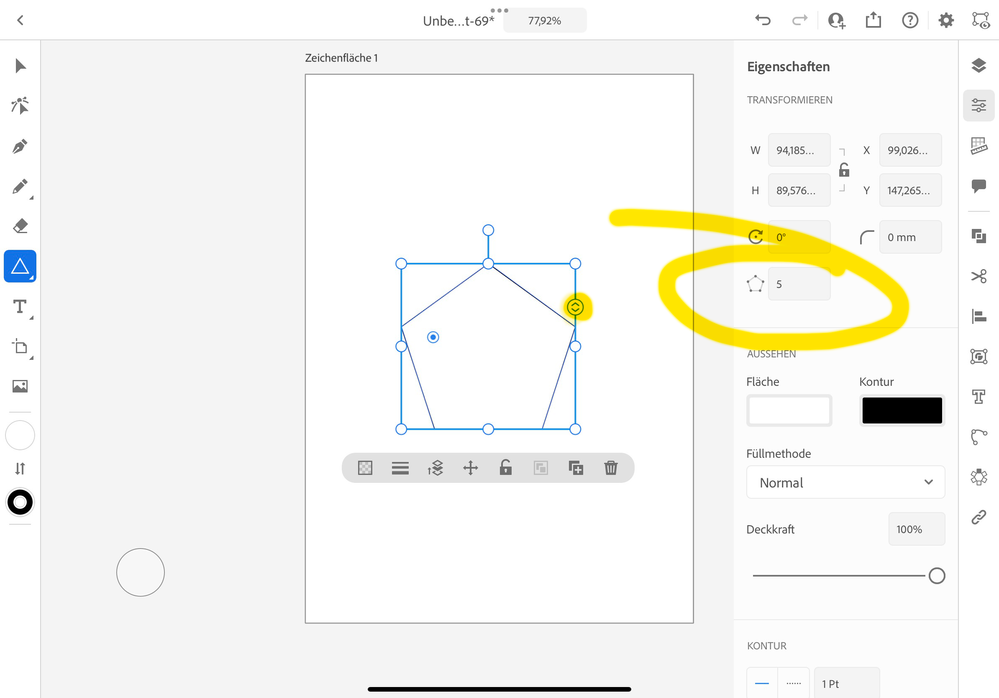
I saw that too.  I just can't seem to find anything on the controls that let me change the number of sides.  When I select the traingle, all I see is opacity, stroke width, stacking order, lock, group, copy and trash.  

Translate
Report
Community guidelines
Be kind and respectful, give credit to the original source of content, and search for duplicates before posting. Learn more
community guidelines
Community Expert ,
Apr 04, 2023 Apr 04, 2023

So you have neither of these? In that case you might look for an update of your Illustrator.


Bildschirmfoto 2023-04-04 um 2.46.04 PM.png

Translate
Report
Community guidelines
Be kind and respectful, give credit to the original source of content, and search for duplicates before posting. Learn more
community guidelines
Community Beginner ,
Apr 05, 2023 Apr 05, 2023

So I would love to tell you that I just needed to do the update but the truth is I'm just blind lol.  Thanks a bunch.  

Translate
Report
Community guidelines
Be kind and respectful, give credit to the original source of content, and search for duplicates before posting. Learn more
community guidelines
Community Expert ,
Apr 06, 2023 Apr 06, 2023

No problem. I know the feeling.

Thank you for the feedback.

Translate
Report
Community guidelines
Be kind and respectful, give credit to the original source of content, and search for duplicates before posting. Learn more
community guidelines
Community Beginner ,
Apr 06, 2023 Apr 06, 2023
LATEST

Np 😁

Translate
Report
Community guidelines
Be kind and respectful, give credit to the original source of content, and search for duplicates before posting. Learn more
community guidelines