


Participant
June 10, 2019
Question

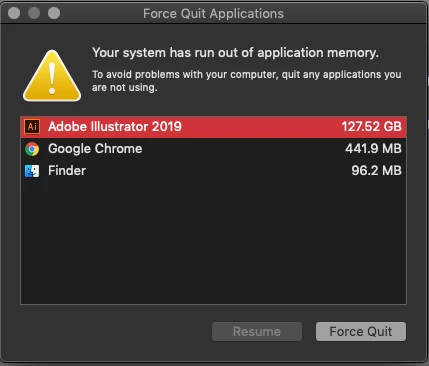
High Memory usage by Illustrator 2019 on MAC OS

  • June 10, 2019
  • 2 replies
  • 1161 views

Hello,

The attached error message has been popping up near the end of my work day more and more over the last two weeks. Since the solution in the support database is to stop running clipboard functions, and since I obviously am not, I am guessing this is being caused by something else.

I have the following system:

MacBook Pro (15-inch, 2017)

2.8 GHz Intel Core i7

16 GB 2133 MHz LPDDR3

Radeon Pro 560 4 GB

Intel HD Graphics 630 1536 MB

Running

Adobe Illustrator 23.0.4

What I have tried:

Restarting the computer (usually takes about 4 or 5 hours of work to trigger the error, then it just keeps coming back over and over again).

Uninstall/reinstall (Seems the same as restarting)

I know there are some files in the Users>Library that I can try to dump but if the unistaller wasn't able to handle them properly I don't know what manually trashing them would do.

This particular software crash has cost me some data and it is sucking up more time than I like.

Any assistance from the forum would be appreciated.
{Renamed by MOD}

    This topic has been closed for replies.

    2 replies

    Mike_Gondek10189183
    Community Expert
    Community Expert
    June 11, 2019

    Do you have any Illustrator plug ins installed. ESKO, Extensis, free trials? Any clipboard enhancers?

    Quit all Adobe apps.

    Try deleting the file in this folder

    /Users/YOURNAME/Library/Preferences

    com.adobe.mediabrowser.plist

    The folder is hidden but you can get there in the mac finder bu Go >> (Hold down Option) LIbrary

    Participant
    June 12, 2019

    I forgot to mention to mention that CADTools was installed. I uninstalled and reinstalled Illustrator (trashing the file you specified) and removed the CADTools installation and after 7 hours of work the error came back up.

    I have a feeling this is going to more involved than cleaning up after another of Adobe's messy upgrades. Seems they have another RAMM cache cleaning error to get out of this build before the error is going be resolved.

    Please let me know if you have any other thoughts but for now this is an open issue.

    Thanks,

    Brett

    Srishti Bali
    Community Manager
    Community Manager
    June 15, 2019

    Hi Brett,

    Thanks for reaching out. Sorry to hear about the high memory usage by Illustrator and quitting unexpectedly. Let us help you make this right. I would request if you can share a few more details like:

    • OS (Exact MAC OSX)
    • Where the files are saved (Network Drive/ System HDD/ Shared Folder on System /External HDD)?
    • Is the issue related to a specific document(s)/asset(s)? If yes, can you please share the document(s)/asset(s) with us? You can upload it to the creative cloud and share the download link.
    • Are there any recent changes made to your system? For example, any antivirus, system updates or web extensions installed recently.
    • Does resetting Illustrator Preferences (https://helpx.adobe.com/in/illustrator/using/setting-preferences.html) help resolve the issue? Please do take a backup of the same before trashing them and share it with us. You can zip the folders, upload them to the creative cloud and share the download link.
    • Share crash logs by following these steps: https://helpx.adobe.com/in/illustrator/kb/crash-next-steps.html
    • Share crash logs from Console:

    Go to Spotlight

    Search for Console.

    Go to User Reports and share the last report related to Illustrator.

    All this information will help us reproduce the issue and report to product teams if required.

    Also, I have sent you a DM, please check and reply accordingly.

    Regards,

    Srishti

    Monika Gause
    Community Expert
    Community Expert
    June 11, 2019

    Did you reset the preferences when uninstalling/reinstalling?

    If so, there is little we can advise you and you might get help quicker when contacting Customer Care: Contact Customer Care

    They can login to your system and check things out.