
Inspiring
July 12, 2022
Answered

Home Screen Local FIles

  • July 12, 2022
  • 1 reply
  • 800 views

Hey!


After some of the recent updates (this year) my home screen switched from Local to Cloud files only. I would prefer to see my Recent Local files instead on the home screen.


Any way there is an option to switch that?


Thanks in advance!
Correct answer Handarand

Thanks for elaborating on the issue. Kindly try opening the file from your computer and then navigate to the home screen to check if the file appears on the recent list.


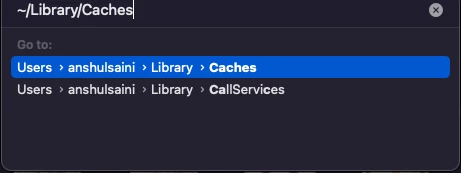
However, if the issue persists, try the following steps and let us know how it goes:


I will be looking forward to your response.


Regards,

Anshul saini


Anshul, thank you for taking the time.


My dumbass fixed it. On home screen I've had "Your files" chosen instead of "Home" all this time. 


The Ai was fine, I screwed up


Cheers

1 reply

Anshul_Saini
Community Manager
Community Manager
July 12, 2022

Hi @Handarand,


Sorry to hear about the trouble you are facing. It seems the app preferences have been reset as they were not imported during an update. Your local files will appear under recent on home screen ones once you start opening them.


Before updating, ensure you select "import previous settings an preferences," or you can toggle this setting in the CCD app preferences to avoid this.


Kindly update the discussion if you still need assistance with it. We'd be happy to help.


Thanks & Regards,

Anshul Saini


HandarandAuthor
Inspiring
July 12, 2022

Thank you for the response, Anshul


No, that's not my issue and I do have the option to import settings set ON in CC. I have my recent files showing up in home tab all well. But it's CLOUD files now and not LOCAL files - which is my issue. 

I want home screen to show me LOCAL recent files, as it was before one of the updates.

Anshul_Saini
Community Manager
Community Manager
July 15, 2022

Anshul, thank you for taking the time.


My dumbass fixed it. On home screen I've had "Your files" chosen instead of "Home" all this time. 


The Ai was fine, I screwed up


Cheers


Glad to hear you were able to resolve it. Thanks for sharing your resolution. It may help others.

Please feel free to reach out if you run into any other questions or issues in the future. We'd be happy to help.


Regards,

Anshul Saini