
dmilazzo
Participating Frequently
April 19, 2020
Answered

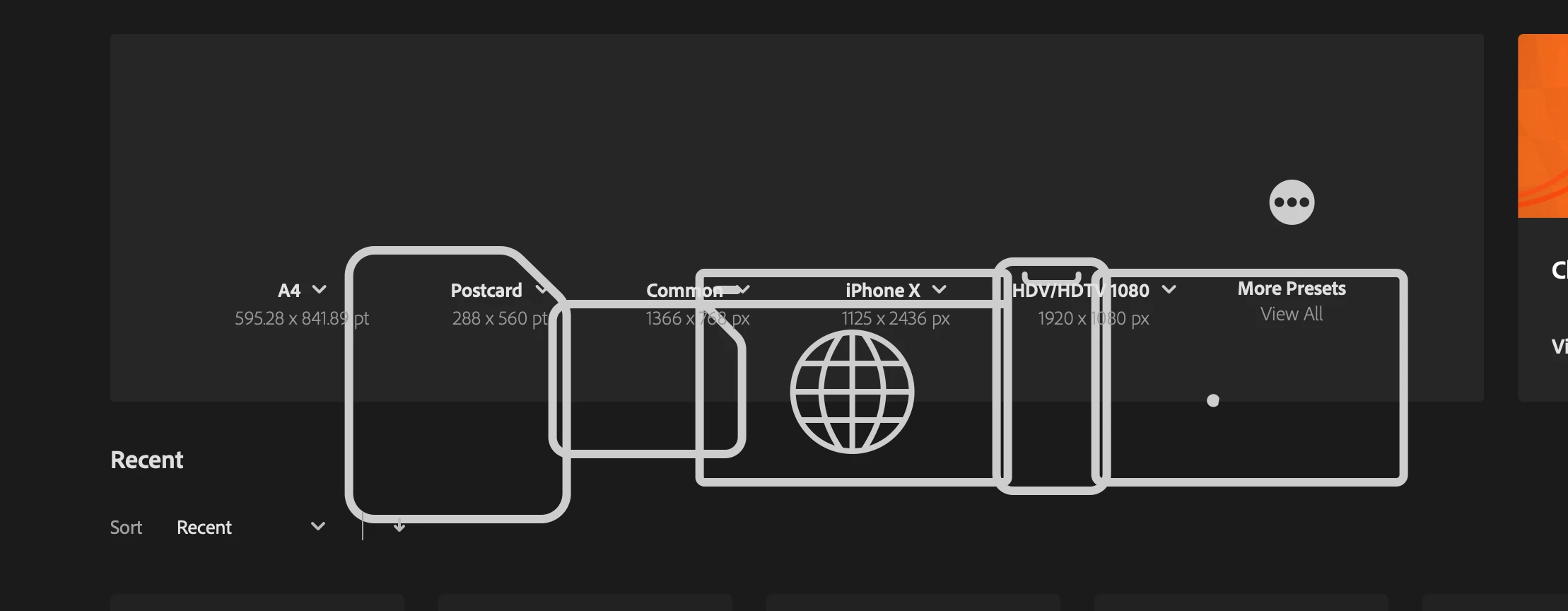
Home screen preset icons display issue in Illustrator CC2020 on macOS
  • April 19, 2020
  • 7 replies
  • 2326 views


Anoyne has the same issue? 


{Renamed by MOD}

This topic has been closed for replies.
Correct answer Ashutosh_Mishra

Hi All,


Sorry to hear about your experience. There are some other users who have reported similar issue with the latest update. This issue is being reviewed by product team. I'd request upvoting this issue on our UserVoice page: https://illustrator.uservoice.com/forums/601447-illustrator-bugs/suggestions/40153591-preset-icons-o...

I  would also request if you could try following these steps and share your observations:

1. Please make sure you have Creative Cloud desktop app updated to the latest version.
2. If that doesn't help, go to following location:
/library > application support > Adobe > UXP > extensions and rename extensions folder to extensions_old.

Let us know how it goes.


Regards,

Ashutosh

7 replies

BradOliver
Participating Frequently
May 11, 2020

Same issue here.  It's been like this for a few weeks.  I'll try fixes now.


Participant
May 8, 2020

I was having this same issue. I used the Illustrator Uninstal file that is located in the Applications Folder on Macs. Removed all notification, alerts, and the like through the Adobe CC app on my desktop. Waited for the uninstal to fully complete and then restarted my computer. Opened the Adobe CC desktop app and reinstalled Illustrator. Seems to have fixed the issue. 

dmilazzo
dmilazzoAuthor
Participating Frequently
April 22, 2020

I don't have extensions in UXP folder?

Srishti Bali
Community Manager
Community Manager
April 22, 2020

Hi Daniel,


I think you are looking for this folder in user Library. Please try these steps:

  • Open Finder and click Go in Finder menu.
  • Click Go to folder, type this path /Library/Application Support/Adobe/UXP and click Go.


Regards,

Srishti

dmilazzo
dmilazzoAuthor
Participating Frequently
April 22, 2020

THank you, I know how to get to the folder but UXP is empty. 

Ashutosh_Mishra
Ashutosh_MishraCorrect answer
Inspiring
April 21, 2020

Hi All,


Sorry to hear about your experience. There are some other users who have reported similar issue with the latest update. This issue is being reviewed by product team. I'd request upvoting this issue on our UserVoice page: https://illustrator.uservoice.com/forums/601447-illustrator-bugs/suggestions/40153591-preset-icons-o...

I  would also request if you could try following these steps and share your observations:

1. Please make sure you have Creative Cloud desktop app updated to the latest version.
2. If that doesn't help, go to following location:
/library > application support > Adobe > UXP > extensions and rename extensions folder to extensions_old.

Let us know how it goes.


Regards,

Ashutosh

Participant
April 21, 2020

Renaming the folder worked for me. Thank you! Will renaming the folder affect any functionality of the app?

Ashutosh_Mishra
Inspiring
April 21, 2020

Glad to hear it worked out. There will be no effect on the app functionality.
Feel free to reach out if there is any other concern, we'll be happy to help. Thanks!

juliearnold
Participant
April 21, 2020

I have the same issue. Started with the latest update. I tried resetting the Illustrator preferences but with no luck. I downgraded to 24.0.3 and it was fixed. 

Participant
April 21, 2020

After last update my Adobe Illustrator got very slow and is always opening like this (view image)

{Renamed by MOD}

Ashutosh_Mishra
Inspiring
April 21, 2020

Hi there,


Sorry to hear about your experience. There are some other users who have reported similar issue with the latest update. This issue is being reviewed by product team. I'd request upvoting this issue on our UserVoice page: https://illustrator.uservoice.com/forums/601447-illustrator-bugs/suggestions/40153591-preset-icons-o...

I  would also request if you could try following these steps and share your observations:

1. Please make sure you have Creative Cloud desktop app updated to the latest version.
2. If that doesn't help, go to following location:
/library > application support > Adobe > UXP > extensions and rename extensions folder to extensions_old.

Let us know how it goes.


Regards,

Ashutosh

Ashutosh_Mishra
Inspiring
April 20, 2020

Hi there,


Sorry to hear about your experience. Would you mind sharing the exact version of Illustrator and macOS?
Please try resetting the Illustrator preferences following the instructions below:

  • Close all Adobe applications. 
  • Go to locations 
  • ~/Library/Caches 
  • ~/Library/Application Support/Adobe 
  • ~/Library/Preferences 
  • Rename Adobe Illustrator, com.adobe.illustrator and Adobe Illustrator 24 Settings folders to  Adobe Illustrator.old, com.adobe.illustrator.old and Adobe Illustrator 24 Settings.old 
  • Launch Illustrator from the Creative Cloud.


**Please note that resetting preferences will remove all the custom settings and Illustrator will launch with default settings. This way all your old settings will be saved in .old folders and Illustrator will recreate new folders with default settings.


You may also try turning off GPU Preferences under Preferences > Performance and see if it makes any change.
Looking forward to your response.


Regards,

Ashutosh

dmilazzo
dmilazzoAuthor
Participating Frequently
April 20, 2020

Mac OS Catalina
v10.15.4

Macbook Pro 2019 16Gb Ram 

2.6 GHz 6-Core Intel Core i7


Illustrator v24.0.1


Mylenium
Legend
April 20, 2020

Without any system info we can't tell you much. This simply looks like a wrongly interpreted screen DPI setting causing AI to scale the icons.


Mylenium

dmilazzo
dmilazzoAuthor
Participating Frequently
April 20, 2020

Mac OS Catalina.

Legend
April 20, 2020

The apple icon top left of your system, shows detailed info, like detailed numerical versión of OSX.

Even more important is the machine and the display it uses. And it's display settings 0Preferences>Display).

You may try to reset preferences, it's harmful, by holding Cmd+Alt+Shift while opening the app.


Alyternatively, press Cmd+K to enter Preferences and check Use legacy "File New"interface to open a document and start working.

Later try again, unchecking that.

I guess you have changed to a too low resolution of your display.