Participant
June 10, 2021
Answered

Home screen preset icons display issue in Illustrator CC2020 on window 10
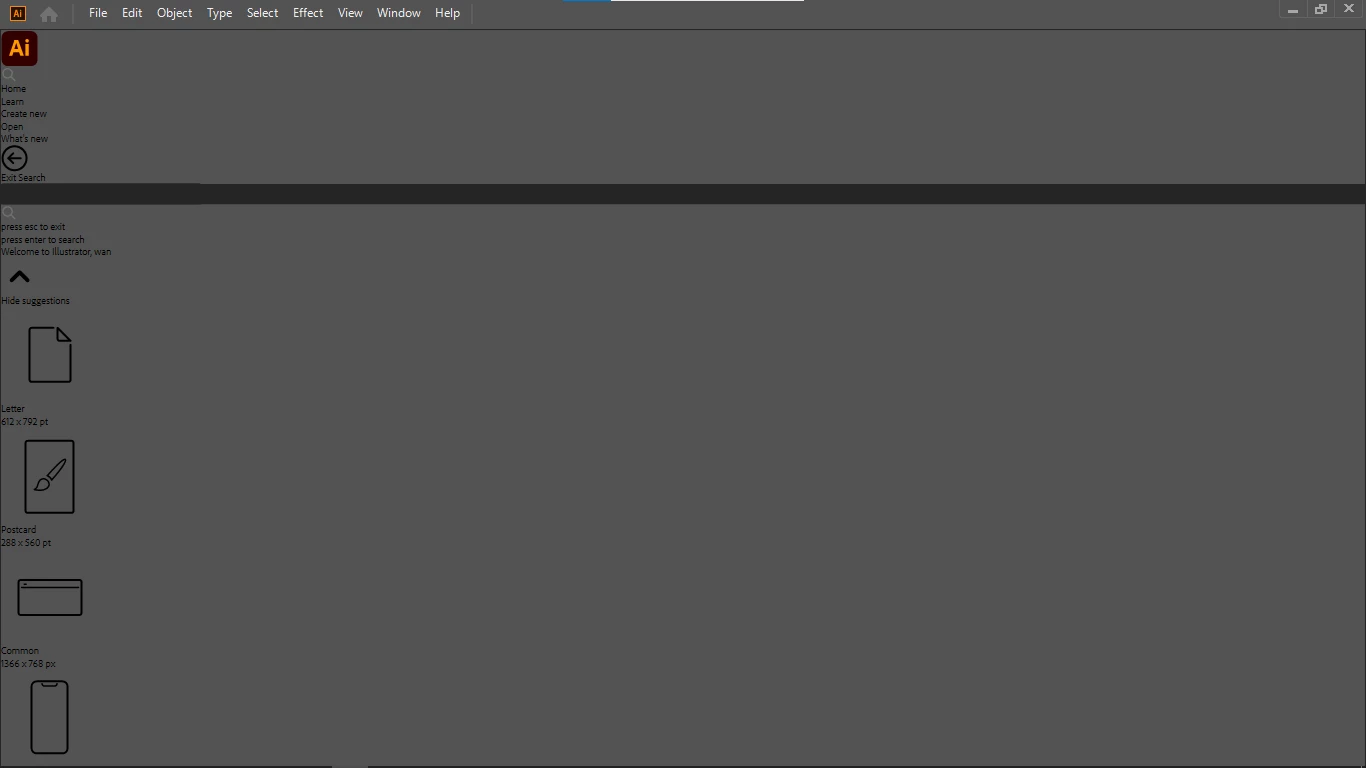
  • June 10, 2021
  • 10 replies
  • 7586 views

Anoyne has the same issue? 

This topic has been closed for replies.
Correct answer Srishti Bali

Please try updating the application to v24. 3 and let us know if that helps resolving this issue.

10 replies

Participant
November 14, 2021

Hi there, 


I'm having the same issue after not using for quite some time and updating to the newest version. Any known fix for this yet?

DNS-Graphics
Participating Frequently
November 15, 2021

I basically did an update and it finally fixed the issue. It's probably a way for Illustrator to force you to upgrade. That's just the nature of their business. Good luck! 


Participant
June 28, 2021

Yes


Participant
June 24, 2021

I am having this issue also. 


I cannot update past version 24.0 as it is the latest version supported by the ESKO system for printing. I have attempted to use a later version but the ESKO plugins had issues and I had to regress.

macOS Catalina 10.15.7

DNS-Graphics
Participating Frequently
June 24, 2021

Oh man I hate it when Illustrator outdates the plugins because of those stup!d upgrades.


The problem with the outdated plugins the should be a solution by going throught the tech support from ESKO.

I had to do the same sh!t for my vinyl cutter thorugh ROLAND, which sucks but what can you do.


Takes forever to get that situated. A headache. Sorry for your troubles.

Flatline
Participating Frequently
June 24, 2021

This is still happening to me on Version (24.0). I cannot update, as I find this version of the program the most stable. 

DNS-Graphics
Participating Frequently
June 24, 2021

Actually, Version (24.3) is what did the job for me. Upgrade to that.

Unfortunately, Illustrator is a pain in the a$$ where they FORCE you to upgrade.

But what can you do, this is the way of running a business. 


Monika Gause
Community Expert
Community Expert
June 24, 2021

Nobody forces you to upgrade.

Just turn automatic upgrades off in the Creative Cloud app. And also turn off deleting the old apps when updating. Keep them.

Participant
June 14, 2021

I attached an image of the illustrator homescreen I have at the moment. I can not seem to get it back to default. I have restarted illustrator and rebooted the PC as well but this screen still returns for the home page. Everything else otherwise works fine you can open and save files its just this screen looks a bit different than usual.

S_Gans
Community Expert
Community Expert
June 15, 2021

Please try to reset Illustrator preferences :https://helpx.adobe.com/illustrator/using/setting-preferences.html#:~:text=To%20restore%20preferences%20quickly%20using,next%20time%20you%20start%20Illustrator.

You WILL lose your list of recent files, but it should reset your home page back to normal.

Adobe Community Expert / Adobe Certified Instructor
Participant
June 12, 2021

Cuando entro a Illustrator la pantalla de inicio se ve como si estuviera desactualizada, pondré una imagen para que sepan a que me refiero...Espero que me puedan ayudar. Gracias

Srishti Bali
Legend
June 12, 2021

Hi there,


This has been reported by a few other users as well. They have confirmed that updating the application has helped resolving the issue. Please update the application to the latest version and let us know how it goes.


Regards,

Srishti

DNS-Graphics
Participating Frequently
June 11, 2021

I am currently having this issue. Still waiting for a soulution.

Srishti Bali
Srishti BaliCorrect answer
Legend
June 11, 2021

Please try updating the application to v24. 3 and let us know if that helps resolving this issue.

DNS-Graphics
Participating Frequently
June 11, 2021

Yes thanks, the update to v24.3 solved my issue.


Although this solved my problem I would have rather not mess around with updating illustrator becuase doing so outdates the software and plugins that are connected to it.

For example, I have a vinyl cutter connected which I launch through Illustrator. Also I have a screen ripping software to output films for screen printing.


Whenever there are certain updates for either MacOS or Illustrator, I get the issue that Illustrator does not recognize the software that I use every day.

If there coud have been a better solution rather than updating constantly illustrator I would prefer that.

And I am still curious to know, based on the information I provided. What could have cause that issue in the first place so it wont happen again in the future?


Please advise. Thanks!

Srishti Bali
Legend
June 11, 2021

Hi all,


We are extremely sorry to hear about this trouble. Our team is currently investigating this and need a few more details to find the root cause of this issue:

  • Please confirm the exact version of Illustrator (25.2.3 or 24.3). You can find version under Help menu (Helpx > About Illustrator). 
  • Share logs by Log Collector tool ( https://helpx.adobe.com/creative-cloud/kb/cc-log-collector.html ).
  • System info
    Please press Windows Key + the letter "R" on your keyboard to bring up the to open the Run command window
    Type "msinfo32" in the Open field and left-click OK
    While viewing the Microsoft System Information summary, go to File then choose Save
    Save this file to Creative Cloud folder of your system.
    Go to https://assets.adobe.com/files and share the download link.


After sharing all these details, please update application to 25.3 or 24.3 and let us know if that resolves the issue.  


We're here to help, just need more info.


Regards,

Srishti


DNS-Graphics
Participating Frequently
June 11, 2021

Hello my version Illustrator is 24.0.1


Here is my log: File: AdobeLogs_20210611_090805_727-mac.zip


Thank you!


Ashutosh_Mishra
Inspiring
June 11, 2021

Hi there,


Sorry to hear about your experience. Would you mind sharing the version of the Adobe Illustrator? Have you tried restarting your computer?

I'd request you to update your app to the latest version(v25) & see if it helps. Additionally, you may try resetting preferences of the app & let us know how it goes.


Regards,

Ashutosh

wan5C70Author
Participant
June 11, 2021

TQ SO MUCH..it working...

Ashutosh_Mishra
Inspiring
June 11, 2021

Thank you for letting us know @wan5C70. Did updating the app help, or resetting the preferences? This information will help other users having similar issues. Thanks!

DNS-Graphics
Participating Frequently
June 10, 2021

I have no idea what is going on with our Illustrator 2020 home screen. As you can see in my attached image everything is grayes out and icons are not there. Also notice the camera icon has blown up in size not even fitting in the home screen. And the menu has tucked into the left side of the home screen.


Any thought's what this may be or if there was an option that caused this to happen?


I've restarted my Mac and same results. My current illustrator version is 24.0.1

Thank you!

(see image below)

Ashutosh_Mishra
Inspiring
June 11, 2021

Hi there,


Sorry to hear about your experience. Would you mind sharing the version of the macOS? Have you tried restarting your computer? I'd request you to update your app to the latest version(v2021) & see if it helps.

Additionally, you may try resetting preferences of the app & let us know how it goes.


Regards,

Ashutosh

DNS-Graphics
Participating Frequently
June 11, 2021

Thank you. My macOS version is 10.15.6 (19G2021)
