dandeyong
Participant
September 23, 2021
Answered

how can i change my colour to the negative version of itself

  • September 23, 2021
  • 1 reply
  • 400 views

Hi 


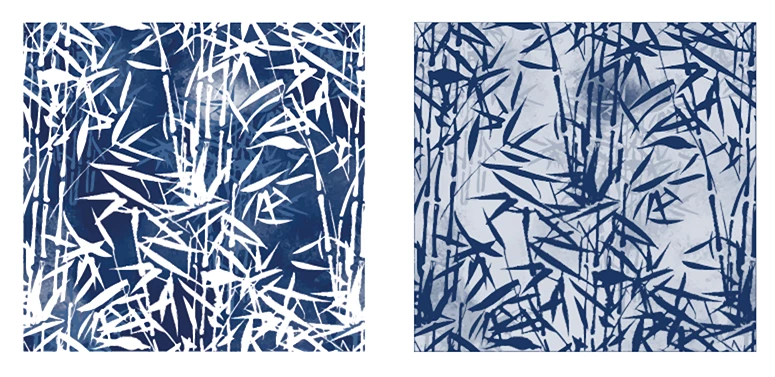
I know how to recolour my artwork and can change quickly. However I am know being asked to reverse the colour combination, where white becomes dark blue and dark blue becomes a very light blue etc


this piece or art has many many colours, so its not a case of selecting the same and just changing as it will take hours and i want the right colour reverse.

is there a way of doing this like the recolour artwork system? quick and easy have added the .ai also if that helps

been stuck for ages


many thanks


This topic has been closed for replies.
Correct answer Ton Frederiks

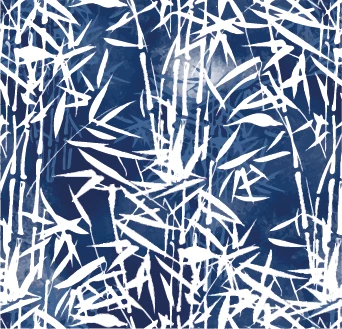
I was thinking about Jacob's method (but would have forgotten the addition of a white object).

Should look like this:

1 reply

Jacob Bugge
Community Expert
Community Expert
September 23, 2021

dandeyong,


Maybe far too far out, but you can (always set (a copy of) the original artwork aside before you destroying things):


1) Create a rectangle/square/other path (for other shape of artwork) exactly covering the whole artwork, behind the artwork, then give it the darkest blue colour;

2) Copy the path from 1) in front of itself (so it is between the bottom single colour path and the artwork), then turn the copy path white;

3) Select the entire artwork and Group it if not already, then convert it to grayscale (therefore keep/save a copy of the original);

4) Select the grayscale artwork and the white middle path and in the Transparency palette use Make (Opacity) Mask with Invert Mask ticked.


Below is a crude sample based on an RGB Blue on a grey background, original first; you can see how the white to the right becomes the full blue, and the full blue to the left becomes a very light blue, the lightness depending on the darkness of the full blue/its grayscale equivalent.


Click Here to see in Chrome 


Ton Frederiks
Community Expert
Ton FrederiksCommunity ExpertCorrect answer
Community Expert
September 23, 2021

I was thinking about Jacob's method (but would have forgotten the addition of a white object).

Should look like this: