Inspiring
January 17, 2023
Answered

How can I do CompoundPaths with logic?

  • January 17, 2023
  • 2 replies
  • 838 views


// Get the active document
var doc = app.activeDocument;

// Get the selected items
var selection = doc.selection;

// Create a new CompoundPath
var compoundPath = doc.compoundPathItems.add();

// Loop through the selected items
for (var i = 0; i < selection.length; i++) {
    var item = selection[i];
    // Move the selected item into the CompoundPath
    item.moveToBeginning(compoundPath);
}


So I have this base code that will create Compound Paths.  Is there a way to
1. Calculate the areas of the Overlapping Vectors Only
2. Store those calculations in an array (in order of largest to smallest)
3. Identify which two numbers in the array have the largest gap
4. Then only have it only apply a CompoundPath to those areas that are Greater than the smaller of the two numbers identified in the array? 

My goal is to be able to CompoundPath the "Plugs" of the "R" and the "A" and not the overlapping serifs.


This topic has been closed for replies.
Correct answer jduncan

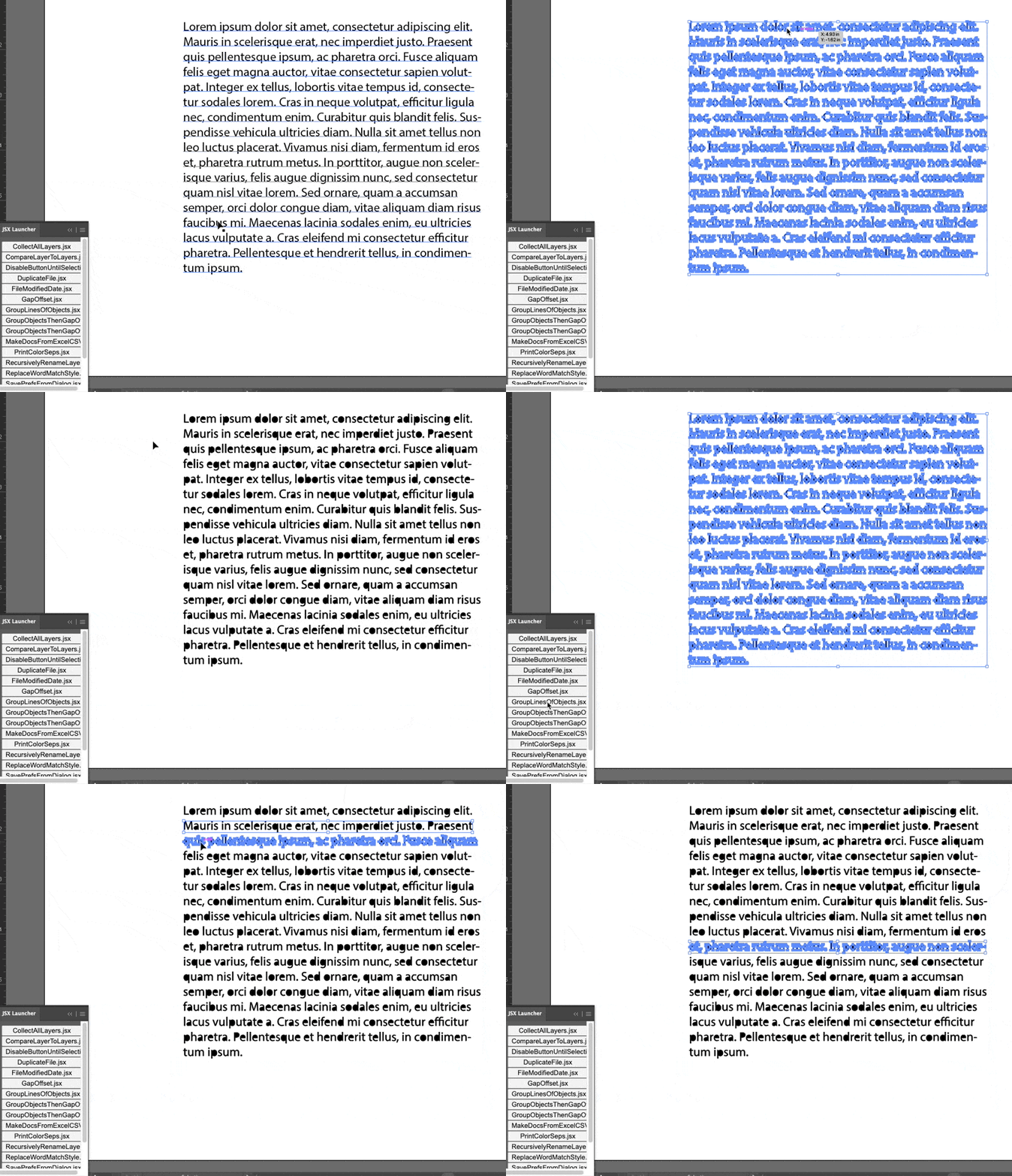
Previously I wrote a script for @BryanPagenkopf that groups characters by line, so if we combine that with the script above by @m1b, you can run the reCompound script on multiple lines at a time.


Here's the grouping script in action...
// GroupLinesOfObjects.jsx

// Take a selection of objects that are separated by a unknown vertical gap
// and group the shapes that are in the same "line" together

var doc = app.activeDocument;
groups = groupObjectsByLine(doc.selection);
if (groups) {
  alert("Groups Created:\n" + groups.length);
}

/**
 * Take an array of Adobe Illustrator pageItems and group them by vertical separation.
 * @param   {Array} sel Adobe Illustrator pageItems
 * @returns {Array}     Array of Adobe Illustrator groupItems
 */
function groupObjectsByLine(sel) {
  var groups = [];
  // sort the selected page items by their height (tallest to shortest)
  sel.sort(function (a, b) {
    var aHeight = a.geometricBounds[3] - a.geometricBounds[1];
    var bHeight = b.geometricBounds[3] - b.geometricBounds[1];
    return bHeight - aHeight;
  });
  // check if each page item shares bounds with others
  var item, placed;
  while (sel.length > 0) {
    item = sel.pop();
    placed = false;
    for (var i = 0; i < groups.length; i++) {
      group = groups[i];
      // check if item bounds overlaps a groups bounds
      if (
        item.geometricBounds[3] <= group.geometricBounds[1] &&
        item.geometricBounds[1] >= group.geometricBounds[3]
      ) {
        item.move(group, ElementPlacement.PLACEATEND);
        placed = true;
      }
    }
    // if an item didn't fit into any current groups make a new group
    if (!placed) {
      g = app.activeDocument.groupItems.add();
      groups.push(g);
      item.move(g, ElementPlacement.PLACEATEND);
    }
  }
  return groups;
}


After combining the scripts here are the results...
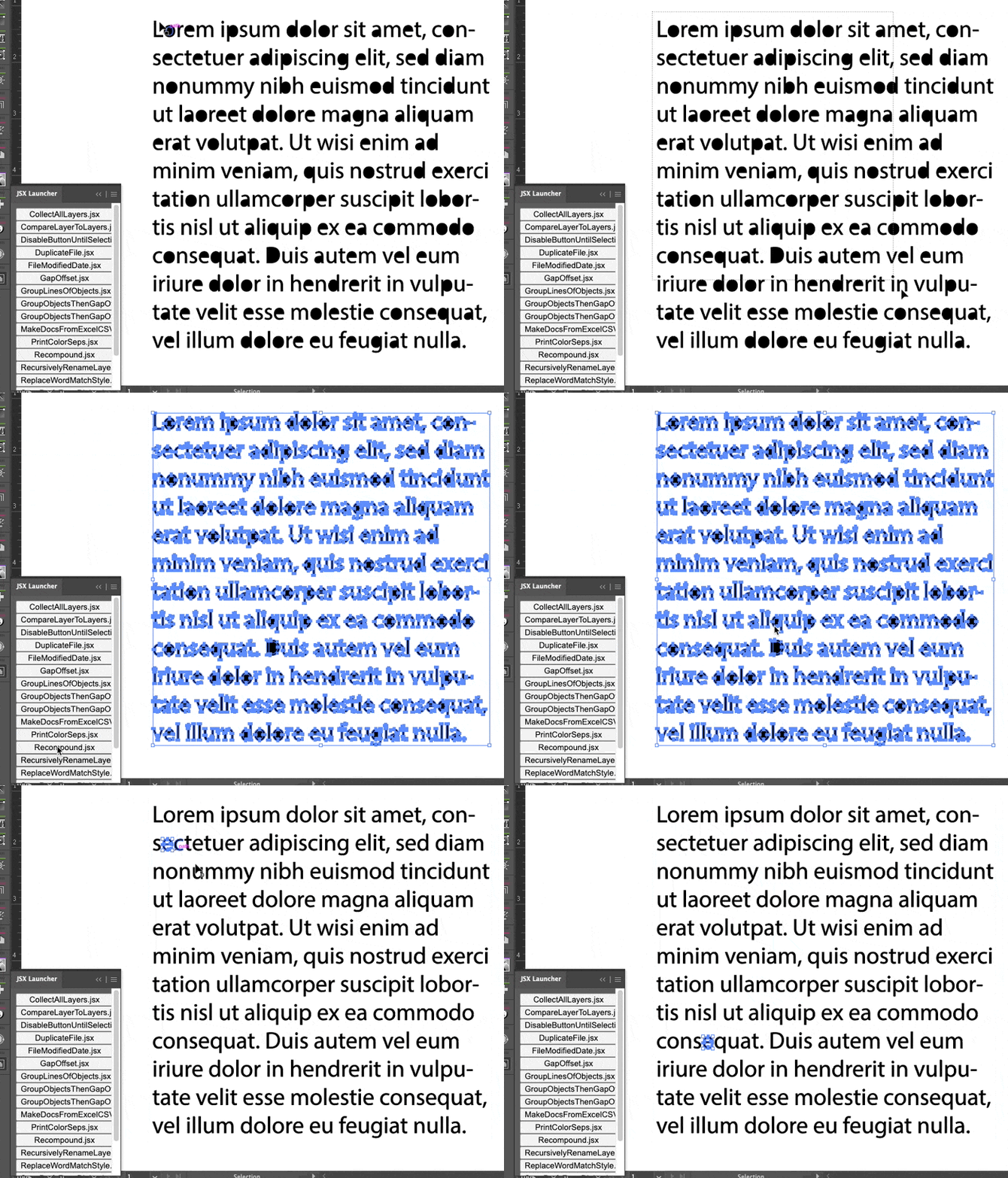
 

And here's the full script with my addition. Basically, I first group all of the lines of items, then group by group, I run @m1b's reCompound script on the group pathItems.


/**
 * Script to turn outlined, uncompounded text back
 * into normal compoundPathItems.
 * @author m1b
 * @discussion https://community.adobe.com/t5/illustrator-discussions/how-can-i-do-compoundpaths-with-logic/m-p/13498584
 * Script isn't smart, and uses the following algorithm:
 * 1. compute a top and bottom boundary for the whole line.
 * 2. collect items whose bounds fall inside the top and bottom, and
 *    also inside the left and right of each item (plus tolerance value)
 * 3. choose the collection with the most elements, discarding others
 * 4. combine these elements into a new CompoundPathItem.
 */
(function () {
  var doc = app.activeDocument;

  if (doc.selection.length == 0) {
    alert("Please select rows of text outlines and try again.");
    return;
  }

  // group all of the characters by line
  var groups = groupObjectsByLine(doc.selection);
  var group;
  // iterate over each grouped line and reCompound the groups items
  for (var i = 0; i < groups.length; i++) {
    var lineItems = [];
    group = groups[i];
    var item;
    while (group.pageItems.length > 0) {
      item = group.pageItems[0];
      item.move(group.layer, ElementPlacement.PLACEATEND);
      lineItems.push(item);
    }
    reCompoundLineOfTextOutlines(doc, lineItems);
  }

  /**
   * Take an array of Adobe Illustrator pageItems and group them by vertical separation.
   * @param   {Array} sel Adobe Illustrator pageItems
   * @returns {Array}     Array of Adobe Illustrator groupItems
   */
  function groupObjectsByLine(sel) {
    var groups = [];
    // sort the selected page items by their height (tallest to shortest)
    sel.sort(function (a, b) {
      var aHeight = a.geometricBounds[3] - a.geometricBounds[1];
      var bHeight = b.geometricBounds[3] - b.geometricBounds[1];
      return bHeight - aHeight;
    });
    // check if each page item shares bounds with others
    var item, placed;
    while (sel.length > 0) {
      item = sel.pop();
      placed = false;
      for (var i = 0; i < groups.length; i++) {
        group = groups[i];
        // check if item bounds overlaps a groups bounds
        if (
          item.geometricBounds[3] <= group.geometricBounds[1] &&
          item.geometricBounds[1] >= group.geometricBounds[3]
        ) {
          item.move(group, ElementPlacement.PLACEATEND);
          placed = true;
        }
      }
      // if an item didn't fit into any current groups make a new group
      if (!placed) {
        g = app.activeDocument.groupItems.add();
        groups.push(g);
        item.move(g, ElementPlacement.PLACEATEND);
      }
    }
    return groups;
  }

  /**
   * Attempts to "ReCompound" a line
   * of outlined, uncompounded path items.
   * @author m1b
   * @version 2023-01-18
   * @param {Document} doc - an Illustrator Document.
   * @param {Array<PathItems>} pathItems - an array or collection of pathItems.
   * @param {Number} [tolerance] - the amount that the algorithm will expand each bounding box horizontally (default: height / 20)
   * @returns {Array<CompoundPathItem>}
   */
  function reCompoundLineOfTextOutlines(doc, pathItems, tolerance) {
    var items = [],
      compounds = {},
      masters = {},
      finalCompoundPathItems = [],
      top = Infinity,
      bottom = -Infinity;

    for (var i = 0; i < pathItems.length; i++)
      if (pathItems[i].typename == "PathItem") {
        var item = pathItems[i],
          b = item.geometricBounds;
        items.push(item);
        if (top > -b[1]) top = -b[1];
        if (bottom < -b[3]) bottom = -b[3];
      }

    if (tolerance == undefined) tolerance = (bottom - top) / 20;

    masterLoop1: for (var i = items.length - 1; i >= 0; i--) {
      var master = items[i],
        mb = [
          master.geometricBounds[0] - tolerance,
          -top,
          master.geometricBounds[2] + tolerance,
          -bottom,
        ];

      testingLoop: for (var j = items.length - 1; j >= 0; j--) {
        var item = items[j];

        if (
          master.uuid === item.uuid ||
          !boundsAreInsideBounds(item.geometricBounds, mb)
        )
          continue testingLoop;

        if (compounds[master.uuid] == undefined) compounds[master.uuid] = [];

        if (masters[item.uuid] == undefined) masters[item.uuid] = [];

        compounds[master.uuid].push(item);
        masters[item.uuid].push(master);
      }

      if (compounds[master.uuid] != undefined) compounds[master.uuid].push(master);
    }

    masterLoop2: for (var key in compounds) {
      if (!compounds.hasOwnProperty(key) || compounds[key].length == 0) continue;

      var items = compounds[key];

      // check to see if any of these items appear as master
      // objects having more items themselves, for example,
      // an item might fit into another item, but that item
      // may, in turn fit into another, and so on. We only
      // want the one with the most items inside it.
      for (var i = items.length - 1; i >= 0; i--) {
        var item = items[i],
          itemCount = 0;

        if (masters[item.uuid] != undefined)
          checkMastersLoop: for (var j = masters[item.uuid].length - 1; j >= 0; j--) {
            var masterUUID = masters[item.uuid][j].uuid;

            if (masterUUID == key) continue checkMastersLoop;

            if (itemCount < compounds[masterUUID].length)
              itemCount = compounds[masterUUID].length;
          }

        if (itemCount > items.length)
          // this isn't the best grouping to compound
          continue masterLoop2;
      }

      // create the CompoundPathItem
      var newCompoundPathItem = doc.activeLayer.compoundPathItems.add();
      finalCompoundPathItems.push(newCompoundPathItem);

      // move the path items into it
      for (var i = items.length - 1; i >= 0; i--)
        items[i].move(newCompoundPathItem, ElementPlacement.PLACEATBEGINNING);
    }

    return finalCompoundPathItems;
  }

  /**
   * Returns true if `bounds`
   * are inside `containerBounds`.
   * @param {Array<Number>} bounds - [L, T, R, B]
   * @param {Array<Number>} containerBounds - [L, T, R, B]
   * @returns {Boolean}
   */
  function boundsAreInsideBounds(bounds, containerBounds) {
    return (
      bounds[0] >= containerBounds[0] &&
      bounds[1] <= containerBounds[1] &&
      bounds[2] <= containerBounds[2] &&
      bounds[3] >= containerBounds[3]
    );
  }
})();


2 replies

m1b
Community Expert
Community Expert
January 18, 2023

Hi @BryanPagenkopf, I've written a script that attempts to solve this problem, at least for one line at a time. Select *one* line of outlined text and run script. The function takes a tolerance value that you may need to tweak in some cases (by default I've set it to one-twentieth of the bounds height which worked okay in my limited testing). Let me know how you go.

- Mark


/**
 * Script to turn outlined, uncompounded text back
 * into normal compoundPathItems.
 * @author m1b
 * @discussion https://community.adobe.com/t5/illustrator-discussions/how-can-i-do-compoundpaths-with-logic/m-p/13498584
 * Script isn't smart, and uses the following algorithm:
 * 1. compute a top and bottom boundary for the whole line.
 * 2. collect items whose bounds fall inside the top and bottom, and
 *    also inside the left and right of each item (plus tolerance value)
 * 3. choose the collection with the most elements, discarding others
 * 4. combine these elements into a new CompoundPathItem.
 */
(function () {

    var doc = app.activeDocument;

    if (doc.selection.length == 0) {
        alert('Please select a row of text outlines and try again.');
        return;
    }

    var items = reCompoundLineOfTextOutlines(doc, doc.selection);
    
    alert('Made ' + items.length + ' CompoundPathItems.');


    /**
     * Attempts to "ReCompound" a line
     * of outlined, uncompounded path items.
     * @author m1b
     * @version 2023-01-18
     * @param {Document} doc - an Illustrator Document.
     * @param {Array<PathItems>} pathItems - an array or collection of pathItems.
     * @param {Number} [tolerance] - the amount that the algorithm will expand each bounding box horizontally (default: height / 20)
     * @returns {Array<CompoundPathItem>}
     */
    function reCompoundLineOfTextOutlines(doc, pathItems, tolerance) {

        var items = [],
            compounds = {},
            masters = {},
            finalCompoundPathItems = [],
            top = Infinity,
            bottom = -Infinity;

        for (var i = 0; i < doc.selection.length; i++)
            if (doc.selection[i].typename == 'PathItem') {
                var item = doc.selection[i],
                    b = item.geometricBounds;
                items.push(item);
                if (top > -b[1])
                    top = -b[1];
                if (bottom < -b[3])
                    bottom = -b[3];

            }

        if (tolerance == undefined)
            tolerance = (bottom - top) / 20;

        masterLoop1:
        for (var i = items.length - 1; i >= 0; i--) {

            var master = items[i],
                mb = [master.geometricBounds[0] - tolerance, -top, master.geometricBounds[2] + tolerance, -bottom];

            testingLoop:
            for (var j = items.length - 1; j >= 0; j--) {

                var item = items[j];

                if (
                    master.uuid === item.uuid
                    || !boundsAreInsideBounds(item.geometricBounds, mb)
                )
                    continue testingLoop;

                if (compounds[master.uuid] == undefined)
                    compounds[master.uuid] = [];

                if (masters[item.uuid] == undefined)
                    masters[item.uuid] = [];

                compounds[master.uuid].push(item);
                masters[item.uuid].push(master);

            }

            if (compounds[master.uuid] != undefined)
                compounds[master.uuid].push(master);

        }

        masterLoop2:
        for (var key in compounds) {

            if (
                !compounds.hasOwnProperty(key)
                || compounds[key].length == 0
            )
                continue;

            var items = compounds[key];

            // check to see if any of these items appear as master
            // objects having more items themselves, for example,
            // an item might fit into another item, but that item
            // may, in turn fit into another, and so on. We only
            // want the one with the most items inside it.
            for (var i = items.length - 1; i >= 0; i--) {

                var item = items[i],
                    itemCount = 0;

                if (masters[item.uuid] != undefined)

                    checkMastersLoop:
                    for (var j = masters[item.uuid].length - 1; j >= 0; j--) {

                        var masterUUID = masters[item.uuid][j].uuid;

                        if (masterUUID == key)
                            continue checkMastersLoop;

                        if (itemCount < compounds[masterUUID].length)
                            itemCount = compounds[masterUUID].length;

                    }

                if (itemCount > items.length)
                    // this isn't the best grouping to compound
                    continue masterLoop2;

            }

            // create the CompoundPathItem
            var newCompoundPathItem = doc.activeLayer.compoundPathItems.add();
            finalCompoundPathItems.push(newCompoundPathItem);

            // move the path items into it
            for (var i = items.length - 1; i >= 0; i--)
                items[i].move(newCompoundPathItem, ElementPlacement.PLACEATBEGINNING);


        }

        return finalCompoundPathItems;

    };


    /**
     * Returns true if `bounds`
     * are inside `containerBounds`.
     * @param {Array<Number>} bounds - [L, T, R, B]
     * @param {Array<Number>} containerBounds - [L, T, R, B]
     * @returns {Boolean}
     */
    function boundsAreInsideBounds(bounds, containerBounds) {

        return (
            bounds[0] >= containerBounds[0]
            && bounds[1] <= containerBounds[1]
            && bounds[2] <= containerBounds[2]
            && bounds[3] >= containerBounds[3]
        );

    };

})();


jduncan
Community Expert
jduncanCommunity ExpertCorrect answer
Community Expert
January 18, 2023

Previously I wrote a script for @BryanPagenkopf that groups characters by line, so if we combine that with the script above by @m1b, you can run the reCompound script on multiple lines at a time.


Here's the grouping script in action...

// GroupLinesOfObjects.jsx

// Take a selection of objects that are separated by a unknown vertical gap
// and group the shapes that are in the same "line" together

var doc = app.activeDocument;
groups = groupObjectsByLine(doc.selection);
if (groups) {
  alert("Groups Created:\n" + groups.length);
}

/**
 * Take an array of Adobe Illustrator pageItems and group them by vertical separation.
 * @param   {Array} sel Adobe Illustrator pageItems
 * @returns {Array}     Array of Adobe Illustrator groupItems
 */
function groupObjectsByLine(sel) {
  var groups = [];
  // sort the selected page items by their height (tallest to shortest)
  sel.sort(function (a, b) {
    var aHeight = a.geometricBounds[3] - a.geometricBounds[1];
    var bHeight = b.geometricBounds[3] - b.geometricBounds[1];
    return bHeight - aHeight;
  });
  // check if each page item shares bounds with others
  var item, placed;
  while (sel.length > 0) {
    item = sel.pop();
    placed = false;
    for (var i = 0; i < groups.length; i++) {
      group = groups[i];
      // check if item bounds overlaps a groups bounds
      if (
        item.geometricBounds[3] <= group.geometricBounds[1] &&
        item.geometricBounds[1] >= group.geometricBounds[3]
      ) {
        item.move(group, ElementPlacement.PLACEATEND);
        placed = true;
      }
    }
    // if an item didn't fit into any current groups make a new group
    if (!placed) {
      g = app.activeDocument.groupItems.add();
      groups.push(g);
      item.move(g, ElementPlacement.PLACEATEND);
    }
  }
  return groups;
}


After combining the scripts here are the results...
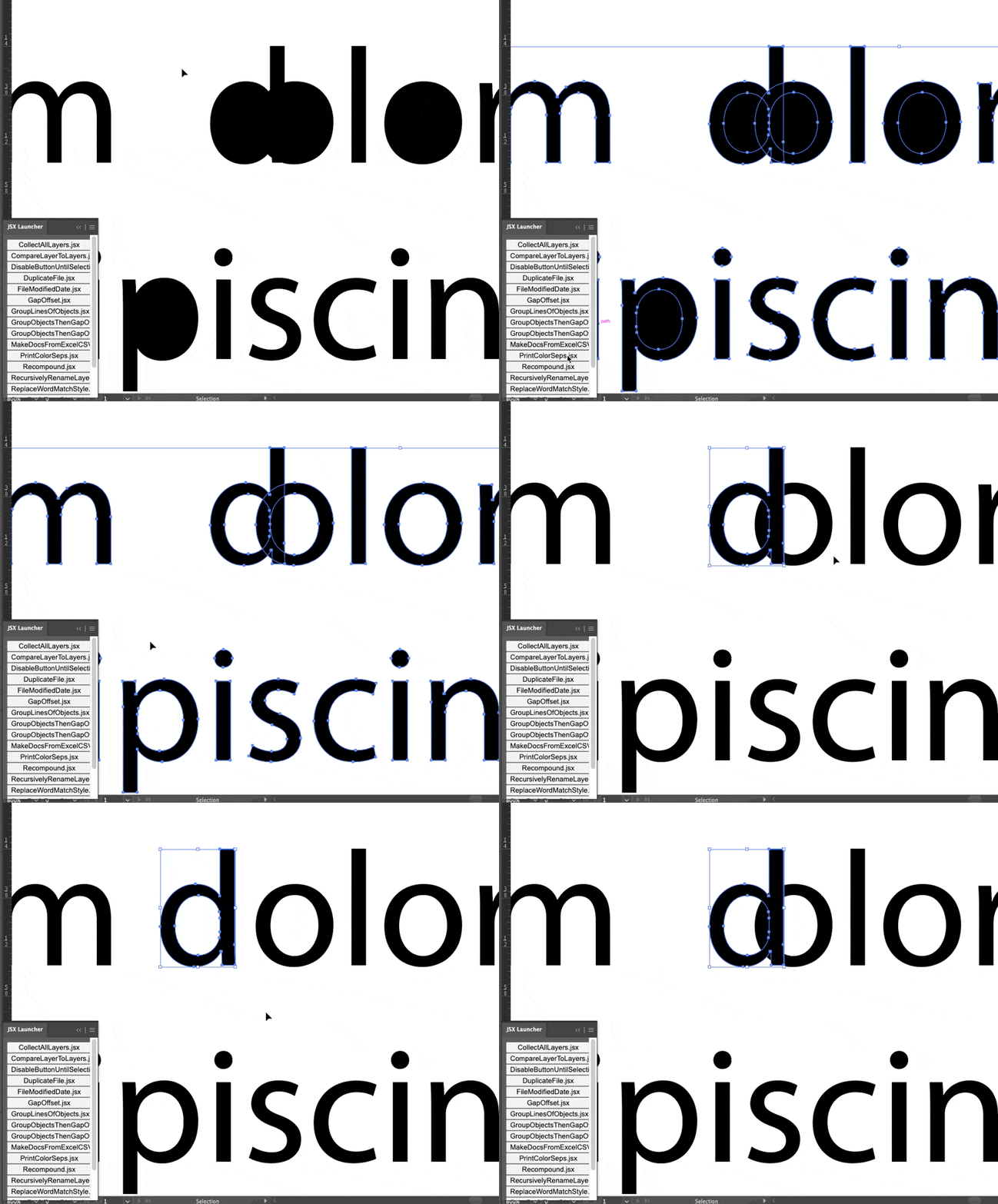
 

And here's the full script with my addition. Basically, I first group all of the lines of items, then group by group, I run @m1b's reCompound script on the group pathItems.


/**
 * Script to turn outlined, uncompounded text back
 * into normal compoundPathItems.
 * @author m1b
 * @discussion https://community.adobe.com/t5/illustrator-discussions/how-can-i-do-compoundpaths-with-logic/m-p/13498584
 * Script isn't smart, and uses the following algorithm:
 * 1. compute a top and bottom boundary for the whole line.
 * 2. collect items whose bounds fall inside the top and bottom, and
 *    also inside the left and right of each item (plus tolerance value)
 * 3. choose the collection with the most elements, discarding others
 * 4. combine these elements into a new CompoundPathItem.
 */
(function () {
  var doc = app.activeDocument;

  if (doc.selection.length == 0) {
    alert("Please select rows of text outlines and try again.");
    return;
  }

  // group all of the characters by line
  var groups = groupObjectsByLine(doc.selection);
  var group;
  // iterate over each grouped line and reCompound the groups items
  for (var i = 0; i < groups.length; i++) {
    var lineItems = [];
    group = groups[i];
    var item;
    while (group.pageItems.length > 0) {
      item = group.pageItems[0];
      item.move(group.layer, ElementPlacement.PLACEATEND);
      lineItems.push(item);
    }
    reCompoundLineOfTextOutlines(doc, lineItems);
  }

  /**
   * Take an array of Adobe Illustrator pageItems and group them by vertical separation.
   * @param   {Array} sel Adobe Illustrator pageItems
   * @returns {Array}     Array of Adobe Illustrator groupItems
   */
  function groupObjectsByLine(sel) {
    var groups = [];
    // sort the selected page items by their height (tallest to shortest)
    sel.sort(function (a, b) {
      var aHeight = a.geometricBounds[3] - a.geometricBounds[1];
      var bHeight = b.geometricBounds[3] - b.geometricBounds[1];
      return bHeight - aHeight;
    });
    // check if each page item shares bounds with others
    var item, placed;
    while (sel.length > 0) {
      item = sel.pop();
      placed = false;
      for (var i = 0; i < groups.length; i++) {
        group = groups[i];
        // check if item bounds overlaps a groups bounds
        if (
          item.geometricBounds[3] <= group.geometricBounds[1] &&
          item.geometricBounds[1] >= group.geometricBounds[3]
        ) {
          item.move(group, ElementPlacement.PLACEATEND);
          placed = true;
        }
      }
      // if an item didn't fit into any current groups make a new group
      if (!placed) {
        g = app.activeDocument.groupItems.add();
        groups.push(g);
        item.move(g, ElementPlacement.PLACEATEND);
      }
    }
    return groups;
  }

  /**
   * Attempts to "ReCompound" a line
   * of outlined, uncompounded path items.
   * @author m1b
   * @version 2023-01-18
   * @param {Document} doc - an Illustrator Document.
   * @param {Array<PathItems>} pathItems - an array or collection of pathItems.
   * @param {Number} [tolerance] - the amount that the algorithm will expand each bounding box horizontally (default: height / 20)
   * @returns {Array<CompoundPathItem>}
   */
  function reCompoundLineOfTextOutlines(doc, pathItems, tolerance) {
    var items = [],
      compounds = {},
      masters = {},
      finalCompoundPathItems = [],
      top = Infinity,
      bottom = -Infinity;

    for (var i = 0; i < pathItems.length; i++)
      if (pathItems[i].typename == "PathItem") {
        var item = pathItems[i],
          b = item.geometricBounds;
        items.push(item);
        if (top > -b[1]) top = -b[1];
        if (bottom < -b[3]) bottom = -b[3];
      }

    if (tolerance == undefined) tolerance = (bottom - top) / 20;

    masterLoop1: for (var i = items.length - 1; i >= 0; i--) {
      var master = items[i],
        mb = [
          master.geometricBounds[0] - tolerance,
          -top,
          master.geometricBounds[2] + tolerance,
          -bottom,
        ];

      testingLoop: for (var j = items.length - 1; j >= 0; j--) {
        var item = items[j];

        if (
          master.uuid === item.uuid ||
          !boundsAreInsideBounds(item.geometricBounds, mb)
        )
          continue testingLoop;

        if (compounds[master.uuid] == undefined) compounds[master.uuid] = [];

        if (masters[item.uuid] == undefined) masters[item.uuid] = [];

        compounds[master.uuid].push(item);
        masters[item.uuid].push(master);
      }

      if (compounds[master.uuid] != undefined) compounds[master.uuid].push(master);
    }

    masterLoop2: for (var key in compounds) {
      if (!compounds.hasOwnProperty(key) || compounds[key].length == 0) continue;

      var items = compounds[key];

      // check to see if any of these items appear as master
      // objects having more items themselves, for example,
      // an item might fit into another item, but that item
      // may, in turn fit into another, and so on. We only
      // want the one with the most items inside it.
      for (var i = items.length - 1; i >= 0; i--) {
        var item = items[i],
          itemCount = 0;

        if (masters[item.uuid] != undefined)
          checkMastersLoop: for (var j = masters[item.uuid].length - 1; j >= 0; j--) {
            var masterUUID = masters[item.uuid][j].uuid;

            if (masterUUID == key) continue checkMastersLoop;

            if (itemCount < compounds[masterUUID].length)
              itemCount = compounds[masterUUID].length;
          }

        if (itemCount > items.length)
          // this isn't the best grouping to compound
          continue masterLoop2;
      }

      // create the CompoundPathItem
      var newCompoundPathItem = doc.activeLayer.compoundPathItems.add();
      finalCompoundPathItems.push(newCompoundPathItem);

      // move the path items into it
      for (var i = items.length - 1; i >= 0; i--)
        items[i].move(newCompoundPathItem, ElementPlacement.PLACEATBEGINNING);
    }

    return finalCompoundPathItems;
  }

  /**
   * Returns true if `bounds`
   * are inside `containerBounds`.
   * @param {Array<Number>} bounds - [L, T, R, B]
   * @param {Array<Number>} containerBounds - [L, T, R, B]
   * @returns {Boolean}
   */
  function boundsAreInsideBounds(bounds, containerBounds) {
    return (
      bounds[0] >= containerBounds[0] &&
      bounds[1] <= containerBounds[1] &&
      bounds[2] <= containerBounds[2] &&
      bounds[3] >= containerBounds[3]
    );
  }
})();


 

Inspiring
January 18, 2023

@m1b and @jduncan   This is Fantastic!  Thank you so much!, This works so much better than the limited action I've been using! 

m1b
Community Expert
Community Expert
January 17, 2023

Hey @BryanPagenkopf is the font always the same? Or does it have to work with any font?

-Mark

Inspiring
January 17, 2023

@m1b it would need to work with any font and cap height ranges between .23" to 3" as well.  Which is why I was thinking about creating the array of areas and then identifying where the largest gap is VS having a hard-coded size.