Participant
January 6, 2018
Answered

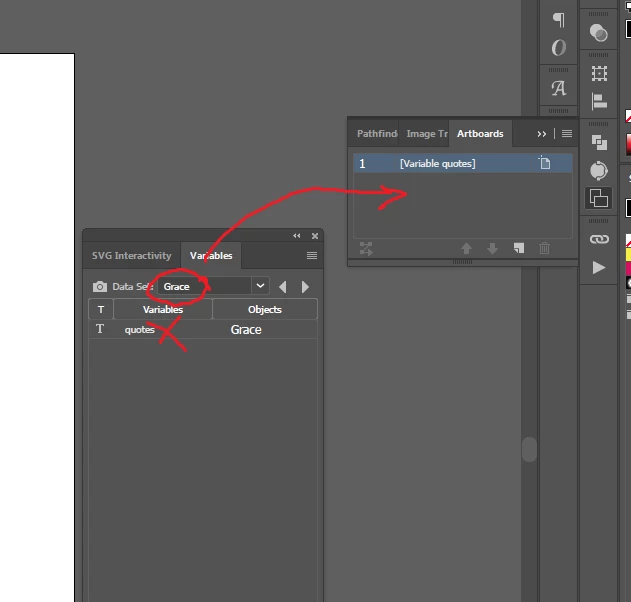
How can I give text variables names to artboard names?

  • January 6, 2018
  • 2 replies
  • 5872 views

I am currently trying to learn to script, am quite at the beginning. And I am wondering how to access the variables content, at the moment I only managed to access the variable?

Hope that makes sense.

Please advise.

Regards, Eva

This topic has been closed for replies.
Correct answer Silly-V

Or import a single-column text file directly with this:

#target illustrator

function RenameArtboardsFromText() {

    if (app.documents.length) {

        function getTextFile() {

            var fileType = ($.os.match("Windows")) ? "*.txt;*.csv;" : function(f) {

                return f instanceof Folder || (f instanceof File && f.displayName.match(/(\.txt|\.csv)$/i));

            };

            var textFile = File.openDialog("Choose a text file.", fileType);

            if (textFile != null) {

                return textFile;

            } else {

                alert("Canceled");

                return null;

            }

        };

        var textFile = getTextFile();

        if (textFile != null) {

            textFile.open('r');

            var namesArray = textFile.read().split("\n");

            textFile.close();

            var doc = app.activeDocument;

            for (var i = 0; i < namesArray.length; i++) {

                try {

                    var thisName = namesArray;

                    var thisItem = doc.artboards;

                    thisItem.name = thisName;

                } catch (e) {

                    // do nothing

                }

            }

            alert("Done with " + i + " names");

        }

    } else {

        alert("No AI document is open or no selection.");

    }

}

RenameArtboardsFromText();

2 replies

Participant
January 9, 2018

Silly-V, Not sure how I select the dataset. (it gets deselected when I run the script)

CarlosCanto , great question, I'm not sure, they both seam to contain my objects.

To give a bit more context, what I am trying to do is load a csv/txt into illustrator and assign each line to an artbord name. (there is more than one line and more than one artboard, hence the reason I need it automated )

Silly-V
Legend
January 9, 2018

It's: app.activeDocument.dataSets[0].display()

Likewise, you can put the variable data from the art objects, back into the xml data, by somehow changing the content of the art to go against what's in the current dataset and then using the dataSet.update() method.

Participant
January 6, 2018

Forgot to mention that my question is for Extended Java script

Silly-V
Legend
January 6, 2018

Long story short, the only way(s) to access the variable data content in a dataset are to:

  • Keep track of a textbox which is associated with a variable and analyze its contents every time datasets are updated (populated) in the document.
  • Export the variables.xml file (you can do this once in the beginning of the script) and use wild text-parsing custom-made functions to tear, dissect and Frankenstein back together the variables from the xml text. Or if you can figure out the way to deal with namespaces in ExtendScript's XML() functions, then you can do the same but more properly.

So suppose you have a textframe which has a variable, you can change the artboard's name like so:

var stringData = app.activeDocument.variables.getByName("MyVar").pageItems[0].contents;

app.activeDocument.artboards.getByName("My Artboard").name = stringData;

Participant
January 7, 2018

Thank you for the answers.

So from what I understand there is no way of cycling directly through the variables contents. I assume the tracking textbox changes is quite winded.

Another question though. Is there any particular reason that variables in Illustrator are thought out this way ?