diggdug39
Known Participant
January 21, 2017
Question

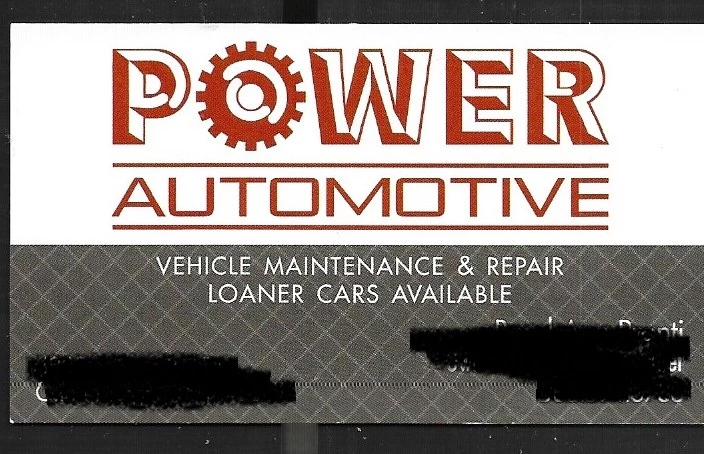
How can I turn this logo into a vector?

  • January 21, 2017
  • 3 replies
  • 3220 views

    I would appreciate some help in order to make this whole name and gear image into a vector so that I can just add it to a sign that I am making if anyone can help.

    This topic has been closed for replies.

    3 replies

    macpawel
    Participating Frequently
    January 22, 2017

    If you have scaned image with hight resolution or photo from modern digital camera you can try to trace this image and convert to vector.

    I'm not sure traced image will be exact but you can try.

    It's simple

    Start with Place your image into ilustrator document

    Select your image and use Image trace command to choose one of method for trace.

    You can also use ImGe Trace Panel (small buton ot to options menu) and then adjust settings.

    You can also use Ignore White command avaible when you go to Advanced options in Image Trace Panel

    If you are happy just click Expand and your image now is vector

    Be sure your image is high resolution

    Pawel

    Monika Gause
    Community Expert
    Community Expert
    January 22, 2017

    Use Image Trace and you will ikely loose a client:

    The best thing is: to do this properly you don't even need to touch the pen tool. Just lines, strokes, ellipses. Strokes need to be expanded, then some shapebuilding with live paint or the shaper builder tool. Identify the font (some flavour of Eurostyle, badly spaced and distorted and you're done.

    15 minutes or less

    jane-e
    Community Expert
    Community Expert
    January 22, 2017

    I agree with Monica — ImageTrace is not a magic bullet, and this artwork is not a good candidate. But do watch the tutorial and give it a try and then you will know for yourself. You do need to spin open the Advanced section and use those settings. If you know Illustrator, it is faster and you will get better results if you start this one from scratch. Monica is giving you good advice.

    jane-e
    Community Expert
    Community Expert
    January 22, 2017

    Justin Seeley has a title on lynda.com on Image Trace

    https://www.lynda.com/Design-tutorials/Using-Image-Trace-panel/370378/412137-4.html

    If you have never been a member you can get your first 10 days free.

    There are other titles on the Pen tool

    https://www.lynda.com/Illustrator-tutorials/Illustrator-CC-Essential-Training-2015/370378-2.html

    Kurt Gold
    Community Expert
    Community Expert
    January 21, 2017

    You may redraw it with Illustrator's various drawing tools (Pen tool, Circle Tool, Rectangle tool etc.) if you need very precise and clean results.

    Or you can use Illustrator's automatic Image Trace tool to get a basic version and then use Illustrator's drawing tools to fine-tune it.

    Which version of Illustrator are you using?

    diggdug39
    diggdug39Author
    Known Participant
    January 21, 2017

    I have the latest version cc 2016 w/ 2017 update. I am not sure how to do this though.

    Kurt Gold
    Community Expert
    Community Expert
    January 21, 2017

    Does that mean that you don't know how to use Illustrator's basic drawing tools at all?

    Or does it mean something else?