
Known Participant
August 5, 2020
Answered

How can I use an existing pattern swatch to make another seamless pattern?

  • August 5, 2020
  • 7 replies
  • 1357 views

Hi, I am planning to make a large seamless pattern. I would like to incorporate an existing seamless pattern swatch into the new pattern. For example, here I have an existing seamless pattern swatch that I got from a microstock website:
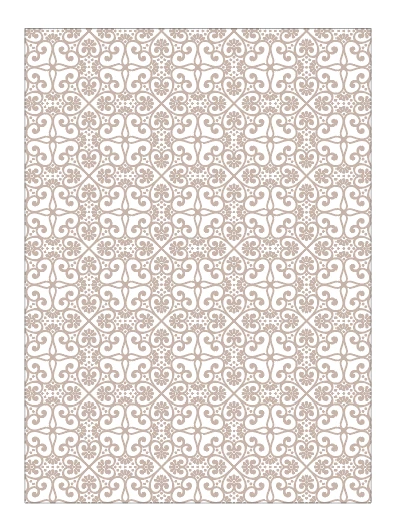
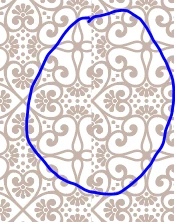
I would like to use this pattern swatch to make another larger seamless pattern for fabric textile printing (75cm wide and 150 cm tall) . However when I do a pattern fill as big as the artboard (that is, 75cm wide and 150 cm tall), and when I do a test print onto a fabric, the pattern clips and is not seamless. Is there any workaround to this?
 

This topic has been closed for replies.
Correct answer Monika Gause

The document needs to be a multiple of the size of the repeat.

7 replies

Jacob Bugge
Adobe Expert
August 6, 2020

For my part you are welcome, JC.


Jacob Bugge
Adobe Expert
August 5, 2020

JC,


As I (mis)understand it now, your client wants you to create and send the (smaller) canvas with the pattern, which

the client then


A) Multiplies into a larger canvas for printing once, or

B) Prints multiple times as it is, so the fabric comprises what corresponds to a larger/endless canvas.


In case A), surely it must be possible for you to create the final larger canvas (possibly as a PDF/especially with the new larger canvas feature see link below) and send that to the client, or for the client to simply fill the larger canvas with the original (single) pattern. Either would be safer in terms of precision/avoidance of mismatch.


In case B), you will have to make sure that a whole number of the pattern fits exactly into the (smaller) canvas to send, as Monika already said. In this case it must be clear that your responsibility is limited to the exact whole number fitting in your delivery (which can be proved by successfully printing a double canvas size), excluding the precision of the actual printing/avoidance of mismatch on the fabric.


https://community.adobe.com/t5/illustrator/larger-canvas-in-illustrator-24-2-100x-more-space/td-p/11243556


JC4Ever97Author
Known Participant
August 6, 2020

Thank you for your help.

michelew83603738
Adobe Expert
August 5, 2020

Unless I am misunderstanding it, you need to expand the pattern that you have, so that you can take the parts of the pattern that you want for the new pattern. From that, you will then create a new pattern. I think you or someone mentioned clipping - you don't want to use a clipping. Just copy the part of the pattern that you want as you did, but rather than copy and paste it, go to Object>Pattern>Make and then play with the type of pattern you want. Hope that is what you are after.

JC4Ever97Author
Known Participant
August 6, 2020

Thank you for replying.

Jacob Bugge
Adobe Expert
August 5, 2020

JC,


"when I repeat the canvas,"


Why repeat the canveas? It is evident that it there is a mismatch in the right side.


Is there any reason to do anything but "just start over with the original pattern swatch on the larger canvas"?

JC4Ever97Author
Known Participant
August 5, 2020

My client will be using the file containing the bigger canvas to print the pattern directly to the fabric. So the pattern in the canvas needs to be seamless. I have no idea why but this is what my client requested.

Monika Gause
Adobe Expert
August 5, 2020

Still that bigger canvas needs to be an exact multiple of the pattern tile. Otherwise it won't work. And no, it doesn't matter that the client demands it to work.

Jacob Bugge
Adobe Expert
August 5, 2020

JC,


As I (mis)understand it now, why not just start over with the original pattern swatch on the larger canvas?


That is what it is for.


JC4Ever97Author
Known Participant
August 5, 2020

This is what I'm trying to achieve, where the pattern tiles' boundaries match up within the boundaries of the canvas:

So, when I repeat the canvas, the pattern tiles repeat seamlessly:

I achieved this by copying and pasting a single pattern tile to fill up the whole canvas and resizing it. Is there a quicker way to achieve this result, rather than having to copy paste and resizing the pattern tiles manually?


I tried to make a box as big as the canvas and filling it with the pattern swatch:

But this doesn't work, because when I repeat the canvas, the pattern clips on the sides:

I hope you understand my inquiry; I'm just wandering whether or not there is a quicker way to achieve this, because I'm rather new to illustrator.

Monika Gause
Monika GauseCorrect answer
Adobe Expert
August 5, 2020

The document needs to be a multiple of the size of the repeat.

Monika Gause
Adobe Expert
August 5, 2020

I'm not quite sure that I understand what you are doing there.

JC4Ever97Author
Known Participant
August 5, 2020

I would like to paste the pattern tiles onto a bigger canvas; so basically when I take the whole canvas and repeat it, the pattern tiles on the canvas repeat seamlessly too.


I tried to do it quickly by making a rectangle as big as the canvas and filling it with the pattern swatch; but when I try to repeat the canvas, the pattern clips on the canvas boundaries. Is there a quick workaround to this? I tried extracting a single pattern tile and copy pasting it to fill up the whole canvas and it worked, the canvas boundaries match with the pattern tiles, and when I take the whole canvas and repeat it, there's no clipping and the pattern is seamless, but I'm wondering if there is a more efficient method to achieve this.


Likes

 
Jacob Bugge
Adobe Expert
August 5, 2020

JC,


It seems that they have oversold the seamlessness of the pattern swatch.


What you need is a swatch that holds one instance of the pattern to be repeated with precise borders.


You may be able to crop/cut your way out of the issue from the existing swatch.


The swatch can have more instances, but one is quite enough, and it is simpler to crop to, and work with, just one.


It seems that whoever made the swatch could have just uploaded the original repeatable instance that the swatch was made from, unless there was a conscious decision to limit the possible size.


JC4Ever97Author
Known Participant
August 5, 2020

Sorry, maybe I am not wording what I'm trying to do correctly: I would like to paste the pattern tiles onto a bigger canvas; so basically when I take the whole canvas and repeat it, the pattern tiles on the canvas repeat seamlessly too.


I tried to do it quickly by making a rectangle as big as the canvas and filling it with the pattern swatch; but when I try to repeat the canvas, the pattern clips on the canvas boundaries. Is there a quick workaround to this? I tried extracting a single pattern tile and copy pasting it to fill up the whole canvas and it worked, but I'm wondering if there is a more efficient method to achieve this.