- Home
- Illustrator
- Discussions
- Re: how do i add a white background to this vector...
- Re: how do i add a white background to this vector...
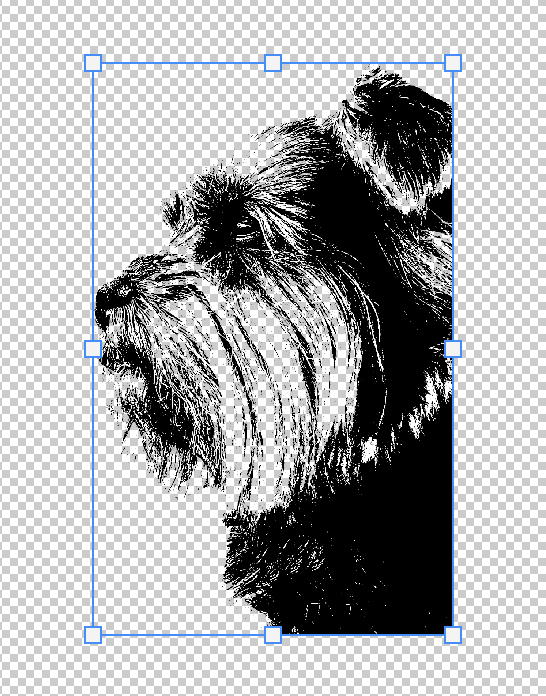
how do i add a white background to this vector just inside the image? thanks

Copy link to clipboard
Copied



Explore related tutorials & articles
 17
Replies
17
17
Replies
17




Copy link to clipboard
Copied
will this still be a vector after i do this ?
If you want vector data why are you working in Photoshop and not Illustrator?
Is the object a Smart Object, a Shape Layer, …?
Could you please post screenshots with the pertinent Panels (Toolbar, Layers, Options Bar, …) visible?
Copy link to clipboard
Copied
I am new to all this so please bare with me.
I put an image (photo) into illustrator and then image trace this then turned it into a black and white vector with a transparent background as you can see this is what i wanted, however certain parts inside the image didnt go white like the rest they went transparent like the background outside the image.
i dont know what they are smart object shape layer? sorry =[
Copy link to clipboard
Copied
Could you please post screenshots with the pertinent Panels (Toolbar, Layers, Options Bar, …) visible?
Likes
Copy link to clipboard
Copied
You are working in Illustrator?
This is the Photoshop Forum.

Copy link to clipboard
Copied
ok sorry about that will post in illustrator thanks for help

Copy link to clipboard
Copied
I'll move this thread to the Illustrator forum for you
Copy link to clipboard
Copied
thank you

Copy link to clipboard
Copied
where do you want to use this file ?
you should have a solid white color behind.
or you can save it as PNG to keep the transparent background , so when you place it on top of anything it will remian the same color, .
to keep it as vector file, save it as SVG or PDF
Copy link to clipboard
Copied
when i save as png i have white background all outside the shape of the dog i just want the inside white and the background transparent
below is what i have done to try and do this
I put an image (photo) into illustrator and then image trace this then turned it into a black and white vector with a transparent background as you can see this is what i wanted, however certain parts inside the image didnt go white like the rest they went transparent like the background outside the image.
Copy link to clipboard
Copied
@M P23346604szca wrote:
when i save as png i have white background all outside the shape of the dog i just want the inside white and the background transparent
png is a pixel format so it cannot be vector.
Please post images properly on the Forum, don’t attach them to email-replies.
Copy link to clipboard
Copied
hey what is the correct way of doing it so i know for the future, i only seen the option underneath the text box that says drag and drop here?

Copy link to clipboard
Copied

Copy link to clipboard
Copied
thanks
Copy link to clipboard
Copied
Can you post the original image you were working from?
Copy link to clipboard
Copied

Copy link to clipboard
Copied
You'll want two traces, one with a threshold of 254, and one with whatever you used before:

Expand the outline, colour it white, then combine them:

The outline is somewhat larger than possibly intended because of feathered pixels at the edge of the dog.

Copy link to clipboard
Copied
You can still do it in Photoshop (unless you're going to want to enlarge it, but the dog seems to be a photo)
-Layer>New Layer
-Move the new layer so it's below the dog layer
-Select white as your foreground color
-Fill the new layer with the paint bucket


Find more inspiration, events, and resources on the new Adobe Community
Explore Now
 AdChoices