
Participant
April 30, 2023
Question

How do I align my brush stroke to my canvas border?
  • April 30, 2023
  • 4 replies
  • 825 views

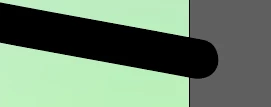
In the picture, the brush stroke goes out of the canvas.

But when I export my file as a png, the excess is still there.

Is there a way to make the stroke align with the border? As in, make it straight/flush with the border?

This topic has been closed for replies.

4 replies

Ares Hovhannesyan
Community Expert
Community Expert
April 30, 2023

Use Trim View from View menu

Ton Frederiks
Community Expert
Community Expert
April 30, 2023

But Trim View is only a view and does not always export like that.

Ton Frederiks
Community Expert
Community Expert
April 30, 2023

But maybe Jacob understands your question better (good morning, Jacob).

Jacob Bugge
Community Expert
Community Expert
April 30, 2023

Ton, I thought of mentioning the Artboard thing, which is obviously easier, with a hesitation owing to the word canvas (and the unknown exporting way), but decided to just give a literal answer.


And good afternoon, Ton.


Ton Frederiks
Community Expert
Community Expert
April 30, 2023

Depending on how you export to PNG; Export for Screens... has an Artboard option and Export As... has a Use Artboards checkbox.

Jacob Bugge
Community Expert
Community Expert
April 30, 2023

Wee Liang Kel,


You can create a rectangle all the way round the border, then select everything, then Ctrl/Cmd+7 (hold Ctrl/Cmd and press 7).


This will create a Clipping set with everything outside the rectangle hidden.


You can read on here,


https://helpx.adobe.com/search-results.html?q=clipping+mask+illustrator&scope=%5B%22helpx%22%5D&subscope=%5B%5D&limit=10&start_index=0&sort_orderby=relevancy&sort_order=desc&post_facet_filters=%7B%22applicable_products%22%3A%5B%5D%7D