New Participant
August 28, 2013
Answered

How do I change the default font in Illustrator CC?

  • August 28, 2013
  • 11 replies
  • 53047 views

How do I change the default font in Illustrator CC?

    Correct answer Larry G. Schneider

    I have tried opening my custom document profile and changing in the Character Styles, and in the Character palette and

    have been able to do it in previous versions but neither of these seem to work in CC. I've used Illustrator for 15+ years and

    cannot tell you how frustrating it is - I'm sure its, obviously, the one thing I haven't tried (and I've tried alot today) …
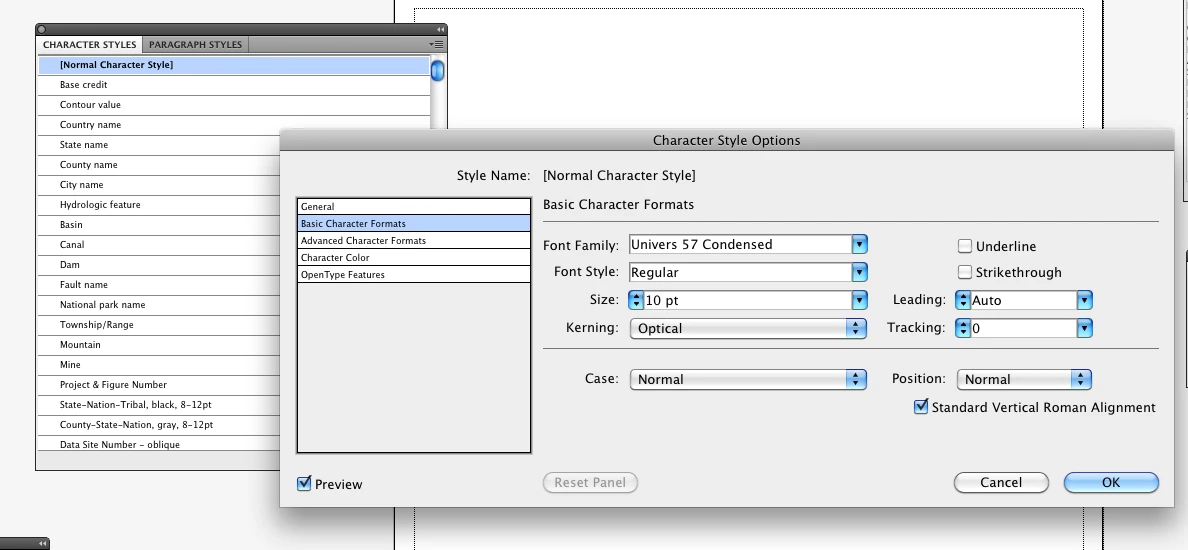

    You double-clicked on the Normal Character Style to open it and then went to the Basic Character Formats line in the box on the left, made the changes you wanted and then said OK. You then Saved the file (actually doing a SaveAs to overwrite the original). Have you tried  restarting AI after doing the above and then trying your revised custom document profile?

    11 replies

    Larry G. Schneider
    Community Expert
    August 28, 2013

    Change it in the Character Styles shown here in the New Dcoument Profile that you use the most (or all if you wish).

    Inspiring
    January 18, 2014

    AI CC up-to-date

    MacOS 10.9.1

    Thanks for your hard work.   I have a niggle to add, and I think there is at least one exception to these instructions. 

    If you open a new AI CC document you see the standard "New Document" dialog which invites you to select a profile.  You can choose one of the disti profiles, modified to your own font selection, or a completely new one you have added.  Fair enough.

    The niggle:  It isn't obvious to me how to tell AI to display the panel in which you make the modifications.  I managed to find it, but I couldn't reproduce the path.  Clearly I don't use panels very often...  How about a sentence or two of guidance?

    The exception:  What if you only access "new document" implicitly -- you use drag-and-drop?  I need to overlay some text on some JPGs, so I drag-and-drop  existing JPG files to the AI dock icon, or the app icon.   AI imports each JPG and places it in a new document.  But using which profile?   None of the disti profiles seem a clear winner. 

    Bonus question:  I realize that applying a profile is a one-shot deal, applied at the instant when a new document is created, but ... is there a way to back-track, to see later from what profile a particular open AI document was derived?

    TIA