
Inspiring
September 23, 2015
Answered

How do I clean up unwanted spot colors?

  • September 23, 2015
  • 2 replies
  • 1030 views

I want to grab the colors from my drawing and convert them to spot colors. I'd like to put these spot colors on a custom color group. However, after I've done my process, I have 2 exact same spot colors in my Swatches panel, as the picture shown below.
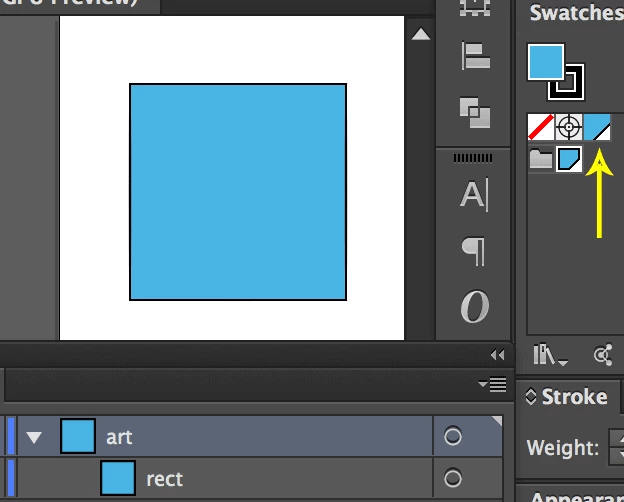
I want to get rid of the one outside of the swatch group (the one that the yellow arrow pointing to). However, if I do

app.activeDocument.spots[0].remove()

, both of them are gone.

Here's my steps of creating the spot color from the artwork:

1. Target the artwork I want to convert color;

2. Create a new Spot instance on the document since Spot doesn't have a public constructor;

3. Create a new color whose RGB values are the same as the fill of the artwork;

4. Create a new SpotColor instance;

5. Set the spot property on SpotColor instance and color property on Spot property;

6. Add the SpotColor instance to the swatch group;

7. Set the artwork's fillColor to the SpotColor instance.

And here is the code.

var doc = app.activeDocument;

var layer = doc.layers.getByName('art');

var rect = layer.pageItems.getByName('rect');

var newRGB = new RGBColor();

newRGB.red = rect.fillColor.red;

newRGB.green = rect.fillColor.green;

newRGB.blue = rect.fillColor.blue;

var newSpot = doc.spots.add();

newSpot.name = 'R=' + newRGB.red +

  ' G=' + newRGB.green +

  ' B=' + newRGB.blue;

newSpot.color = newRGB;

var newSpotColor = new SpotColor();

newSpotColor.spot = newSpot;

newSpotColor.tint = 100;

var newSwatch = doc.swatches.add();

newSwatch.color = newSpotColor;

var swatchGroup = doc.swatchGroups.getByName('my_color');

swatchGroup.addSwatch(newSwatch);

rect.fillColor = newSpotColor;

This topic has been closed for replies.
Correct answer Silly-V

Aha!  This is actually what gives you the desired result: add the newly-created spot directly to the swatchGroup using the addSpot command, it appears that adding a swatch to the document first is unnecessary.

function test(){

    var doc = app.activeDocument;

    var layer = doc.layers.getByName('art');

    var rect = layer.pageItems.getByName('rect');


    var newRGB = new RGBColor();

    newRGB.red = rect.fillColor.red;

    newRGB.green = rect.fillColor.green;

    newRGB.blue = rect.fillColor.blue;


    var newSpot = doc.spots.add();

    newSpot.name = 'R=' + newRGB.red +

      ' G=' + newRGB.green +

      ' B=' + newRGB.blue;

    newSpot.color = newRGB;


    var newSpotColor = new SpotColor();

    newSpotColor.spot = newSpot;

    newSpotColor.tint = 100;


    var swatchGroup = doc.swatchGroups.getByName('my_color');

    swatchGroup.addSpot(newSpot);

}

test();

2 replies

schroef
Inspiring
December 17, 2022

Have you tried the action remove all unused items? It's in the default folder in the action panel. I'm not 100% sure it will work. I also find it weird we can have 2 spots with the exact same name in one open document.

Silly-V
Silly-VCorrect answer
Legend
September 23, 2015

Aha!  This is actually what gives you the desired result: add the newly-created spot directly to the swatchGroup using the addSpot command, it appears that adding a swatch to the document first is unnecessary.

function test(){

    var doc = app.activeDocument;

    var layer = doc.layers.getByName('art');

    var rect = layer.pageItems.getByName('rect');


    var newRGB = new RGBColor();

    newRGB.red = rect.fillColor.red;

    newRGB.green = rect.fillColor.green;

    newRGB.blue = rect.fillColor.blue;


    var newSpot = doc.spots.add();

    newSpot.name = 'R=' + newRGB.red +

      ' G=' + newRGB.green +

      ' B=' + newRGB.blue;

    newSpot.color = newRGB;


    var newSpotColor = new SpotColor();

    newSpotColor.spot = newSpot;

    newSpotColor.tint = 100;


    var swatchGroup = doc.swatchGroups.getByName('my_color');

    swatchGroup.addSpot(newSpot);

}

test();

schroef
Inspiring
December 17, 2022

Well one remark is, is the document always RGB, otherwise it would need a bit more code so it can also do CMYK. Also I think this script will return an error if the spot is lab color or a book color