Participant
August 23, 2020
Question

How do I correct this?
  • August 23, 2020
  • 3 replies
  • 247 views

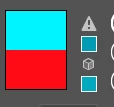
When I place a very striking color, for example in this case I select a very light blue, when I give it ok, this warning appears, and the object is with a darker color, and not with the one I want, it helps

This topic has been closed for replies.

3 replies

barbara_a7746676
Community Expert
Community Expert
August 24, 2020

The exclamation mark means that the color cannot be reproduced accurately in CMYK. The small square color swatch underneath the exclamation mark is the closest color in CMYK to the color you selected. If you are working in RGB and the image is for the web or electronic distribution, you can ignore the exclamation mark If the image is going to be printed, you will not be able to get the exact color that you selected, and blues are one of the most difficult colors to reproduce accurately in CMYK. Another way to check for colors that are out of the CMYK gamut is to choose View > Proof Colors. 

This is a simplified explanation. Color matching for print is a complex topic.

Ton Frederiks
Community Expert
Community Expert
August 23, 2020

You are probably trying to get an RGB color that is not possible in a CMYK document.

Use an RGB color in an RGB Document.

Monika Gause
Community Expert
Community Expert
August 23, 2020

You are probably working in CMYK color mode.This color cannot be eproduced in CMYK.

Will it ever be printed? Or is your design for the web?