Participant
April 25, 2017
Answered

How do I create a 3D sphere out of icons?

  • April 25, 2017
  • 2 replies
  • 2134 views

Hello,

I am trying to create a globe made from different icons that I created. I want it to look something like this but with my icons. I am having trouble with the 3D map art.

Thank you!

Keri

This topic has been closed for replies.
Correct answer Mike_Gondek10189183

Ingredients

  • half circle
  • one embedded image or vector art

Drag the image to you symbols and choose static. Then on the half circle add an effect >> 3D >> Revolve. Click on map art and choose the symbol you made.
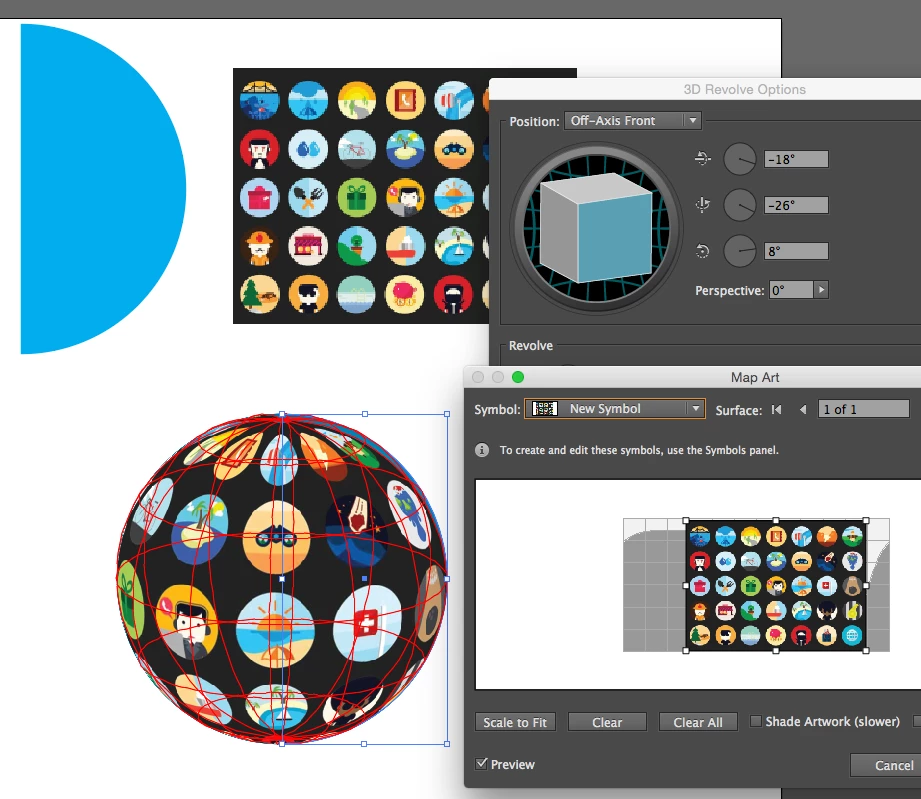
You may want to start with art that looks extruded on a few of them as in your sample, alternatively you will need to expand and manually create the extrusions.

2 replies

Mike_Gondek10189183
Community Expert
Mike_Gondek10189183Community ExpertCorrect answer
Community Expert
April 25, 2017

Ingredients

  • half circle
  • one embedded image or vector art

Drag the image to you symbols and choose static. Then on the half circle add an effect >> 3D >> Revolve. Click on map art and choose the symbol you made.

You may want to start with art that looks extruded on a few of them as in your sample, alternatively you will need to expand and manually create the extrusions.

Participant
April 25, 2017

Thank you for taking the time to comment. This is what I have been doing but for some reason the symbol I created wouldn't show up. There must have been an issue with one of the elements. I recreated the icons and now it is working. Thanks again!

Mike_Gondek10189183
Community Expert
Community Expert
April 26, 2017

If you were successfully able to create a symbol that should show up when you click on map art.

What option do you get when you map art and click on symbols, is none the only option. Can I see the symbol options you choose just incase there is something like how the symbol is named or another option that may be interfering.

Though I mentioned choosing static, that really does not make a difference for this, ( just when you rotate or transform symbols with effects like drop shadow). Was an error on my part mentioning that.

Inspiring
April 25, 2017

You might be better trying something like envelop distort > make with top object. If you make a pattern out of your object, make the envelop distort and under the options for the distortion, make sure that the pattern distorts, you will get a similar effect. Of course the objects that are popping out as above will require additional work, but this might be an easier alternative to start with.

Participant
April 25, 2017

I will try that, thank you!